User manual WTS Ver.1.16
Seite 26 von 52
9.9 SEMI-AUTOMATIC ZERO (WEIGHT ZERO-SETTING FOR SMALL VARIATIONS)
By closing the SEMI-AUTOMATIC ZERO input, the weight is set to zero. The zero setting will
be lost when the instrument is turned off.
This function is only allowed if the weight is lower than the
value (see paragraph
RESETTABLE WEIGHT SETTING FOR SMALL WEIGHT CHANGES), otherwise the alarm
appears and the weight is not set to zero.
9.10 PEAK
Keeping the input closed the maximum weight value reached remains displayed. Opening the
input the current weight is displayed.
If you wish to use this input to view a sudden variation peak, set the FILTER ON
THE WEIGHT to 0.
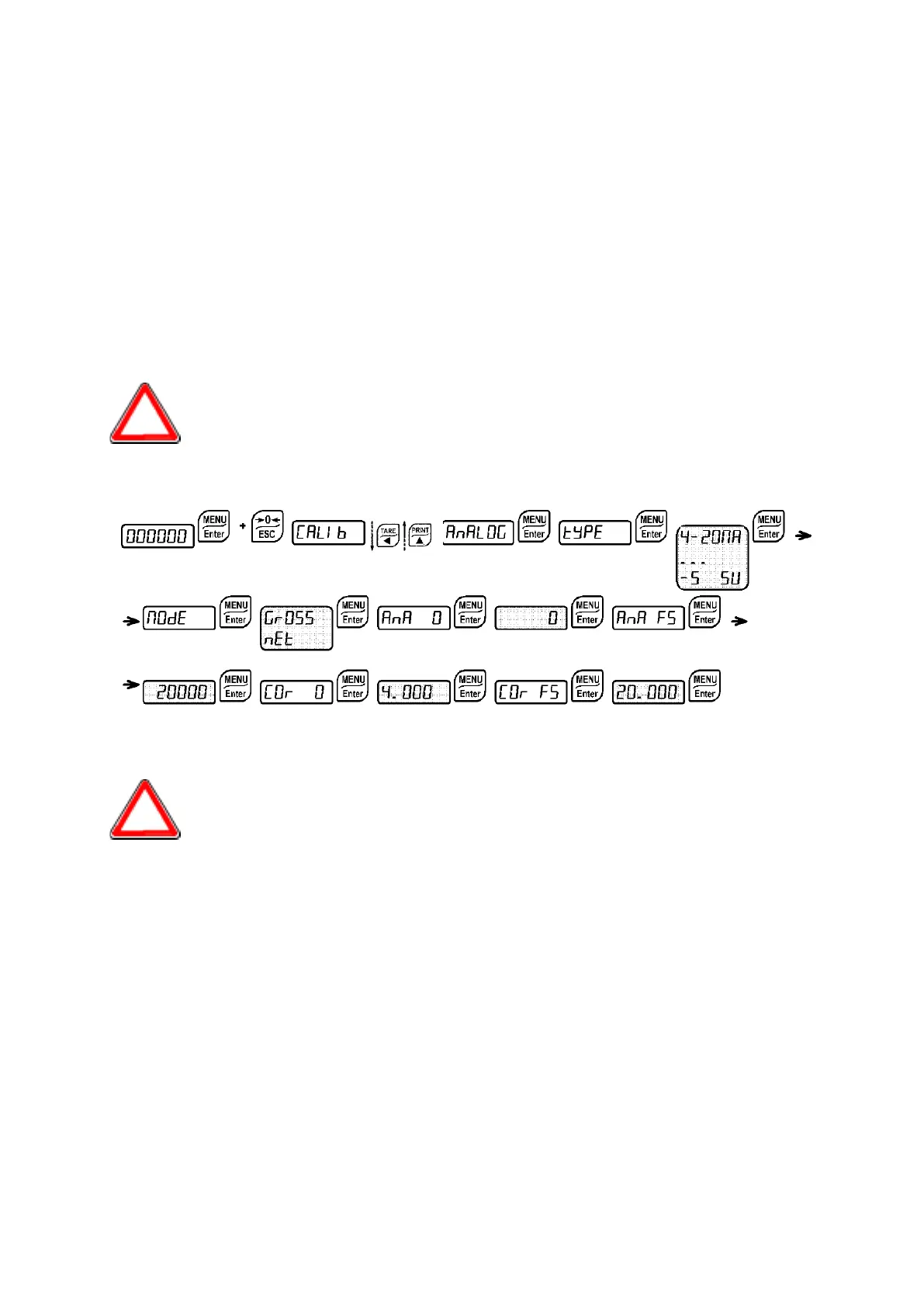
9.11 ANALOG OUTPUT
-
: it selects the analog output type (4-20 mA, 0-20 mA, 0-10 V, 0-5 V, -10 +10 V, -5 +5
V; default: 4-20 mA).
For the output -10 +10 V and -5 +5 V the soldered jumper SW4 must be closed:
- Remove the face plate of the instrument removing the screws that attach it to the little
columns on the printed circuit board
- On the circuit board below find jumper J7, situated above the 3 and 4 terminals at
about mid board.
- Scrape away the solder from the jumper bay, until the copper underneath is
uncovered.
- Close the jumper short circuiting the bays, it is recommended that a small piece of
copper wire without insulation or a leg wire be used to facilitate the operation.
-
: choice of a weight followed by the analog output: gross (
) or net (
). If the
net function is not active, the analog output varies according to gross weight.
-
: set the weight value for which you wish to obtain the minimum analog output value.


 To Next Page