User manual WTS Ver.1.16
Seite 16 von 52
9.1.1 MAXIMUM CAPACITY
: Maximum displayable weight (from 0 to full scale; default: 0). When the weight exceeds
this value by 9 divisions the following is displayed ‘
’. To disable this function, set 0.
9.1.2 TARE WEIGHT ZERO SETTING
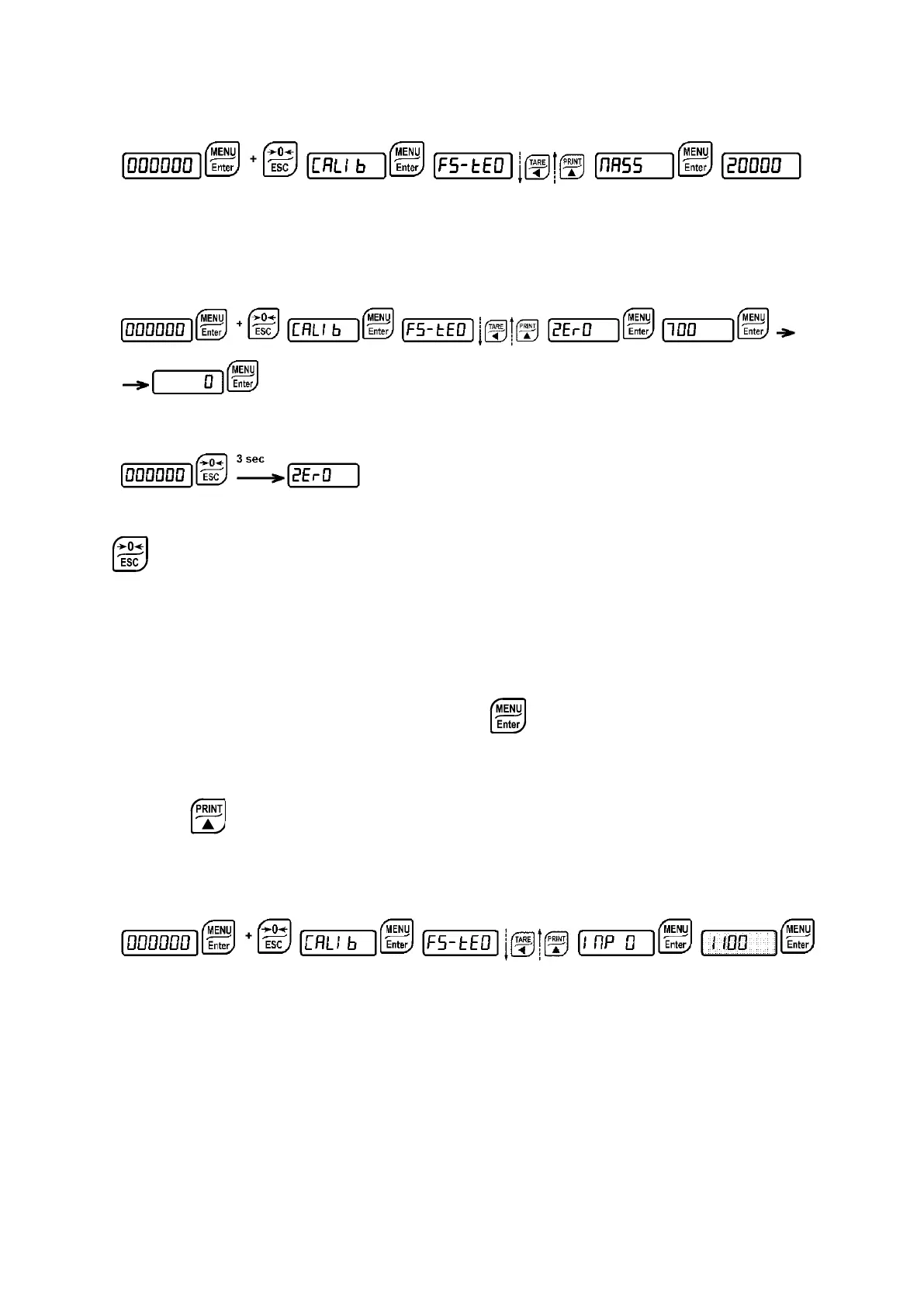
This menu may also be accessed directly from the weight display, holding down the
key for 3 seconds.
Perform this procedure after having set the THEORETICAL CALIBRATION data.
Use this function to set to zero the weight of the empty system after commissioning and then
later on to compensate zero variations due to the presence of product residues.
Procedure:
- Confirm the message
(Zero) by pressing .
- The weight value to be set to zero is displayed. In this phase all of the LEDs are flashing.
- Confirming once again, the weight is set to zero (the value is stored to the permanent
memory).
- Press to display the value of the total weight reset by the instrument, given by the
sum of all of the previous zero settings.
9.1.3 ZERO VALUE MANUAL ENTRY
WARNING: Perform this procedure only if it’s not possible to reset the weighed structure
tare, for example because it contains product that can not be unloaded.
Set in this parameter the estimated zero value (from 0 to 999999; default: 0).


 To Next Page