User manual WTS Ver.1.16
Seite 19 von 52
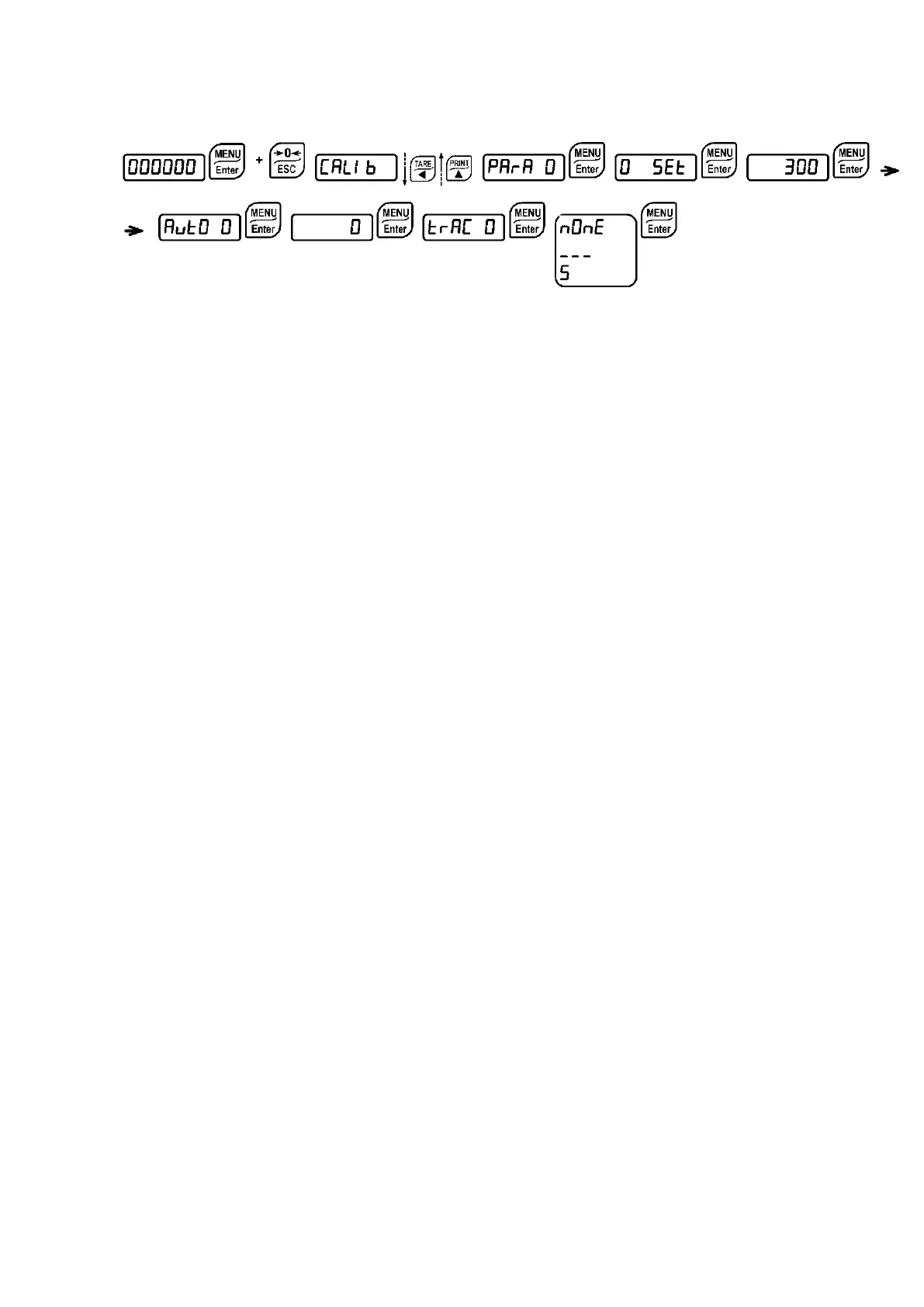
9.4 ZERO PARAMETERS
9.4.1 RESETTABLE WEIGHT SETTING FOR SMALL WEIGHT CHANGES
(from 0 to full scale; default: 300; considered decimals: 300 – 30.0 – 3.00 – 0.300): this
parameter indicates the maximum weight value resettable by external contact, keypad or serial
protocol.
9.4.2 AUTOMATIC ZERO SETTING AT POWER-ON
(from 0 to 10% of full scale; default: 0): If at switch-on the weight value is lower than
the value set in this parameter, the weight is reset. To disable this function, set 0.
9.4.3 ZERO TRACKING
(from 1 to 5, default:
): When the zero weight value is stable and, after a
second, it deviates from zero by a figure in divisions smaller or equal to the figure in divisions
set in this parameter, the weight is set to zero. To disable this function, set
.
Example: if the parameter
is set to 5 and
is set to 2, the weight will be
automatically set to zero for variations smaller than or equal to 10 (
x
).


 To Next Page