User manual WTS Ver.1.16
Seite 20 von 52
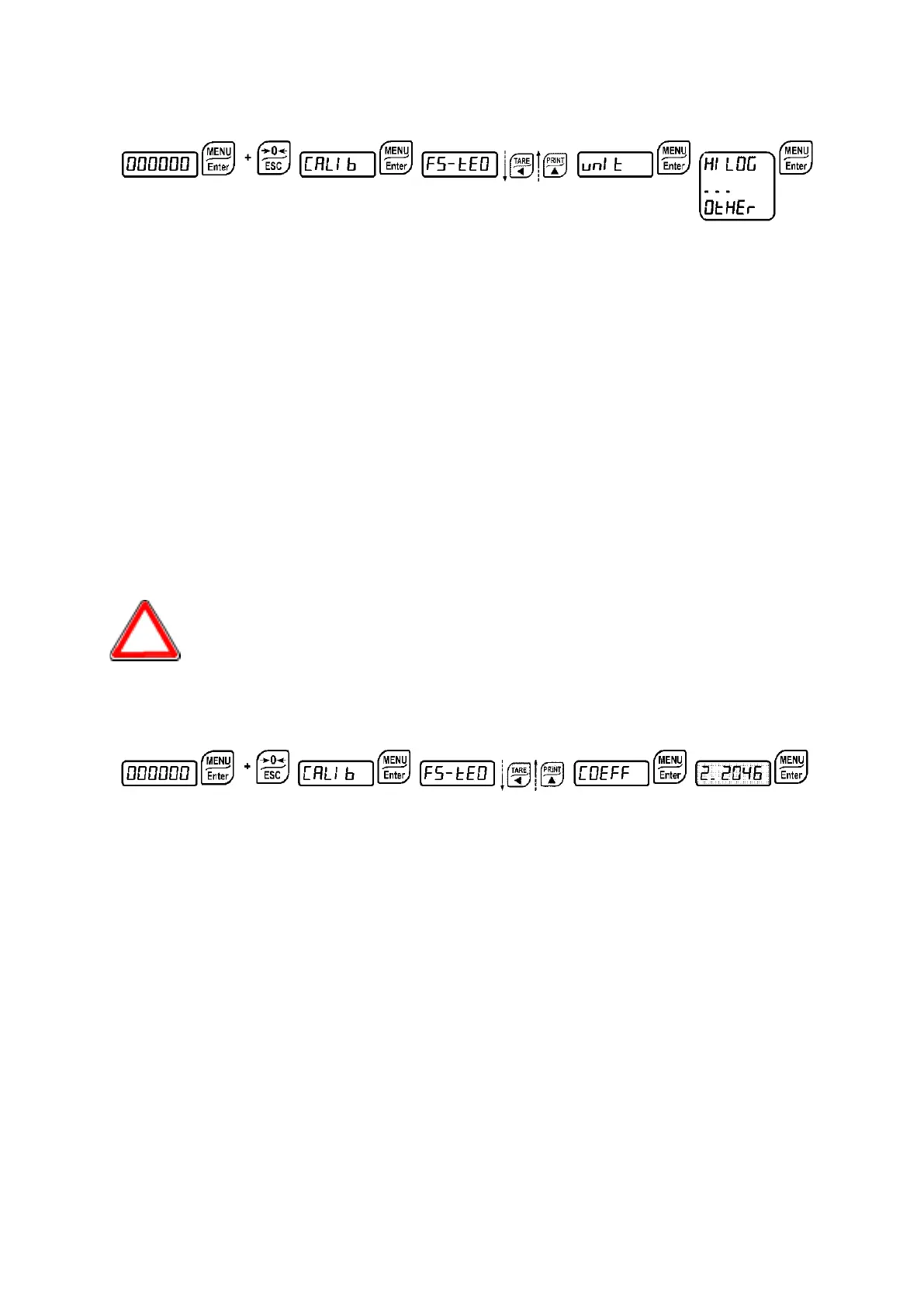
9.5 SETTING UNITS OF MEASURE
Available unit of measure are:
: kilograms
: grams
: tons
: pounds*
: newton*
: litres*
: bar*
: atmospheres*
: pieces*
: newton metres*
: kikogram metres*
: other generic units of measure not included in the list*
If the print function is enabled, the symbol corresponding to the selected unit of measure will
be printed after the measured value.
For the units marked with * it’s possible to set also the display coefficient
(parameter
, see the related paragraph). To use
is necessary to
enable it, closing the
input (see paragraph OUTPUTS AND INPUTS
CONFIGURATION).
9.5.1 DISPLAY COEFFICIENT
By setting the coefficient
the display is changed accordingly.
If one of the inputs is set to
mode (see paragraph OUTPUTS AND INPUTS
CONFIGURATION) when the input is closed the value will be displayed modified according to
the
coefficient; when the input is opened the standard weight display will be restored.
: (max settable value: 99.9999; default: 1.0000) will have different meanings according to the
value set in
, i.e. the selected unit of measure. (see paragraph SETTING UNITS OF
MEASURE).


 To Next Page