Icon Information Details Action
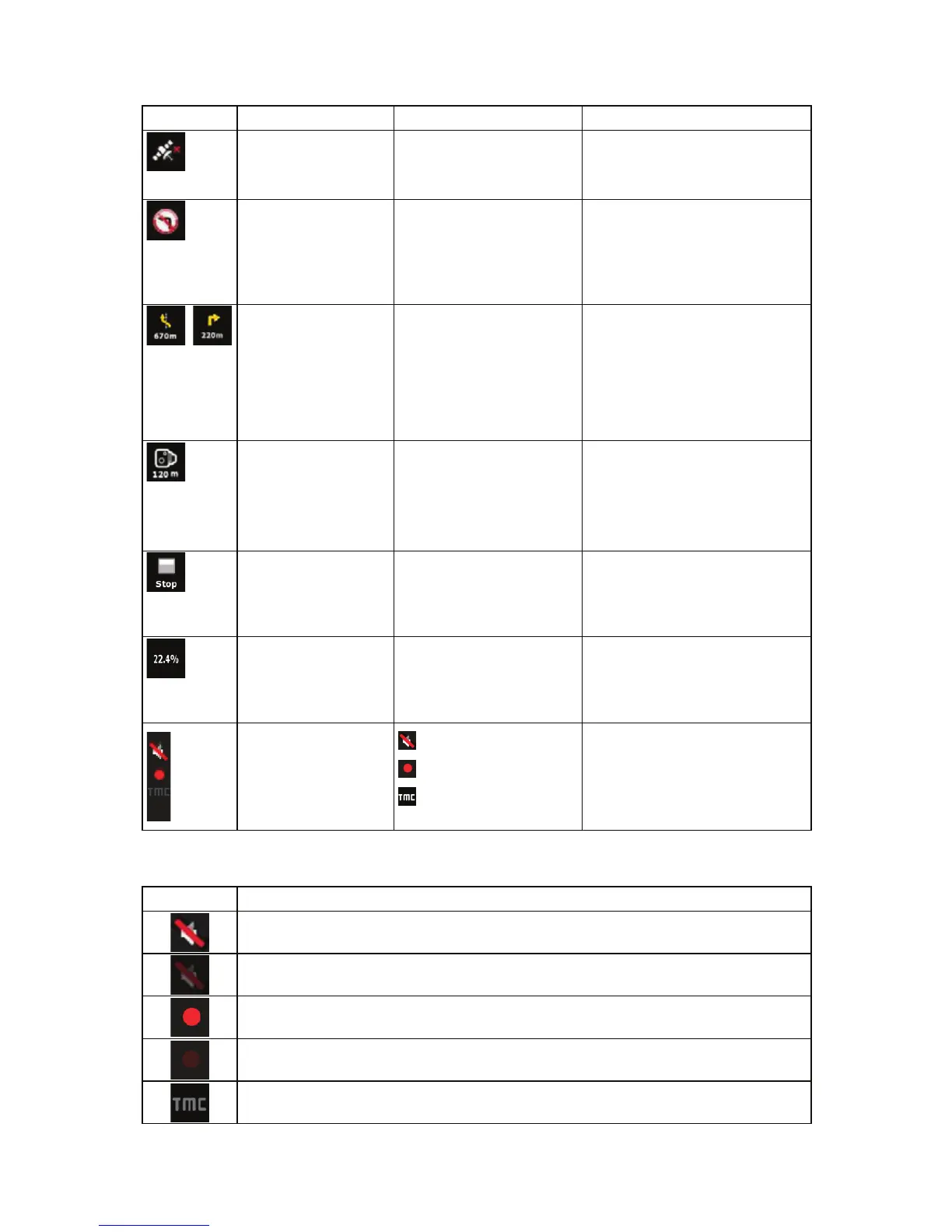
There is no valid GPS
position
If there is no valid GPS
position, this symbol
appears here.
Tap this area to open the GPS
Data screen to check the signal
status or the connection settings.
Traffic restriction When GPS position is
available but there is no
route to be navigated, the
traffic restriction of the
upcoming intersection is
shown here if there is any.
Nothing happens if you tap this
area of the screen.
,
Second route event
(manoeuvre after the
next manoeuvre)
When GPS position and an
active route are both
available, this field shows
the route event that follows
the next route event shown
in the above described
area.
Tap this area to open the Itinerary
screen with the turn by turn
guidance instructions.
Approaching a Road
Safety Camera
This icon appears when
you are approaching a
Road Safety Camera, and
the warning for cameras is
enabled in Settings.
Tap this area to suppress the
audible camera warning.
Tap again to display the second
route event with the possibility to
open the Itinerary.
Stops the running
simulation
This icon appears during
Route Fly Over, Route
Simulation, and Track Log
playback.
Tap this area to stop the
simulation.
Route recalculation
progress
During route recalculation,
this field shows the
recalculation progress
between 0% and 100%.
Nothing happens if you tap this
area of the screen.
Indicator strip
- sounds muted/enabled
- Track Log recording
- TMC status
Tap this area to open the Itinerary
screen with the turn by turn
guidance instructions.
The following symbols appear in the Indicator strip:
Icon Description
The sound output of iGO8 is muted.
The sound output of iGO8 is enabled.
iGO8 records a Track log when GPS position is available.
Track log recording is disabled.
No TMC receiver is connected or TMC is turned off.
17


 To Next Page