Connecting to the IPG
Clinician Manual
97035873-01 45 of 75
Programming with the Innion 16 Lead and Innion CX Lead
For detailed programming instructions, refer to the appropriate Bionic Navigator Software Guide. When the
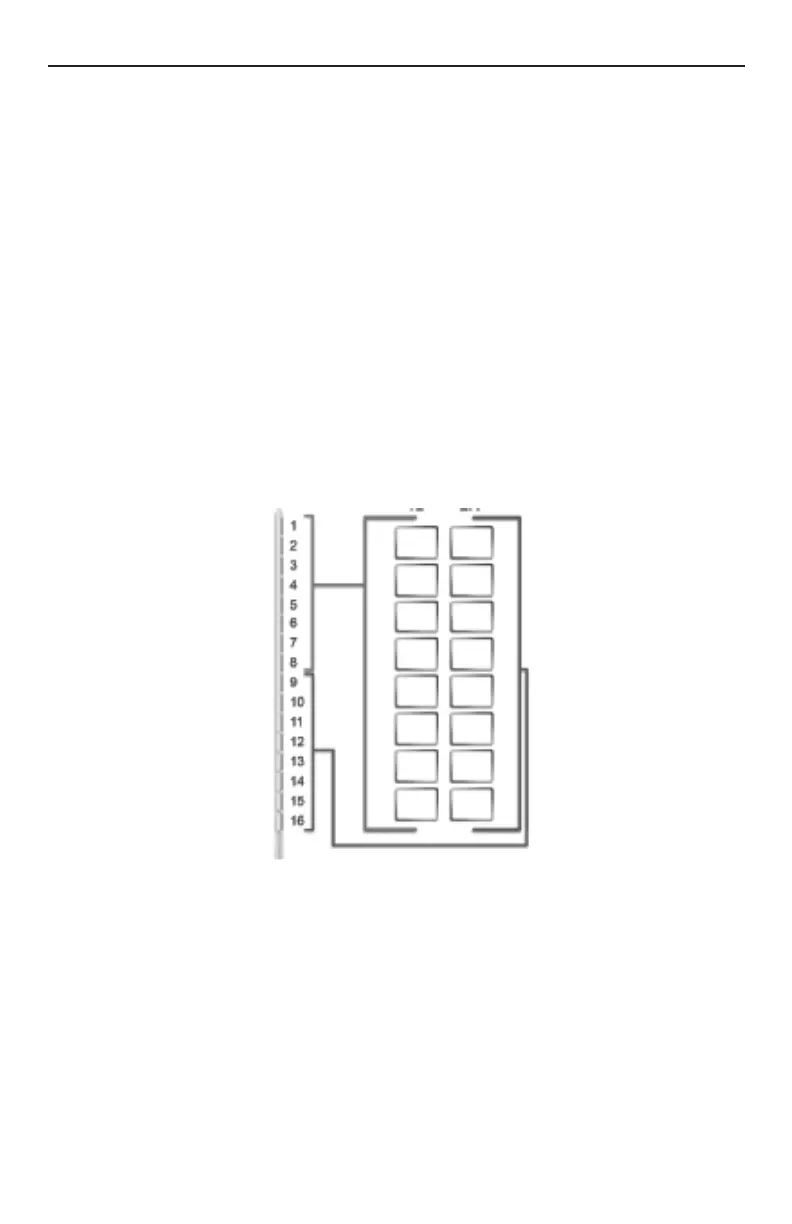
Innion 16 lead is used with the Splitter 2x8 and placed properly into the Precision IPG ports (laser-marked
tail of Splitter 2x8 connecting to IPG port “1-L”), the distal 8 contacts of the Innion 16 lead (contacts 1-8) will
correspond with contacts 1-8 on the left side of the Bionic Navigator software display. Likewise, the proximal
8 contacts of the Innion™ 16 lead (contacts 9-16) will correspond with contact 9-16 on the right side of the
Bionic Navigator software display.
When the Innion CX Lead is placed properly into the Precision IPG ports (tail with one marker band
connecting to IPG port “1-L”), the distal 8 contacts of the Innion CX Lead (contacts 1-8) will correspond with
contacts 1-8 on the left side of the Bionic Navigator software display. Likewise, the proximal 8 contacts of the
Innion CX Lead (contacts 9-16) will correspond with contact 9-16 on the right side of the Bionic Navigator
software display.
The following diagram depicts this wiring.
Using test stimulation, enlist patient feedback to verify lead placement and pain coverage. The user may
program with the Innion 16 Lead and Innion CX Lead using all the functions available in Bionic Navigator
for the Linear family of leads (E-Troll, Navigator, etc.). For complete instructions on programming, see the
Bionic Navigator Software Guide.




 To Next Page