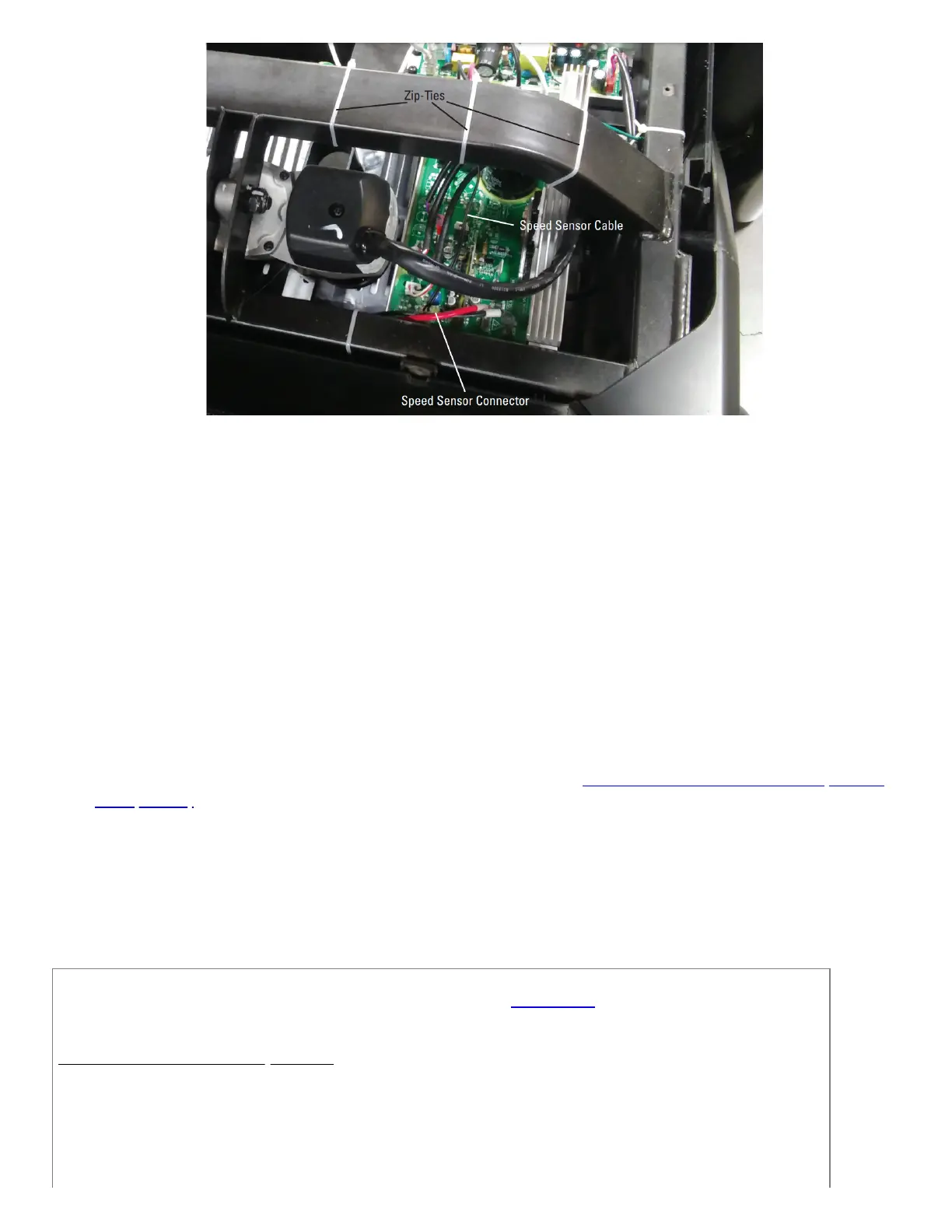
The speed sensor cable is secured to the frame with zip-ties to prevent any accidental damage.
The cable plugs into the MCB near the top and is labeled in this image.
Belt stops in the middle of a workout
1. Start a workout and let your treadmill run for approximately 30 seconds. Do not touch any buttons during this time.
2. Check the console display to see if a Stuck Button error message appears.If no error message is displayed or the erro
has been cleared:
a. Turn off your treadmill and turn it back on.
b. Watch the console as your machine powers on.
c. If the machine detects a "stuck button", astuck button error message will reappear within a couple of
minutes.
3. If a stuck button message is displayed or the issue persists, please seeTreadmill 10 and 22: Button Issues (Stuck or
Unresponsive) to continue troubleshooting.
Need to order replacement parts?
Please contact Customer Care at 1-800-605-3369 for additional help or to order replacement parts.
Some replacement parts may also be available for purchase online here.
A list of part numbers referenced within this guide can be located at the bottom of this page.
Customer Care - Hours of Operation:
Monday - Friday 6:00am - 5:00pm PST
The replacement part will be provided to you at no cost assuming your machine meets the warranty eligibility
requirements. A Customer Care Agent will be able to assess your current warranty eligibility and provide you with your
options.













 To Next Page