Treadmill 10: My treadmill is powered on but the display won't light up
Follow this troubleshooting guide to help resolve issues involving consoles not lighting up on the BowFlex Treadmill 10. If your
treadmill does not power on at all, please troubleshoot using this guide:Treadmill 10: Why won't my machine or console
power on?
Some common complaints may include:
Power on but display is dark
Console won't turn on
Console not lit up
Follow these steps to troubleshoot the issue
Tools you may need:
Phillips head screwdriver
1. Check along the console display's bezel for a red LED light. This lights up independently from the screen. If the red
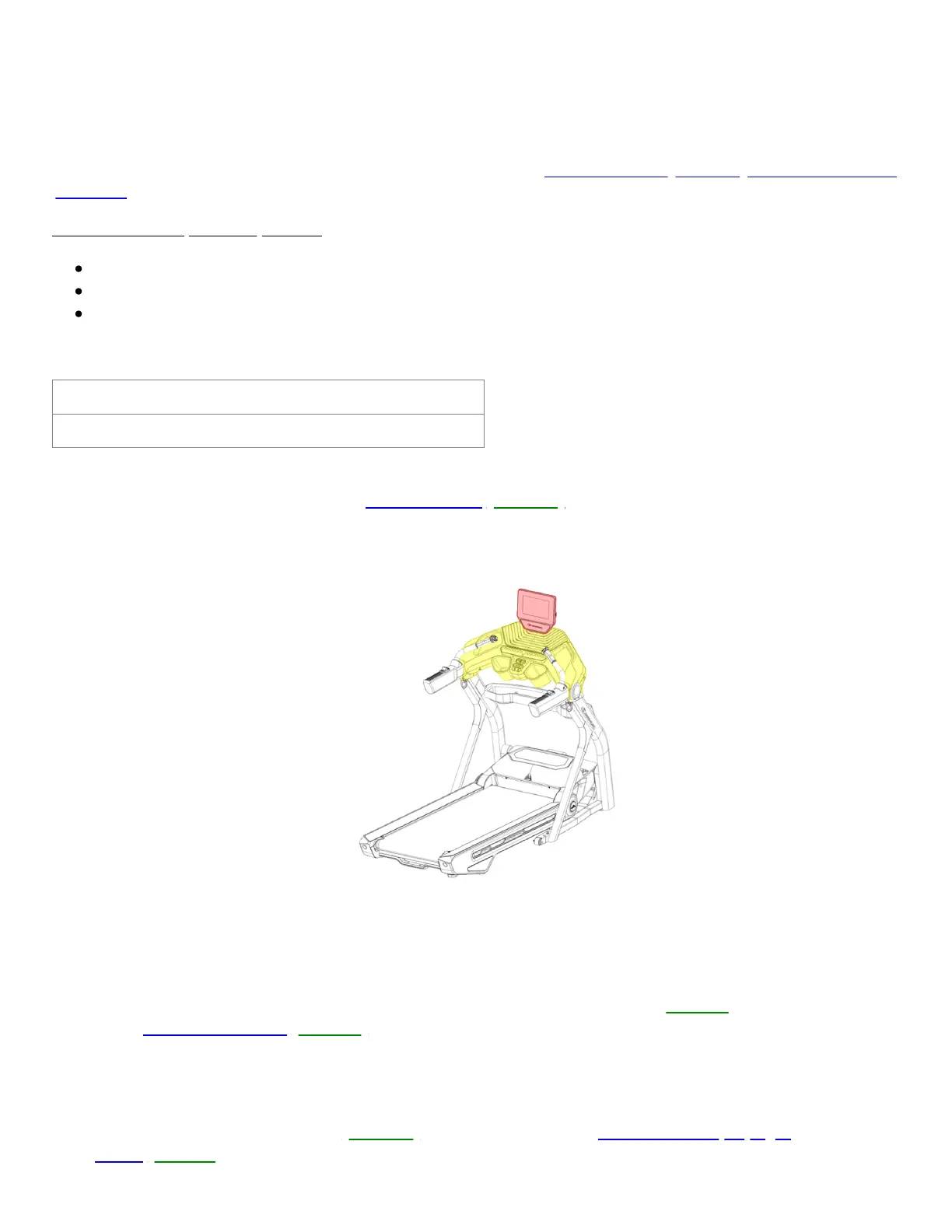
LED is lit but the screen remains blank, order a Console [11407.A]. When placing your order, make sure that you are
ordering the correct part. Replacing the console base will not resolve this issue (reference 1)
(Reference 1)
The console is highlighted red and the console base is highlighted yellow.
Make sure you order the correct part to resolve the issue.
2. If the red LED is not lit, check that the outlet the treadmill is plugged into is working properly. Disconnect and
reconnect the power cord from the treadmill and the wall. Ensure that both ends are firmly connected and turn your
treadmill back on, checking if the power switch lights up. Test if the issue persists[11407.C]. If the power switch is
not lit, order a Power Cord[11407.B].
3. If the issue persists, remove the right base shroud (reference 2) and inspect the white 6-pin connector. Unplug the
white 6-pin connector and check for damage to the connector or cable. If undamaged, firmly reconnect the cable,
ensuring the connector is oriented properly; the tabs on top should line up and audibly click into place when firmly
connected. Test if the issue persists[11407.D]. If the cable is damaged,order MCB to Top Upright
Cables[11407.F].
ID:11407.1













 To Next Page