- 14 -
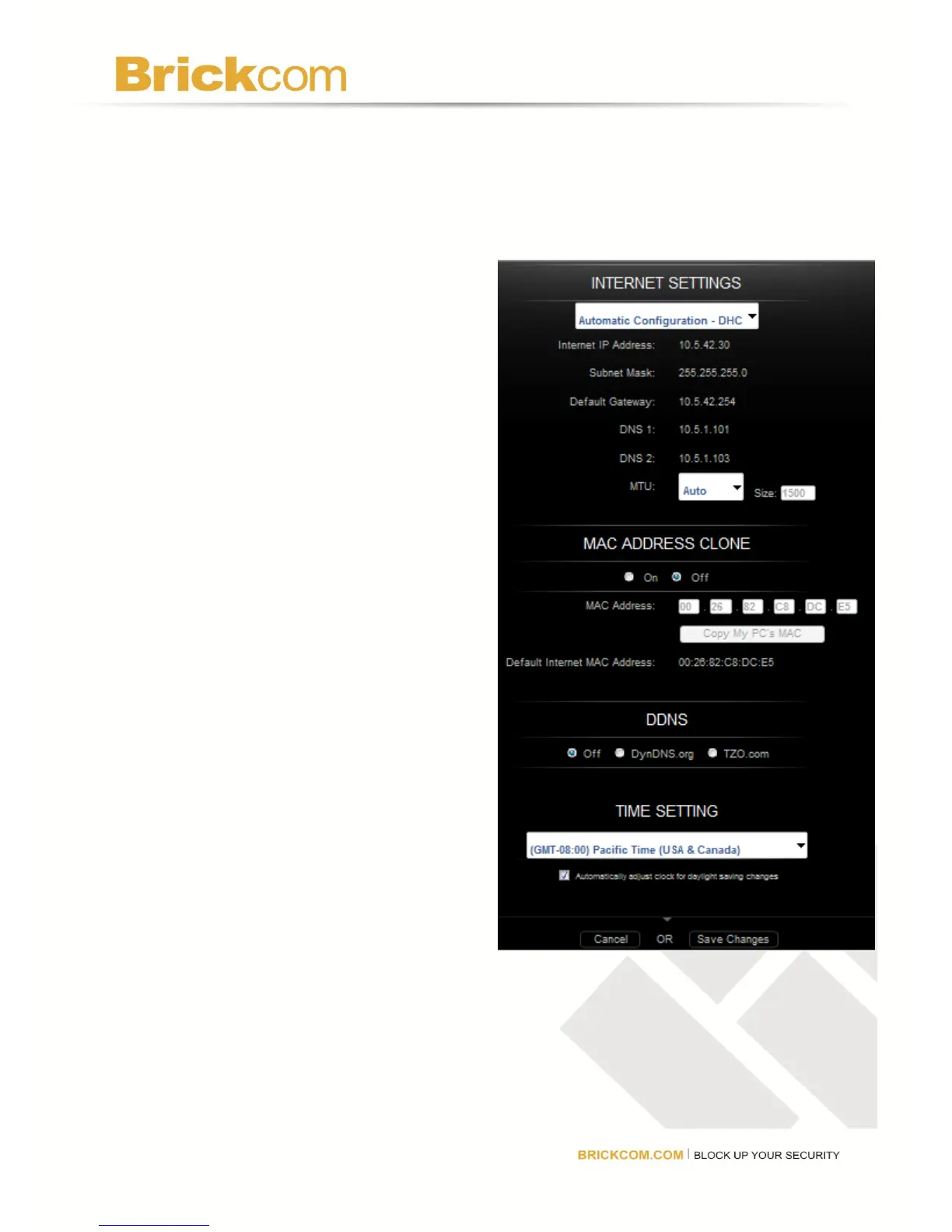
Select Automatic Configuration – DHCP to have the router set the Internet settings
automatically (recommended).
Select Static IP to manually assign a permanent public IP address to the router.
Select PPPoE if the router is connected using a DSL line that requires PPPoE (For more
details, contact the ISP). Enter the PPPoE user name and password.
Internet IP Address: This is the router’s
public IP address. Contact the ISP to get the
IP Address to enter in the spaces provided.
Subnet Mask: This is the router’s Subnet
Mask, as seen by other users on the Internet
(including the ISP). Do not change the
Subnet Mask unless there is a specific
reason to do so. Contact the ISP to get the
Subnet Mask to enter in the spaces
provided.
Default Gateway: This is the ISP server’s IP
address. Contact the ISP to get the Gateway
Address to enter in the spaces provided.
DNS 1 - 2: A Domain Name Server (DNS) is
a server on the Internet that translates URLs
into IP addresses. If Static IP is selected
from the Configuration drop-down box, then
the ISP needs to be contacted to get at least
one DNS (Domain Name System) Server IP
Address to enter in the spaces provided.



 To Next Page