- 27 -
Restart Router
Click Restart Router to do a
software restart of the router.
Wireless Menu
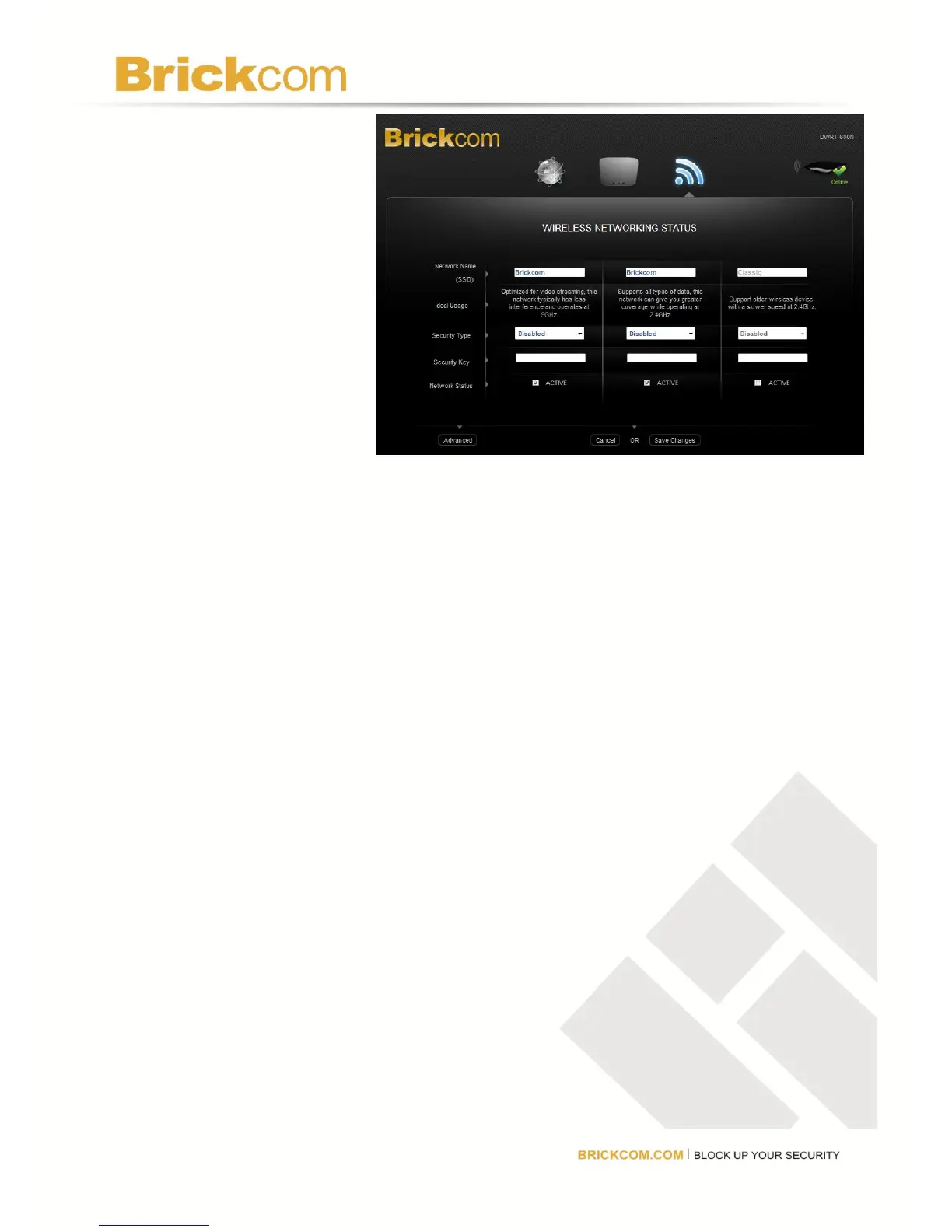
The current wireless settings
will be displayed. Select
Advanced to make changes
to the wireless network
settings. Select EDIT
SETTINGS to change the
Network Name (SSID),
Security Type, Security Key, or Network Status. Select WPS to set up the wireless devices
using WI-FI Protected Setup.
Edit Settings
Network Name(SSID)
Each wireless network has a unique name or SSID. The three wireless networks have default
names which can be customized. If the user changes the name, consider using something
unique to make sure it is not the same as other wireless networks that the router may detect in
the area. Do not use personal information that can be visible to other users in the area
searching for wireless networks.
Security Type
Select from WPA2 Personal, WPA Personal, WEP 128bit, or WEP 64bit. See the Security
Mode Chart above for more information.
Security Key
Enter a new security key that users must enter to gain access to the wireless network. The
key must be between 8 and 63 characters.
Network Status
Check the box to keep the network available in the list of available wireless networks or



 To Next Page