© 2022 Brivo Systems LLC. All rights reserved. PUB-Brivo ACS6100 Installation Manual
29
Brivo ACS6100 Installation Manual
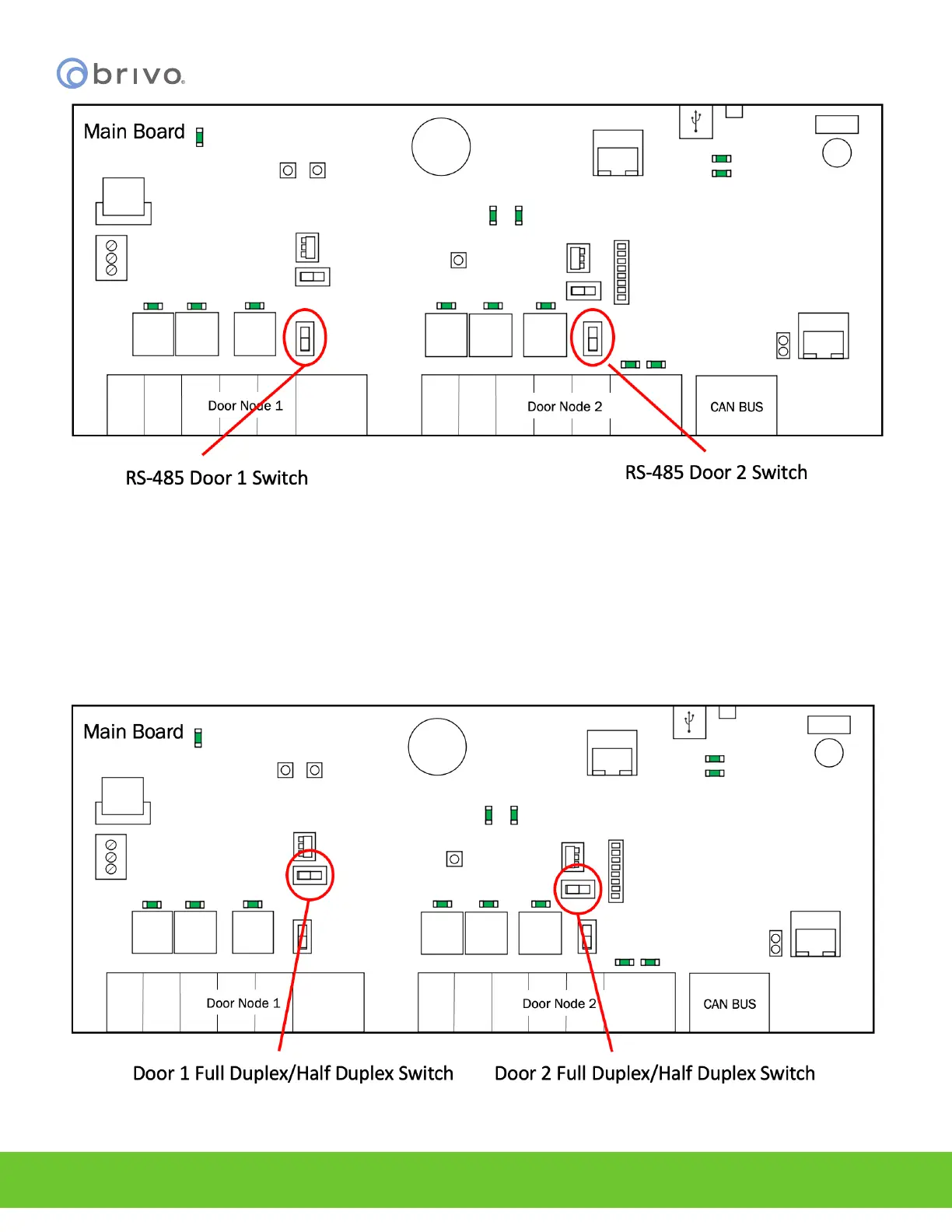
Figure 21 - RS-485/Wiegand Switch Locations
NOTE: The B-ACS6000-MBE MAIN CONTROL BOARD ships and defaults to Half-Duplex communication for OSDP
reader functionality. If placing the board into Full-Duplex mode, be careful as most readers will typically operate in
Half-Duplex mode.
NOTE: To activate Full Duplex functionality on the B-ACS6000-MBE MAIN CONTROL BOARD for Door 1, put the FDX/
HDX Door 1 switch in the FDX position. For Door 2, put the FDX/HDX Door 2 switch into the FDX position. To activate
Half Duplex functionality on the B-ACS6000-MBE MAIN CONTROL BOARD for Door 1, put the FDX/HDX Door 1 switch
in the HDX position. For Door 2, put the FDX/HDX Door 2 switch in the HDX position.
Figure 22 - RS-485 Full Duplex/Half Duplex Switch Locations for Doors 1 and 2



 To Next Page