29
Installation and Operation Manual
X-DPT-Profibus-Interface-eng
PN 541-C-068-AAG
November, 2008
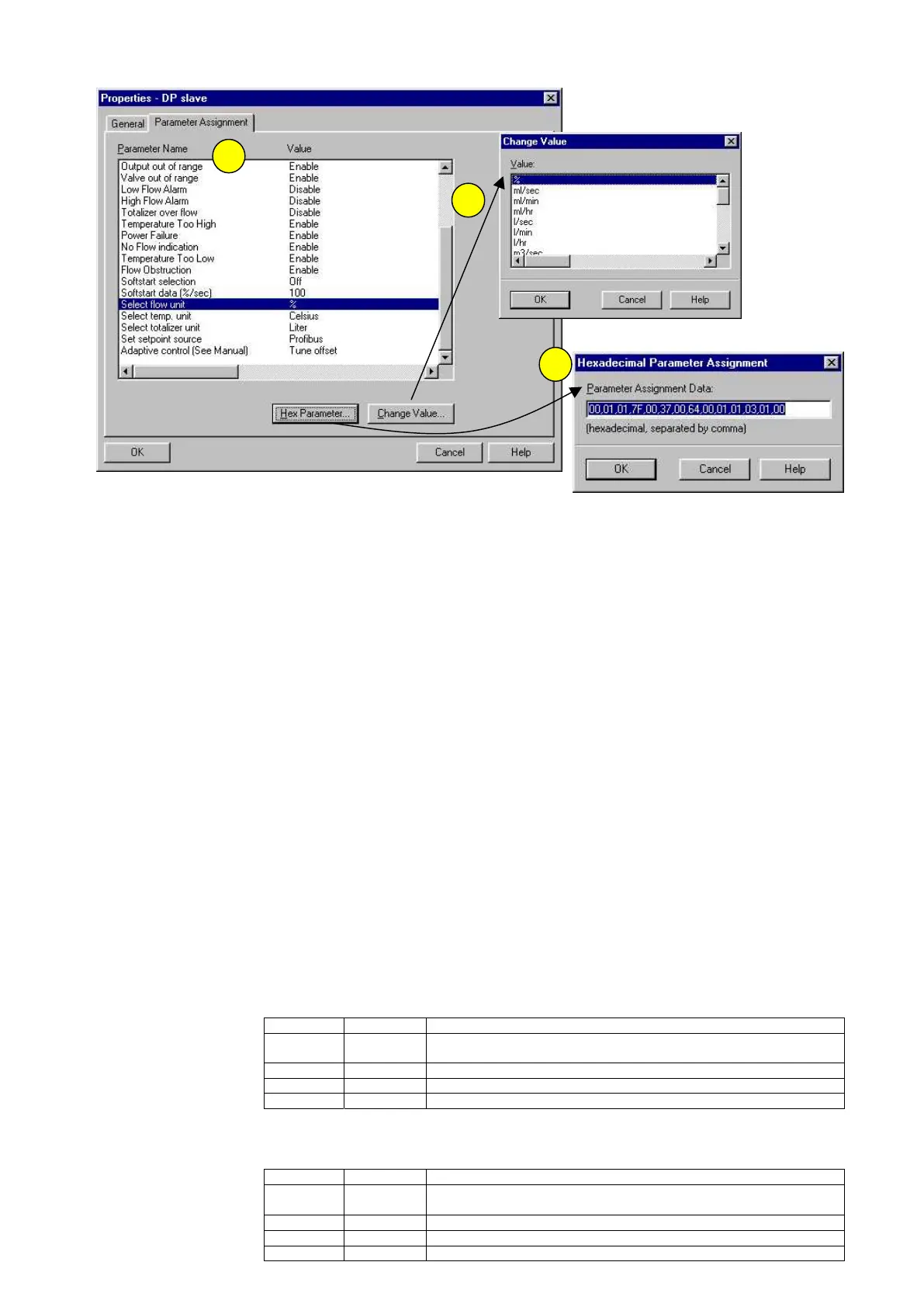
Using the STEP 7 configurator from Siemens one will see the slaves in the
hardware configuration and by double clicking on these slaves the window
properties of the slave is opened. In case of the selecting the Parameter
Assignment tab the above window is shown [1]. Here the parameters are
shown by name and their value. This information is imported from the GSD file.
The parameter setting can be changed by selecting one of the parameter
names and opening the Change Value window by entering the Change Value
button [2]. Now all possible options are shown and a new option can be cho-
sen.
All parameters will be sent to the slave by the parameterization message. The
hexa decimal value of this can directly be seen, or changed, via the Hexadeci-
mal Parameter window [3].
4.4 CONFIGURATION OF THE SLAVE
With the configuration telegram, the number of input and output bytes for the
data exchange mode is compared. The entry takes place via identifier bytes. A
configuration telegram can contain one or more identifiers. In case of the
Brooks Mass Flow products the special identifier format is used. This first code
indicates one byte of output data length follows, one byte of input data length
follows and one byte of manufacturer specific data. The latter is the module
number which is known to the Brooks DP slave.
The Mass Flow Controller is making use of the special identifier byte after
which one of the three I/O configuration possibilities can be sent.
For module 1:
For module 2:
3
1
2
Byte Code Description
1 0xC1 Special identifier with one length byte each for Output and Input
follows, with one byte of vendor specific data
2 0x83 Output data, 4 bytes (1 float)
3 0x83 Input data, 4 bytes (1 float)
4 0x01 Manufacturer specific data, module #1
Byte Code Description
1 0xC1 Special identifier with one length byte each for Output and Input
follows, with one byte of vendor specific data
2 0x84 Output data, 5 bytes (1 float + 1 byte)
3 0x88 Input data, 9 bytes (2 floats + 1 byte)
4 0x02 Manufacturer specific data, module #2



 To Next Page