4 - 19
Adjustment
Adjustment
Feed dog forward/reverse and left/right adjustment
1. Hold down the backstitching button and the selecting button (right), and turn the power on (the buzzer must sound
four times).
2. Select pattern number [07].
3. Remove needle plate A.
4. Press the [REV] key twice to set the feed length to 0 mm. (Check that the mark on the feed adjusting gear is
aligned with that on the F pulse motor gear.)
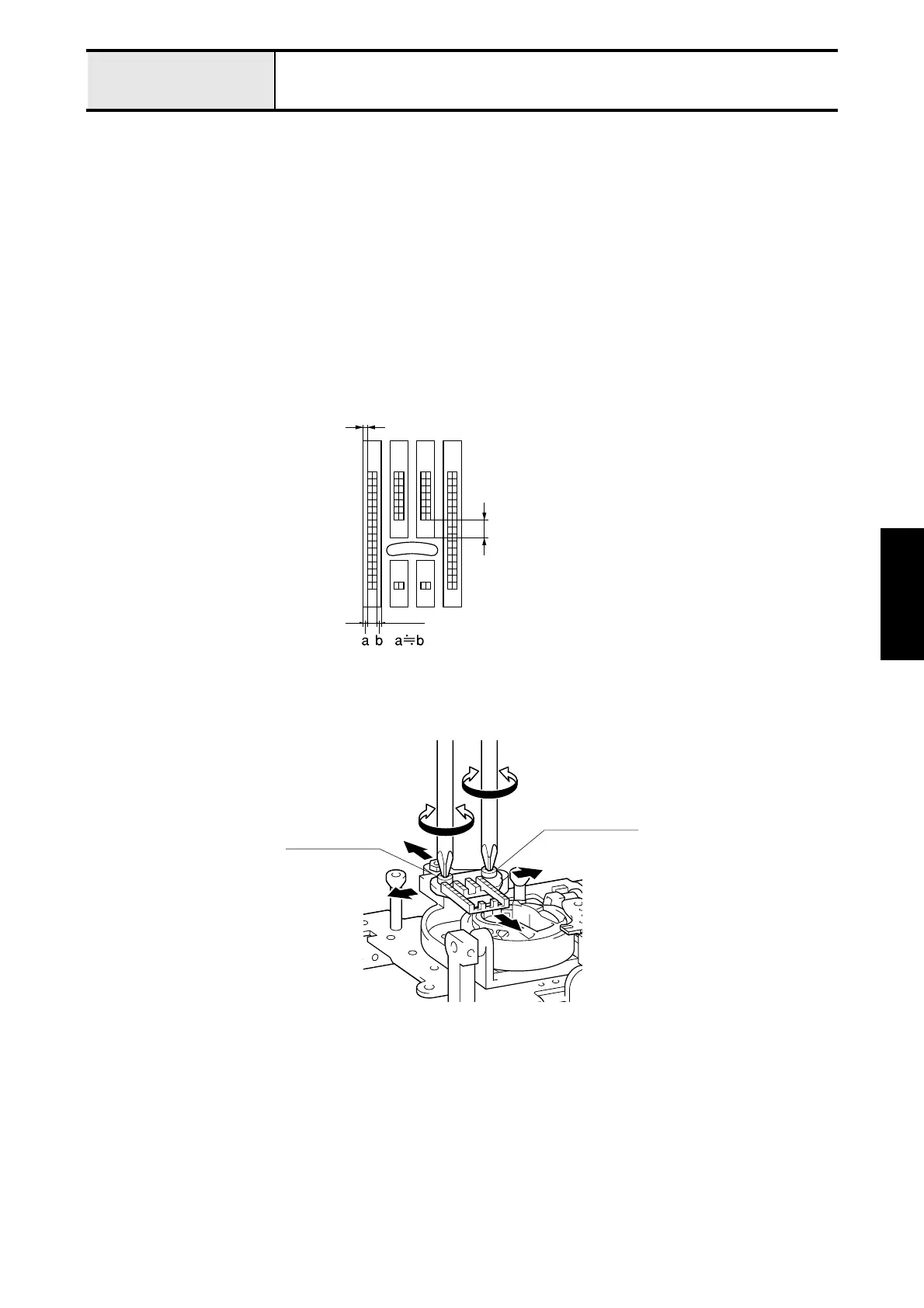
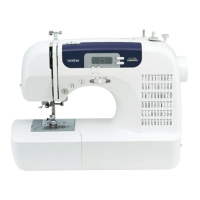
5. Loosen the screw (bind 3 x 8), temporarily install needle plate A, and adjust the forward/reverse and left/right
positions of the feed dog.
*Key point
• Adjust the gap between the forward edge of the feed dog middle tooth and feed plate A front to back to 3.2 -
3.8 mm.
• Adjust the left and right gaps between the feed dog and needle plate A to be approximately the same.
• Make sure that the feed dog and needle plate A are not at an angle to each other.
6. Tighten screw (bind 3X8).
7. Tighten screw M4 (two).
Parallel
3.2-3.81mm
Screw
(bind, M3x8)
Screw
(bind, M3x8)


 To Next Page