6-21 Confidential
ADF parts
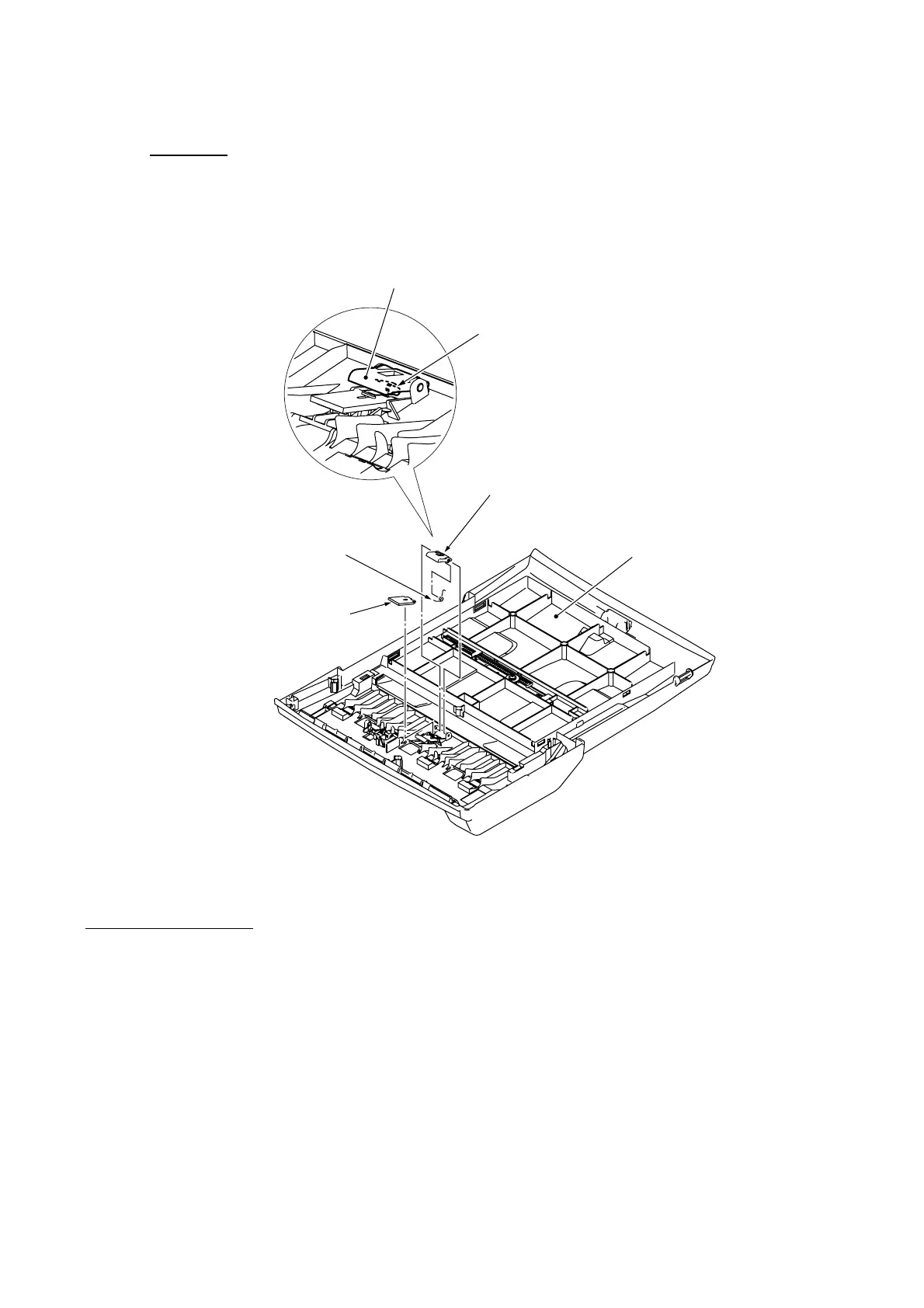
(21) Place the document cover upside down.
(22) Remove the ADF pull-in piece and its spring from the document cover.
(23) Remove the separation pad from the document cover.
(Rear)
(6_22)
Document cover
(placed upside down)
ADF pull-in piece
ADF pull-in spring
Separation pad
ADF pull-in piece
ADF pull-in spring
Assembling Notes
• When mounting the ADF pull-in piece on the document cover, be sure to set the ADF pull-in
spring as shown above.
• Before mounting the document roller holder onto the ADF unit (see page 6-20), apply the
specified lubricant to the specified points, referring to Section 6.2.
• When mounting the ADF motor onto the ADF unit, route the ADF motor harness and the
grounding wire as shown on page 6-18. When securing the motor with two screws, be sure to
secure the grounding wire also with one of those screws (see page 6-18).



 To Next Page