Driver and Software
31
2
Duplex / Booklet 2
When you want to print a booklet or do duplex printing, use this function.
None
Disable duplex printing.
Duplex
When you want to do duplex printing, use these options.
When you choose Duplex, the Duplex Settings button becomes available to choose. You can set the
following settings in the Duplex Settings dialog box.
• Duplex Type
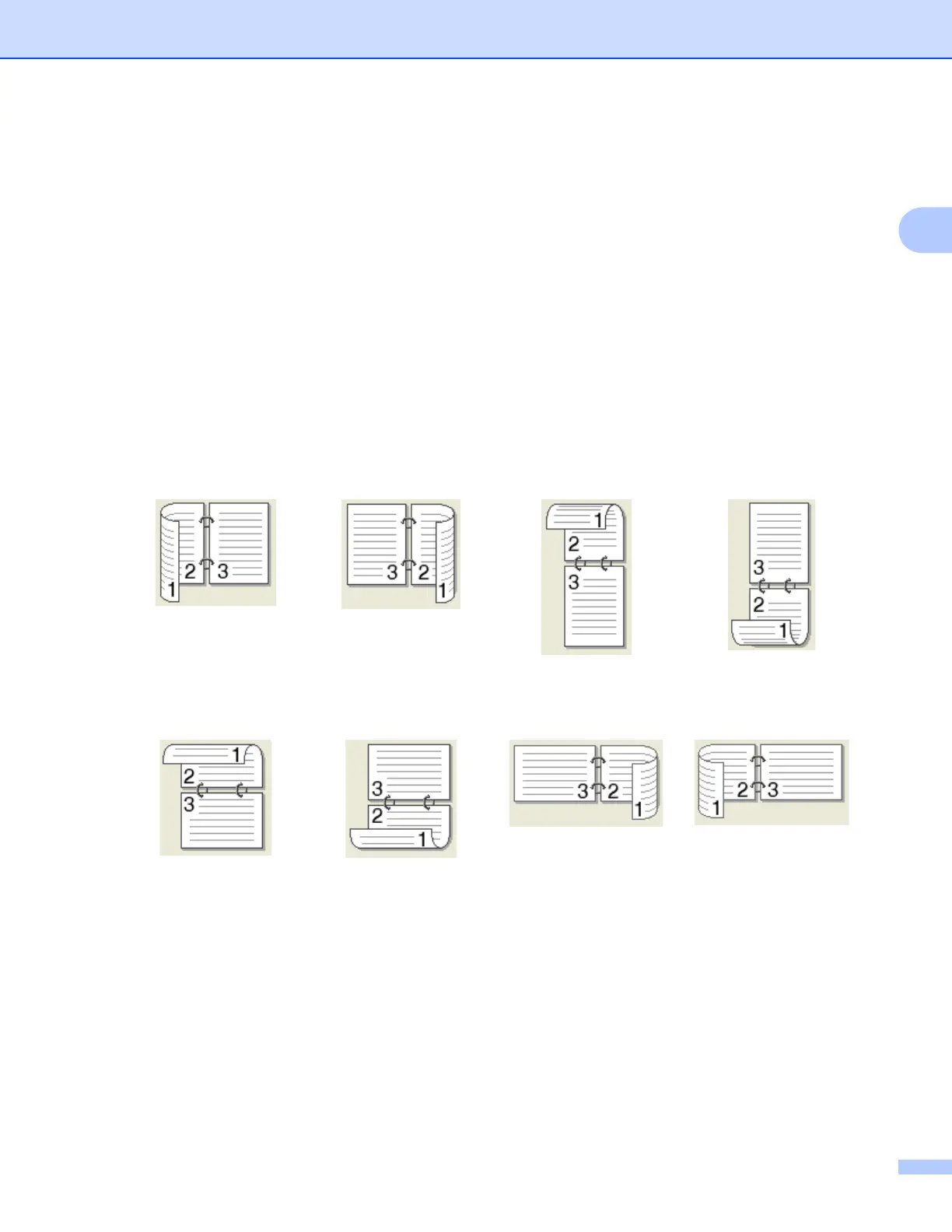
There are four types of duplex binding directions available for each orientation.
• Binding Offset
When you check Binding Offset, you can also specify the offset for binding in inches or millimeters.
Portrait
Long Edge (Left)
Long Edge (Right)
Short Edge (Top)
Short Edge (Bottom)
Landscape
Long Edge (Top)
Long Edge (Bottom)
Short Edge (Right)
Short Edge (Left)



 To Next Page
 Loading...












