41
Using the Data Transferred to the P-touch
USING P-TOUCH SOFTWARE
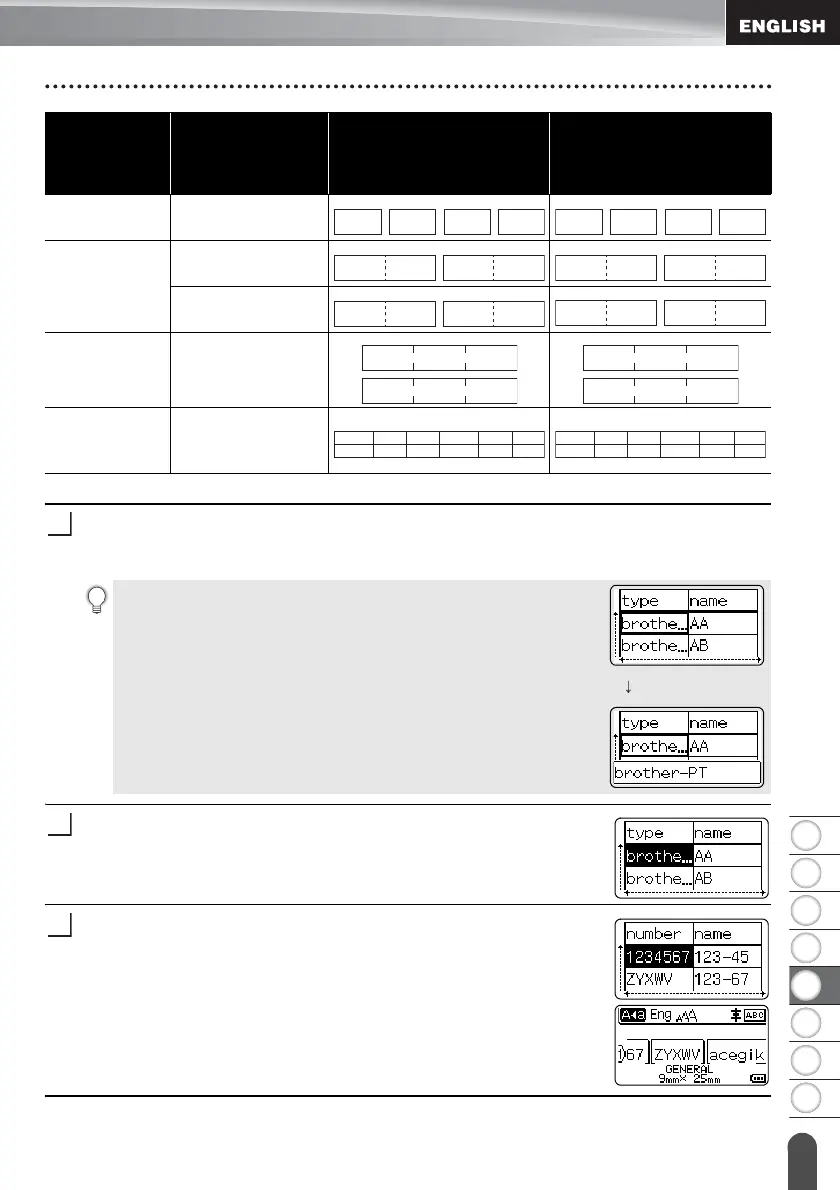
Press the Database key, select the database to be used and then press the OK or
Enter key.
The first record of the selected database is displayed.
Select the first record in the range that you want to insert and then
press the OK or Enter key.
The selected record will be highlighted.
Select the last record in the range that you want to insert and then
press the OK or Enter key.
The selected range will be highlighted.
The contents of the selected database will be displayed.
CABLE
WRAP
For each page
separately
CABLE FLAG For each page
separately
For each block
separately
PATCH
PANEL
For each block
separately
PUNCH-
DOWN
BLOCK
For each block
separately
Label
Application
Type
Data Import
Method
Print Result for
Example 1
(one field per record
selected)
Print Result for
Example 2
(two fields per record
selected)
AA
AA
AA
AB
AB
AB
AC
AC
AC
AD
AD
AD
AA
AA
AA
a
a
a
AB
AB
AB
b
b
b
AA AA AB AB AA AA a a
AA a AB b
AA a AB
bACc
• If the selected record is not changed within a certain time
while the database is displayed, the contents of the record
will be displayed at the bottom of the screen. However, the
contents of the record will not be displayed if the record
contains 7 characters or less.
• When the Preview key is pressed, the properties of the
record will be displayed.
• When setting the range, the “field names” line (first line of
data) cannot be selected.














 To Next Page