55
Specifications
APPENDIX
APPENDIX
Main Unit
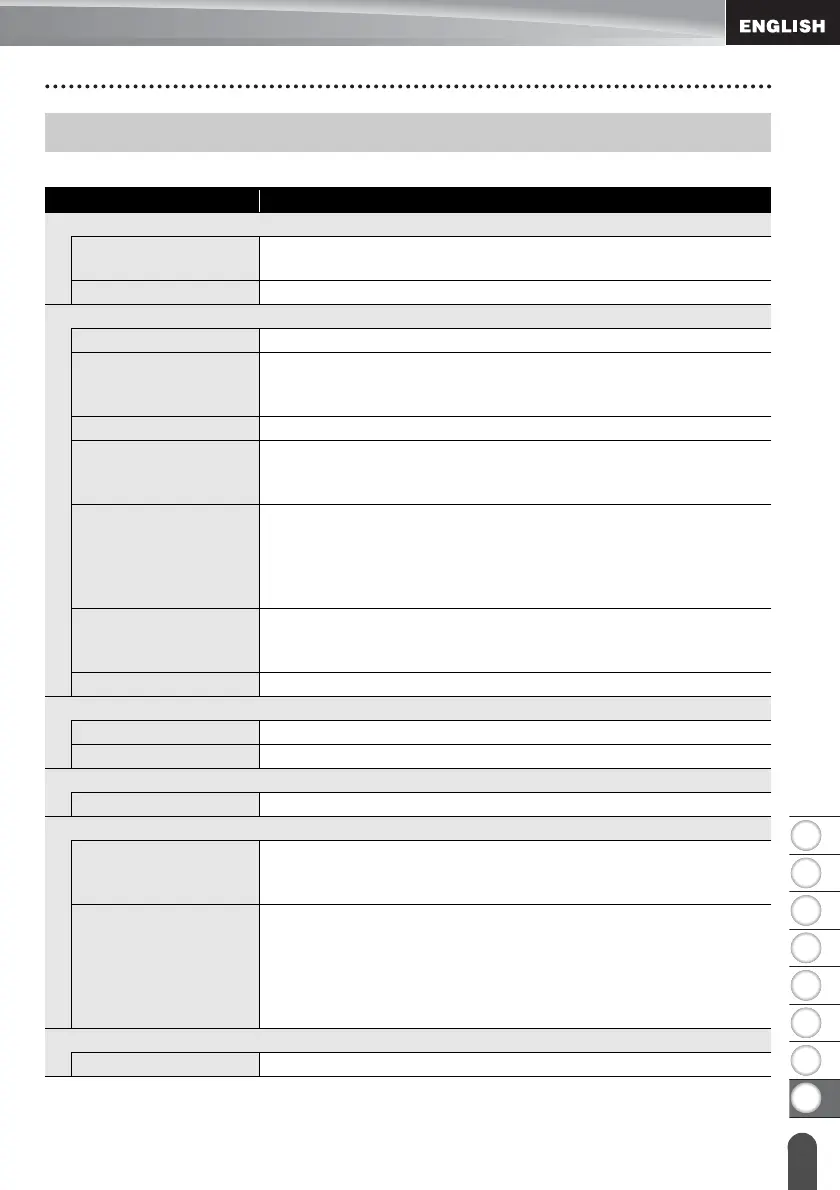
Specifications
Item Specification
Display
Character display 15 characters x 2 lines and guidance area
(128 dot x 64 dot)
Screen contrast 5 levels (+2, +1, 0, -1, -2)
Printing
Print method Thermal Transfer
Print head 128 dot / 180 dpi
High resolution mode: Maximum 180 dpi × 360 dpi (when
connected to a computer)*
1
Print height 18.0 mm max. (when using 24 mm tape)*
2
Print speed AC Adapter: Maximum 30 mm/sec.
Batteries: Maximum 20 mm/sec.
Actual print speed varies depending on the conditions.
Tape/Tube cassette Brother TZe tape cassette (6 mm, 9 mm, 12 mm, 18 mm, 24 mm
widths)
Brother HSe tube cassette (5.8 mm, 8.8 mm, 11.7 mm, 17.7
mm, 23.6 mm widths)
No. of lines 24 mm tape : 1 - 7 lines; 18 mm tape : 1 - 5 lines;
12 mm tape : 1 - 3 lines; 9 mm tape : 1 - 2 lines;
6 mm tape : 1 - 2 lines
Cut option Large margin, Small margin, Chain, No cut, Special tape
Memory (local files)
Memory buffer size Maximum 18297 characters
File storage Maximum 99 files
Memory (transferred)
File storage
Maximum 99 templates, databases, and images each (total of 6 MB)
Power Supply
Power supply Six “AA” alkaline batteries (LR6)*
3
, Six “AA” Ni-MH rechargeable
batteries (HR6)*
3,
*
4
, Li-ion Battery (BA-E001), AC adapter (AD-
E001).
Auto Power-off Six “AA” alkaline batteries (LR6)/Six “AA” Ni-MH rechargeable
batteries (HR6): 20 min.
Li-ion Battery (BA-E001): 30 min.
AC adapter (AD-E001): 60 min.
(Use the Menu key to change the Auto Power-off setting for the
Li-ion battery or AC adapter.)
Interface
USB Ver. 2.0 (Full Speed) (mini-B, Peripheral)














 To Next Page