99
Predelivery
Water Test and Final Adjustments
6
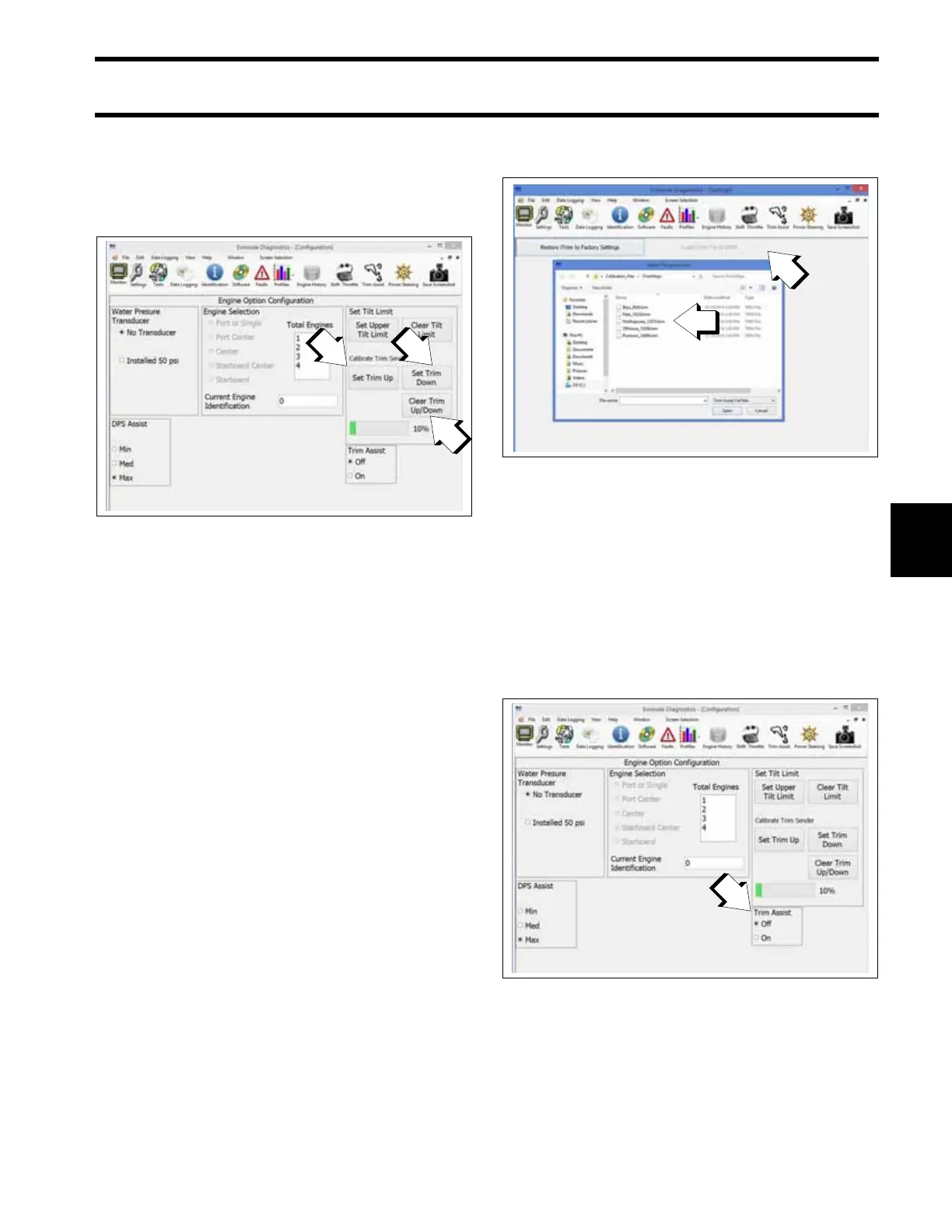
Trim Gauge Calibration
Observe the trim gauge. If needed, use Evinrude
Diagnostics software v 6.1 or higher to calibrate
the upper and lower trim range of the gauge.
i-Trim
Custom i-Trim Settings
Custom i-Trim settings are available for certain
applications where the factory default setting is
not optimized to the application.
Use Evinrude Diagnostics software v 6.1 or higher
to select an available custom i-Trim setting.
From the Trim Assist menu, select “Load i-Trim
File to EMM”.
From the pop-up window, select the desired “.trm”
file, then select the “Open” button to load the file.
Operation
Evinrude E-TEC G2 outboards are equipped with
i-Trim, an automatic trim-assist feature. By
default, this feature is disabled from the factory.
Use the Evinrude ICON-Touch or ICON CS digital
display to enable i-Trim. If the boat is not
equipped with an ICON digital display, use Evin-
rude Diagnostic software v 6.1 or higher to enable
this feature.
To activate the i-Trim:
• the key switch must be in the ON position
• use the trim/tilt switch to trim the engine to the
full DOWN position.
1. Set Upper Trim Limit
2. Set Lower Trim Limit
3. Clear Trim Limit
009237
1. Load i-Trim File to EMM button
2. .trm files
009198
1. Trim Assist
009237







 To Next Page