OL-B200(XL)-14
COUPLE / DOORPROFILE
1
7.b MOTORCABLE
1
2
3
22
2
3
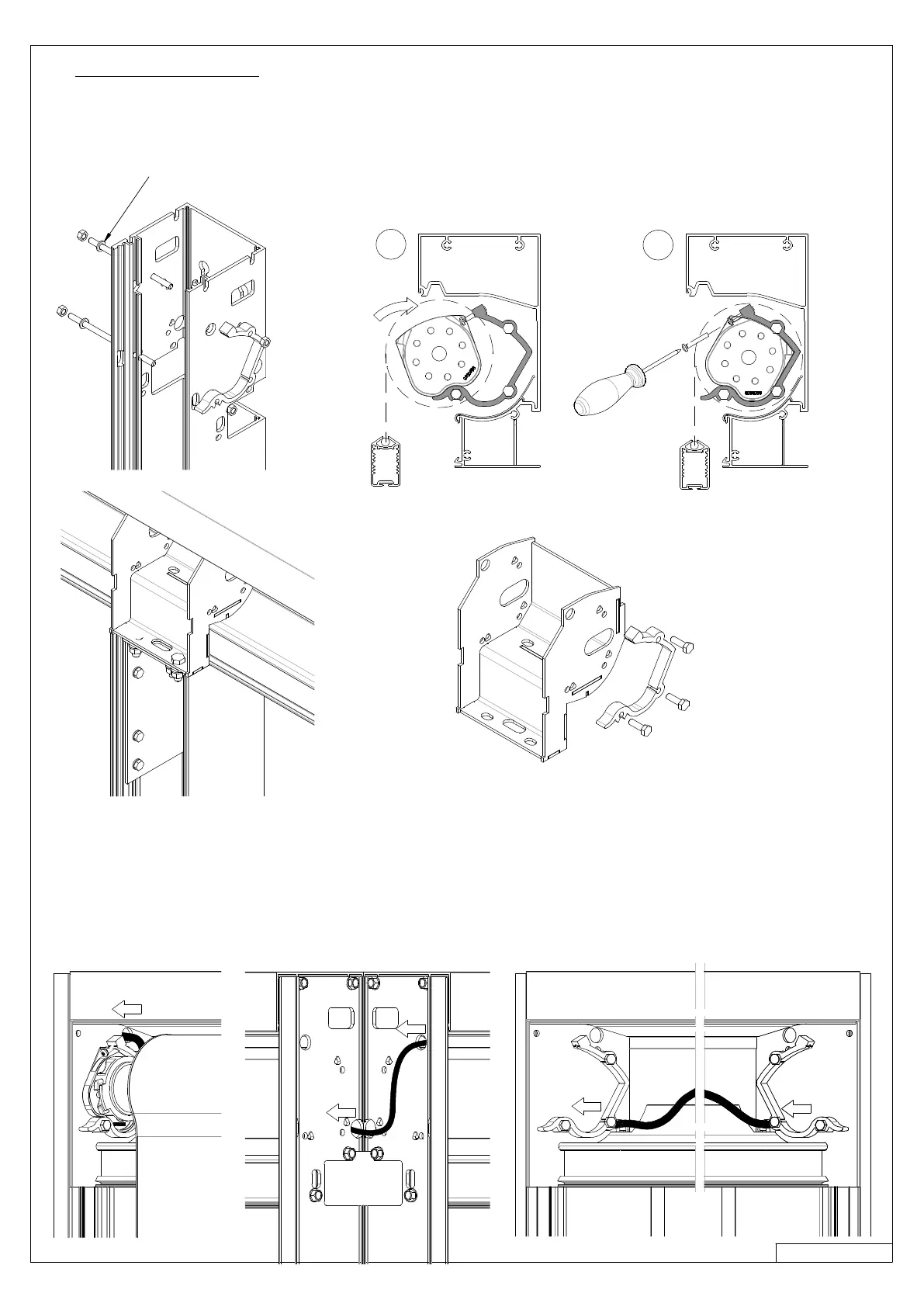
› Fix the rollertube support on the vertical poles as shown underneath.
› Do “not” use a ring on the side where the rollertube support is installed.
› Two rollertube supports can be installed at each pole.
› Tilt the screen in the brackets as shown on the drawing (2), and secure them at both ends (M4x20) (3).
› Place the cable as shown below.
› numbers 2 and 3 only count for the most distant screens.
› Hide the cable behind the PVC fabric protection.
› Position the cables tightly behind the PVC fabric support or stick them to prevent unevenness in the screen fabric.
› In some cases it may be necessary to hide the cable behind its own rollertube !
Ring, only needed if
no rollertube support has to be installed



 To Next Page