OL-B200(XL)-16
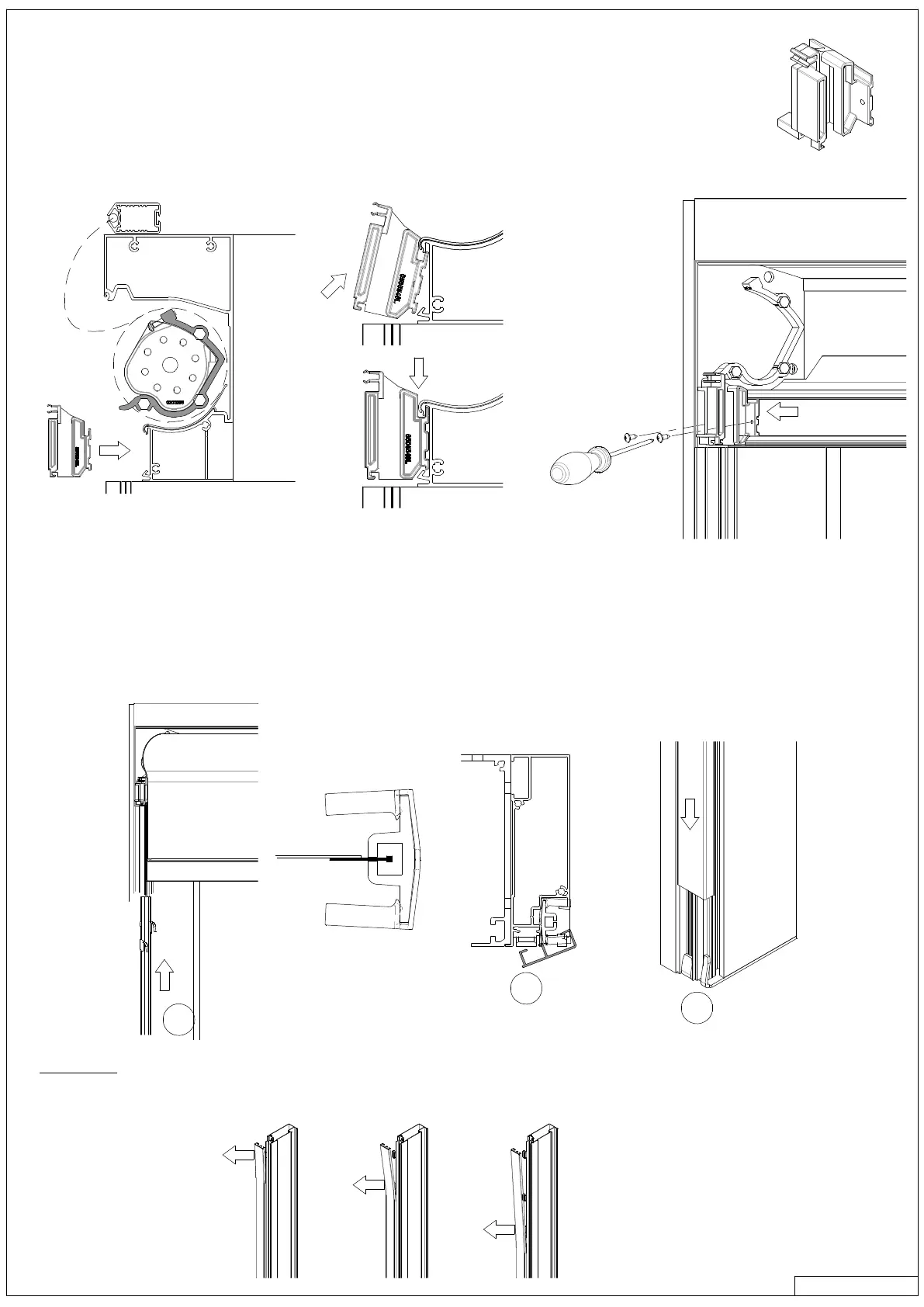
9.a GUIDES LEADRAIL
9.b PVC - GUIDES
9 SCREEN GUIDES
4.2 x 6.5
1
2
3
› WARNING when opening a side guide:
› When opening a side guide you must start at the upper clips and go down one by one.
› Pull as close as possible on the clips profile in order not to deform it.
› While mounting the plastic guides, place the leadrail on top of the screen.
› Place the plastic guides in the groove under the rollertube.
› Slide them completely to the left and right side of the screen, and secure them with two screws.
› Push the pieces down while thighting the screws.
› Slide the leadrail, left and right, in the plastic guides and lower the fabric 1-1/8”.
› Slide the PVC-guide over the zipper that has been welded to the fabric. (1
)
› Hook the cover over the PVC-guide. (2)
› Close the guide at the bottom, and move the cover down over the pins (3) that are mounted on the bottom of the guides.
› Close the guide completely.



 To Next Page