Sensor Configuration and Numbering
SMART MATRIX TWIST - 2-10 -
Sensor Configuration and Numbering
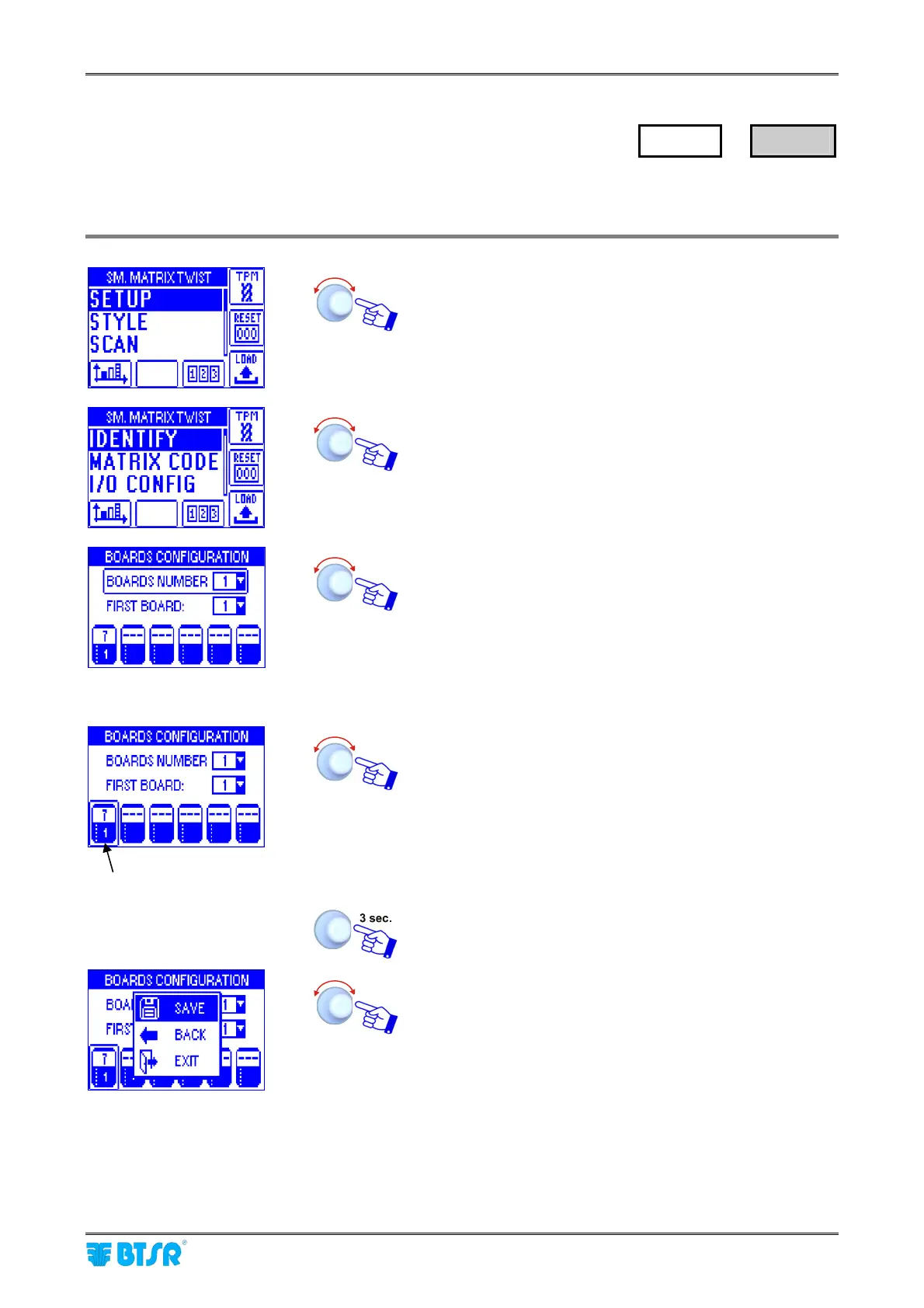
This function allows you to univocally identify each IS3.. device connected to SM-DIN TWIST Boards or
ACT/Power.
Enter the SETUP menu.
Select IDENTIFY.
• Point and select BOARDS NUMBER:
• Set the number of SM-DIN TWIST Boards used [1..8]
(in the example 1).
• Set the number of the 1
st
Board (FIRST BOARD)
+ Always set FIRST BOARD =1.
• Point the symbol of 1
st
Board.
• Select the field indicating the number of sensors
connected to Board 1 (default 0).
• Set the number of sensors actually connected to Board
1 (e.g. 7) and confirm.
• Point the symbol of 2
nd
Board and so on for all the
Boards used.
Once you have configured all the Boards.
SAVE to save the settings.
SETUP
→
IDENTIFY
FIRST BOARD









 To Next Page