Sensor Configuration and Numbering
SMART MATRIX TWIST - 2-11 -
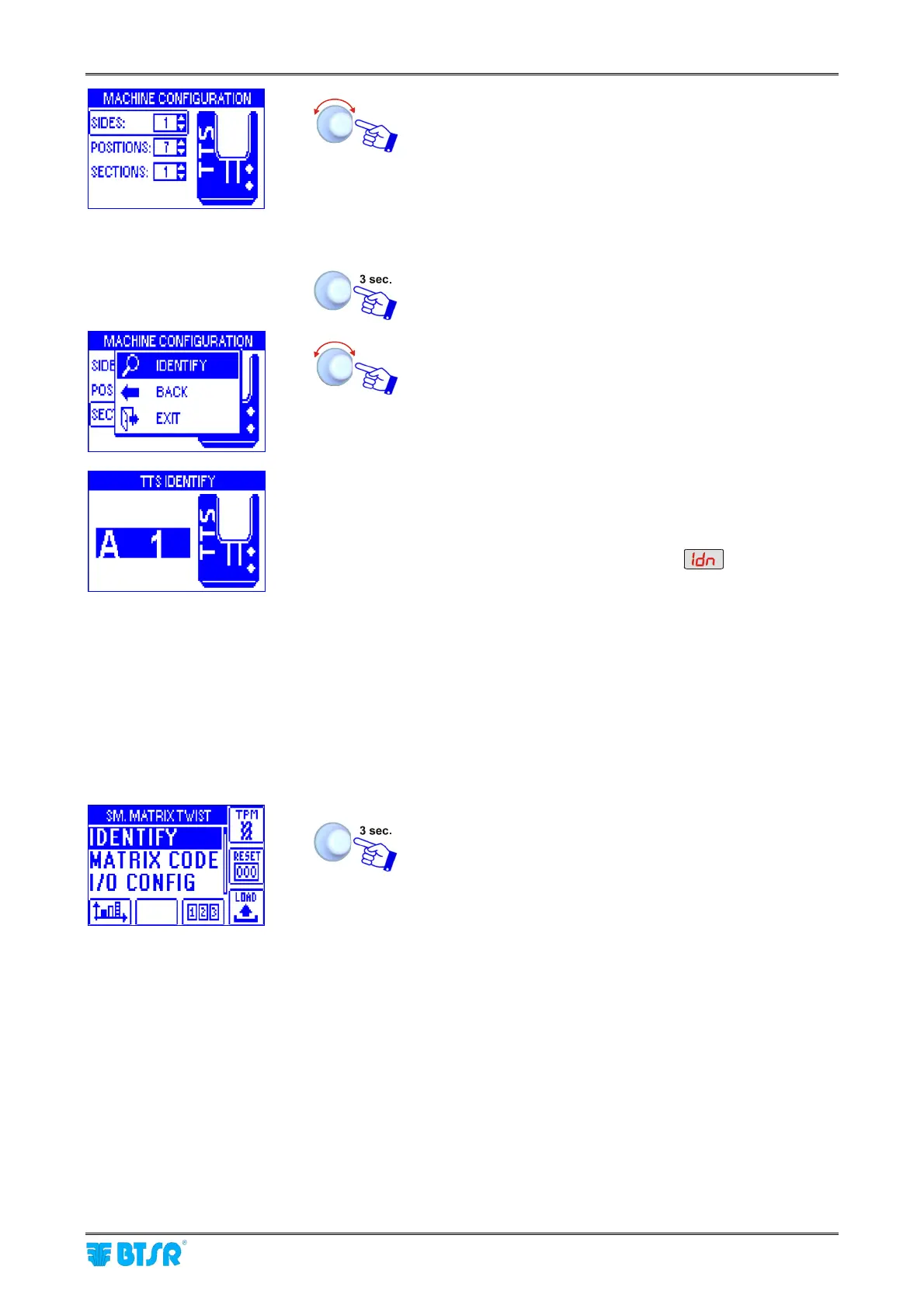
Select and set in sequence the fields SIDES, POSITIONS,
SECTIONS.
• SIDES: number of machine sides [1 or 2]
• POSITIONS: number of sensors for machine/side [1 to
128] (in the example 7).
• SECTIONS: number of subdivisions for each machine
side (it must be an integer divisor of POSITIONS).
Once you have configured the machine.
The example above indicates a configuration with one
section, 1 machine side (A) and 7 positions (sensors) per
side.
IDENTIFY to start the sensor identification.
• The example shown indicates that the numbering
(identification) of the 7 configured sensors is going to
start. The flashing reference indicates the first sensor to
be identified (A1).
• The display of all Boards will show
• The green led will flash on all sensors.
• Skim the touch light of the sensor you want to assign
the identifier A1; the green led of the sensor will turn
from flashing green to red.
• On SMART MATRIX display, the identifier of the next
sensor (A2) will start flashing.
• Skim the touch light of the indicated sensor and
continue with the numbering of all the remaining
sensors .
At the end of the numbering operation, the configuration
menu will re-appear.
To return to SETUP menu.









 To Next Page