Input/Output Configuration on SM-DIN/Smart Matrix
SMART MATRIX TWIST - 2-14 -
Input/Output Configuration on SM-DIN/Smart Matrix
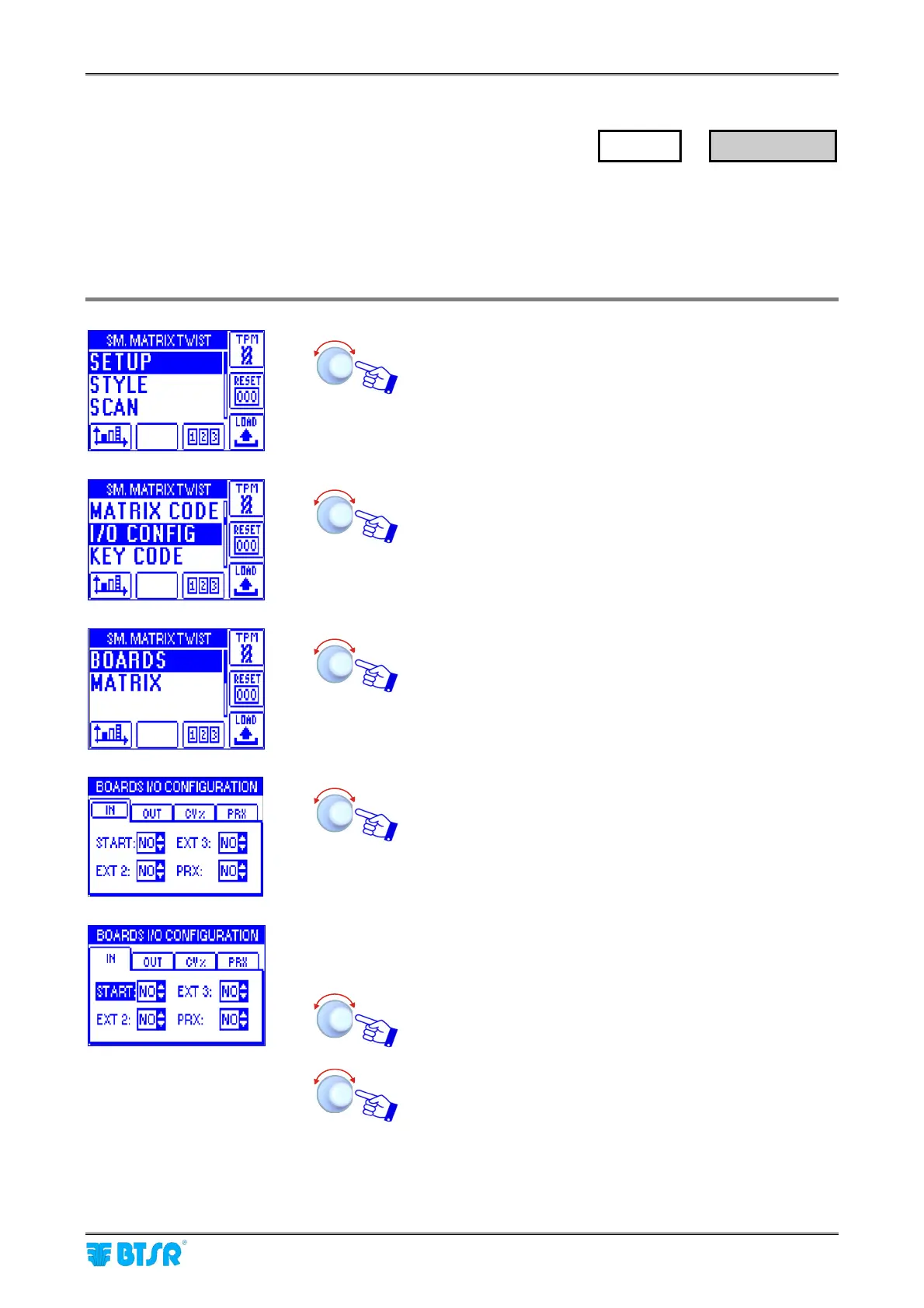
This function allows you to configure the input/output signals of all the SM-DIN Boards (BOARDS option) as
normally open (NO) or normally closed (NC) contacts. The parameters to be configured are distributed on 4
different windows (IN, OUT, CV%, PRX).
It also allows you to configure the output relay of SMART MATRIX terminal as normally open (NO) or
normally closed (NC) contact.
Enter the SETUP menu.
Select I/O CONFIG.
Select BOARDS.
Turn the selector to point in sequence each field of the
window (IN
→
START
→
EXT 3
→
EXT 2
→
PRX).
The frame indicates the “Pointed” field.
Click to select the pointed item. The field name will be
highlighted (reverse.
Example:
START field selected (reverse)
Turn the selector to choose the polarity of START signal
(either Normally Open = NO, or Normally Closed = NC),
then click to confirm.
Point and select in sequence the EXT 3, EXT 2 and PRX
signals and set the relevant polarity.
Then point the window header (IN) and click to select it.
SETUP
→
I/O CONFIG











 To Next Page