Style Parameters Programming
SMART MATRIX TWIST - 2-29 -
Style Parameters Programming
This function allows you to create, modify and save up to 100 different articles (styles) and, for each one of
these styles, it allows you to program the detection parameters of IS3.. sensors.
At any time, pressing the LOAD button, you will have the possibility to load any of the available styles to all
the IS3.. sensors or to a selectable range of sensors.
For detailed information about the individual parameters, please refer to Section 3: “IS3.. Sensors
Features”.
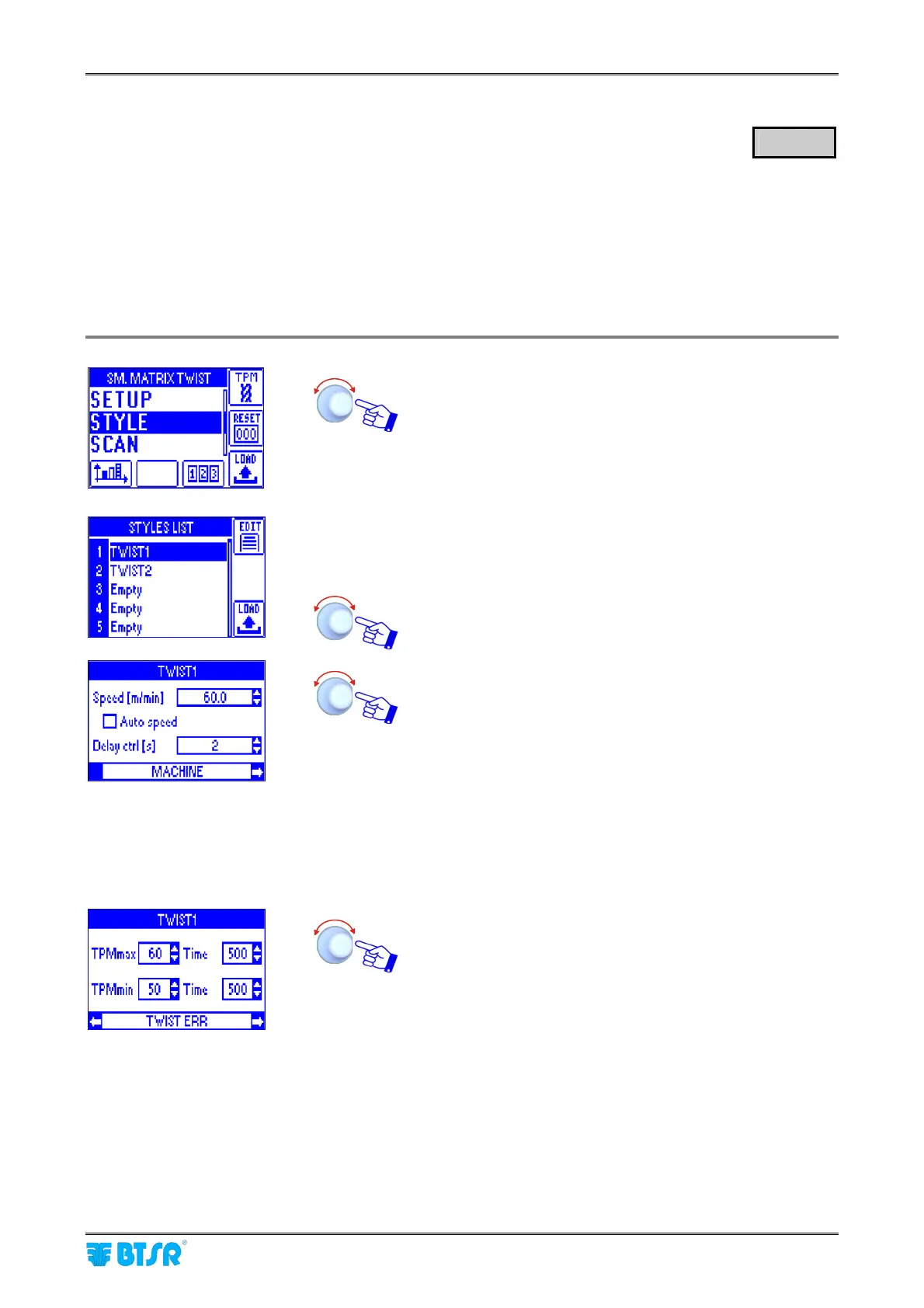
Select the STYLE menu item.
The example shown indicates that the Smart Matrix TWIST
terminal currently contains 2 styles (TWIST1 and TWIST2);
the other positions [3 to 100] are empty
Select the desired position (for instance position 1
TWIST1):
Click to highlight MACHINE.
Select the Speed [m/min] parameter (or [y/min] if the inches
have been set as measure unit) set the desired yarn
collection speed [0.1 … 2000.0].
Select the Delay ctrl [s] parameter and set the desired start
delay [2…60].
Selecting ; Auto speed the system calculates in automatic
way the yarn collecting speed through the synchronism
signal connected to the PRX input.
Select again MACHINE and turn the selector.
Click to highlight TWIST ERR.
Select the TPMmax and TPMmin parameters and set the
maximum and minimum twist per meter value and the
relevant error Time (in ms) [100…1000 with steps of 100
ms; or 2000, 3000, 4000 or 5000].
If the TPI option has been chosen as measure system (by
means of the B4 push-button on the initial screen), instead
of TPMmax and TPMmin, TPImax and TPImin will appear.
The TPX maximum and minimum values that can be set,
depend on the set Speed.
Select again TWIST ERR and turn the selector.
STYLE









 To Next Page