Style Loading
SMART MATRIX TWIST - 2-32 -
Style Loading
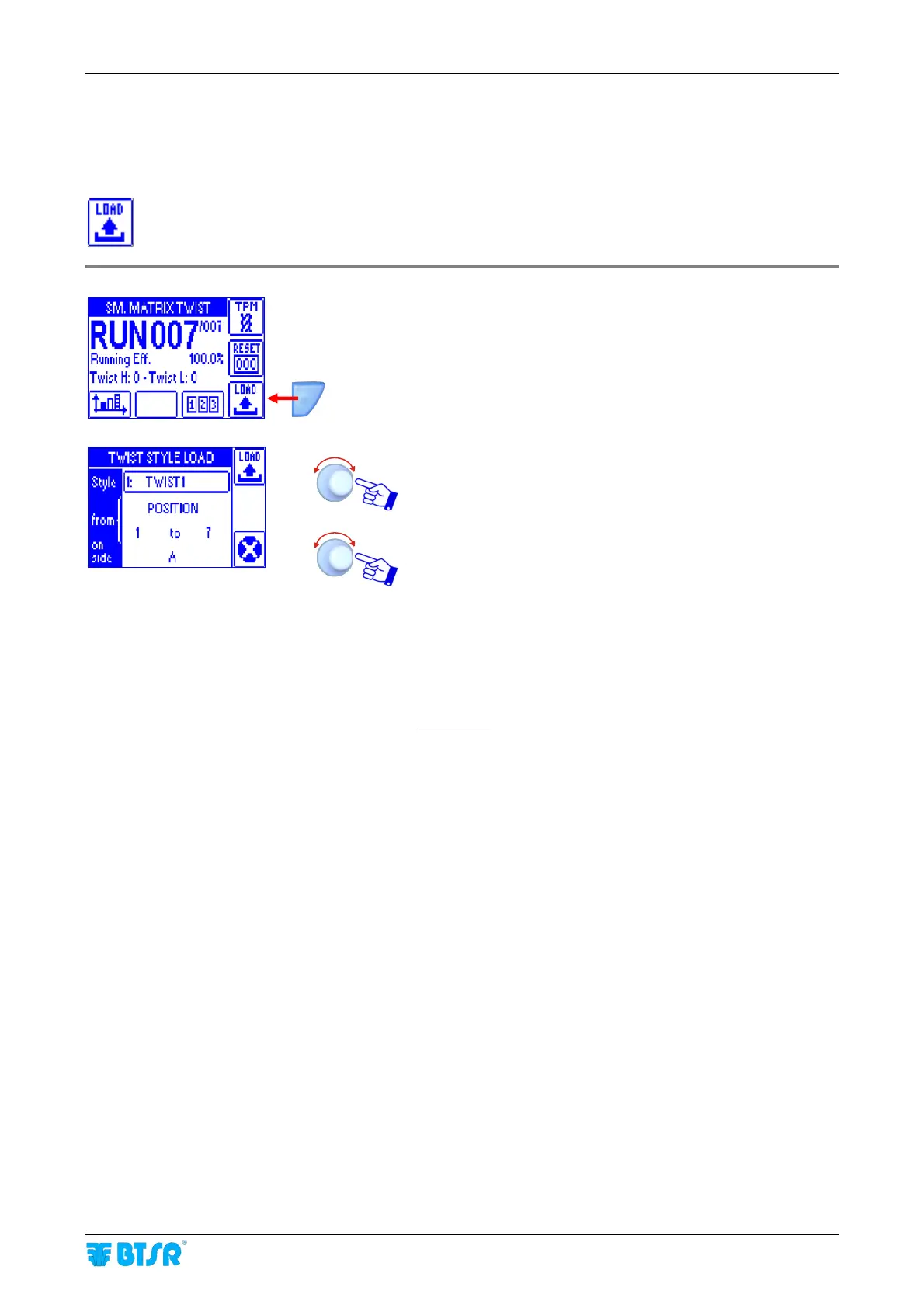
At any time you may load a new style on all the sensors or on a specific range of sensors, pressing the
button.
Press LOAD
Highlight the Style field and turn the selector to choose the
style you want to load (in this example TWIST1), then click
to remove the highlighting.
Select the sensor(s) on which you want to load the selected
item.
In the “from” space you may choose the range of sensors
whose firmware shall be updated:
POSITION n to m or
SECTION n to m
pointing and confirming the relevant fields.
In the “on side” space you may specify both machine sides
(ALL) or only the desired side (A or B).
Examples:
to update only the sensor No. 3 of side B, set:
from POSITION 3 to 3 on side B.
to update all sensors of section 3, side A and B, set:
from SECTION 3 to 3 on side ALL.
Once you have selected the sensor(s) you want to update,
press LOAD.
During the loading process, a LOADING STYLE…
message will briefly appear









 To Next Page