Service Functions
SMART MATRIX TWIST - 2-22 -
Service Functions
This menu item allows you to carry out several service functions:
- Firmware upgrade on IS3.. sensors (SENS. UPG).
- Reading the parameters programmed on sensors (SENS. READ).
- Reading the parameters programmed on SM-DIN Board (SMDIN READ).
- Smart Matrix terminal function control (CHK MASTER)
Sensors Firmware Upgrade
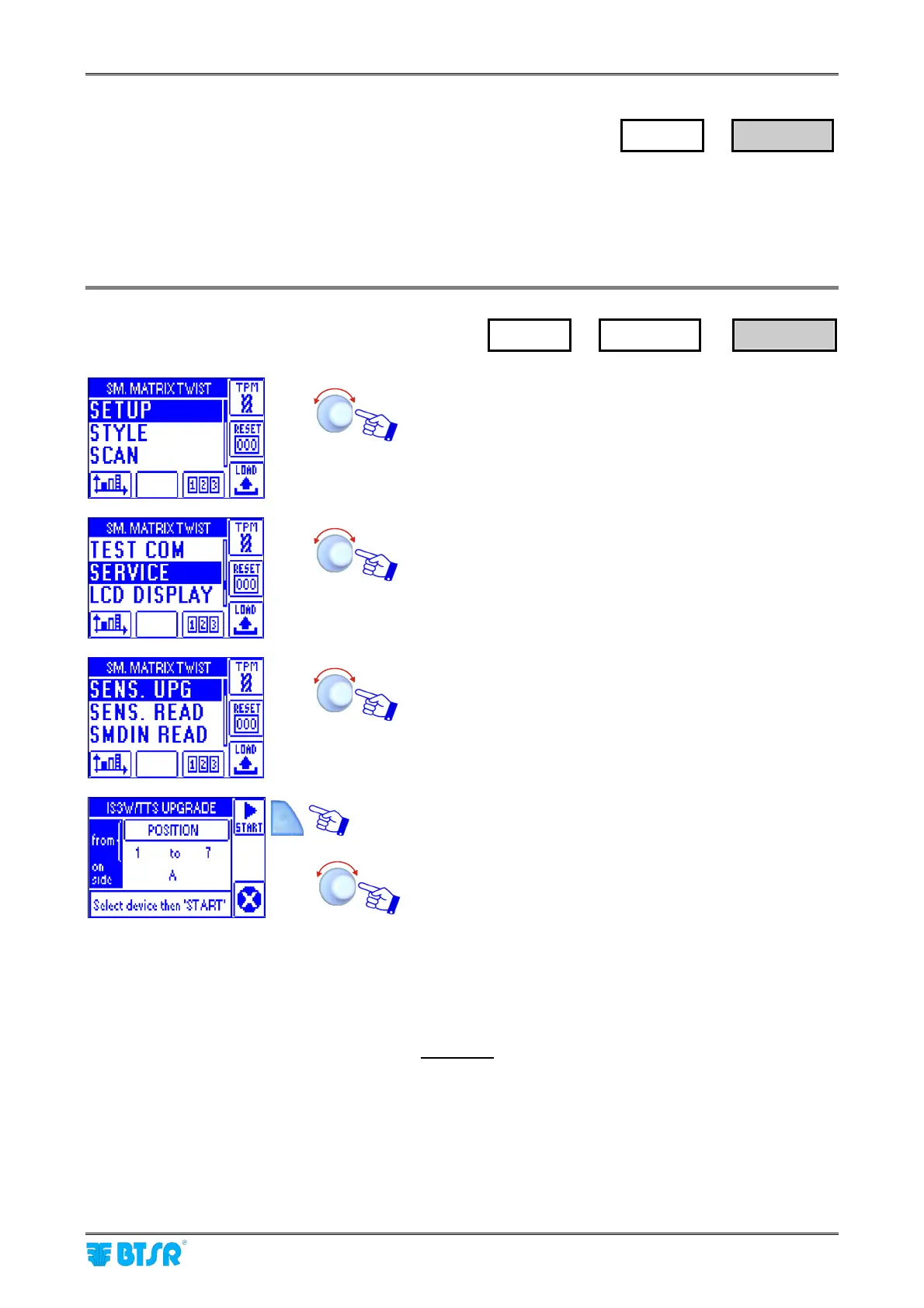
Enter the SETUP menu.
Select SERVICE.
Select SENS. UPG.
Select the sensor(s) for which you want to upgrade the
firmware.
In the “from” space you may choose the range of sensors
whose firmware shall be upgraded:
POSITION n to m or
SECTION n to m
pointing and confirming the relevant fields.
In the “on side” space you may specify all machine sides
(ALL) or only the desired side (A or B).
Examples:
to upgrade only the sensor No. 3 of side B, set:
from POSITION 3 to 3 on side B.
to upgrade all sensors of section 3, side A and B, set:
from SECTION 3 to 3 on side ALL.
Once you have selected the sensor(s) you want to
upgrade, press START.
SETUP
→
SERVICE
SETUP
→
SERVICE
→
SENS. UPG









 To Next Page