Style Parameters Programming
SMART MATRIX TWIST - 2-30 -
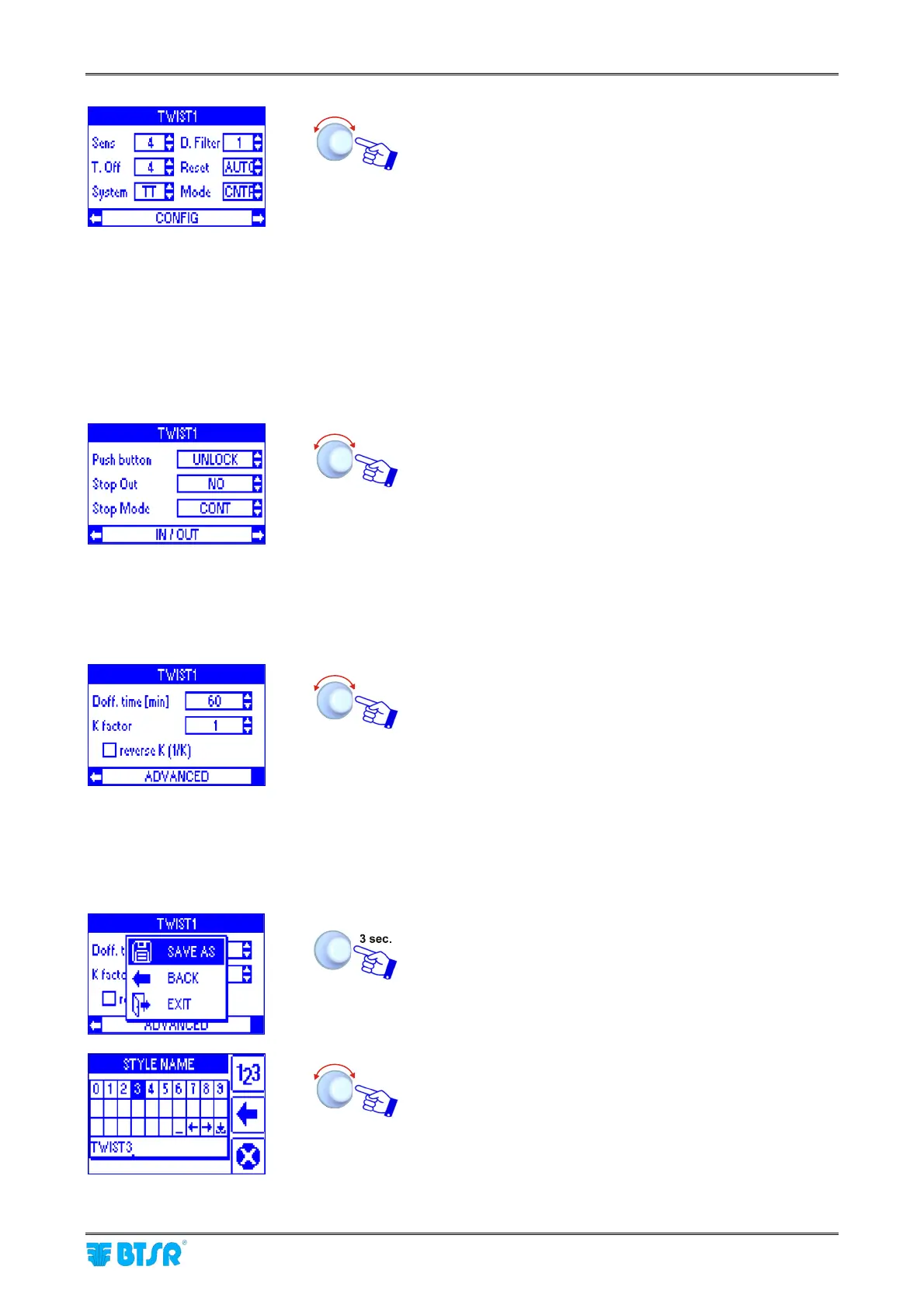
Click to highlight CONFIG.
Select the Sens parameter and set the sensor sensitivity
level [1…8].
Select the T.Off parameter and set the time in which the
yarn is outside the sensor. (the parameter is effective when
the System parameter is set to TB) [1…8].
Select the System parameter and set TT (Twist) mode or
TB (Balloon) mode.
Select the D.filter parameter and set the digital filter value
in order to reduce the yarn hairiness influence [1…8].
Select the Reset parameter and set MAN. or AUTO.
Select the Mode parameter and set the sensor operating
mode (CONTROL or MONITOR).
Select again CONFIG and turn the selector.
Click to highlight IN/OUT.
Select the Push button parameter and set the Touch Light
button operating mode: [UNLOCK] or [LOCK].
Select the Stop Out parameter and set the STOP output
characteristic: [NO] = Normally Open contact or [NC] =
Normally Closed contact.
Select the Stop Mode parameter and set the STOP output
timing: [CONT] = continuous signal, [PULSE 2S] = 2
seconds pulse signal or [PULSE 10S] = 10 seconds pulse
signal.
Select again IN/OUT and turn the selector.
Click to highlight ADVANCED.
Select the Doff.time[min] parameter and set the minimum
working time requested to consider good a package free of
defects [1…2000].
Select the K factor parameter and set the twist division
factor [1…5].
Selecting ; Reverse K (1/K) the twists will be divided by
1/K.
At the end select again ADVANCED.
At this point the style parameter programming is
completed.
To activate the saving function
SAVE to save the style,
BACK to return to the previous screen without saving,
EXIT to return to menu STYLE without saving.
Enter the name you want to assign to the new style (e.g.
TWIST3), then hold the selector pressed for 3 seconds.









 To Next Page