Keycode Setting
SMART MATRIX TWIST - 2-18 -
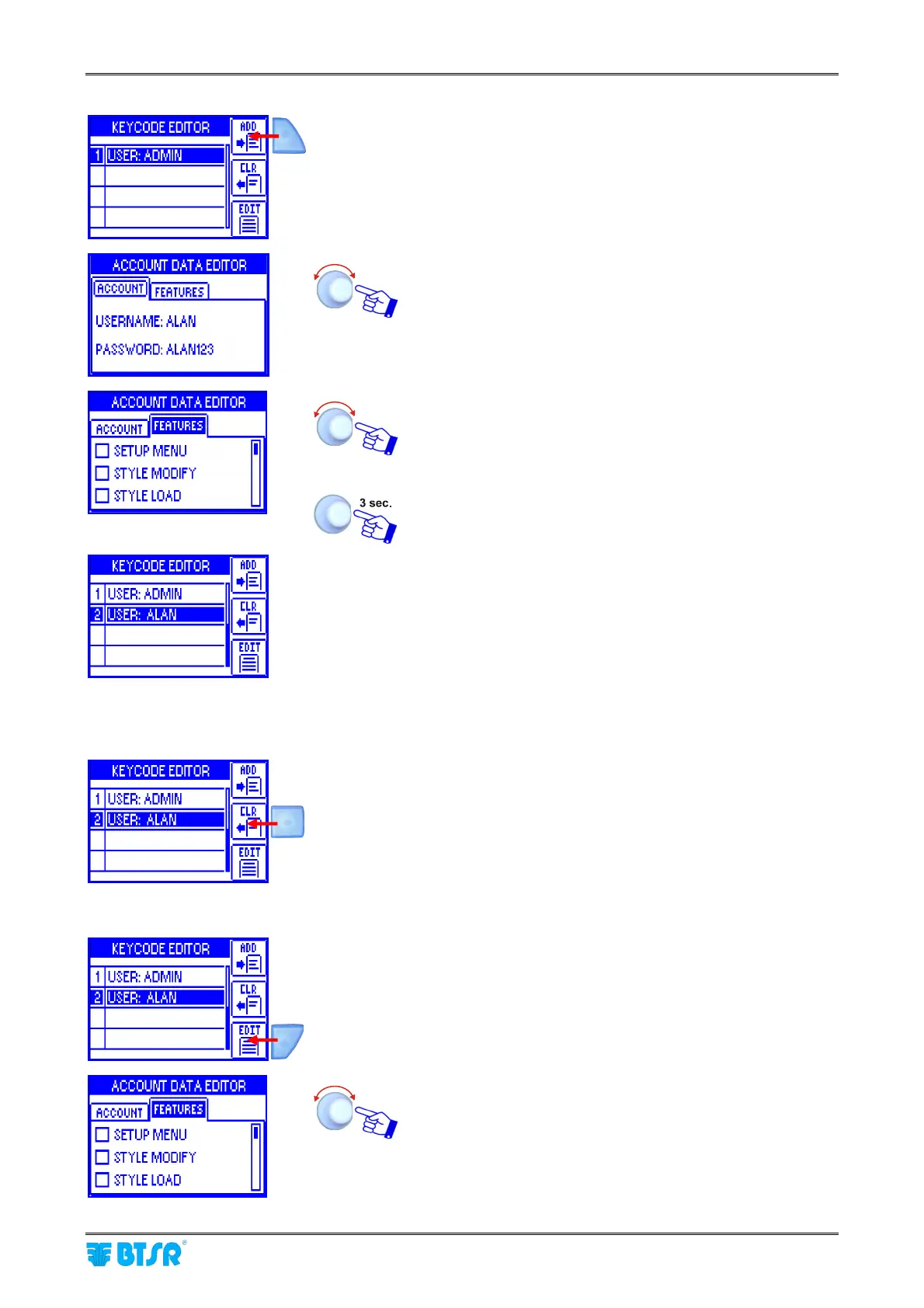
Add New User
A new user can only be added by the Administrator.
Once you have selected the KEYCODE menu item, press ADD to add a
new user.
Set the new user name (e.g. ALAN) and password (e.g.
ALAN123) in the ACCOUNT (*) window
In the FEATURES window select the menus and options
available to the new user (SETUP MENU, STYLE
MODIFY, STYLE LOAD, RESET COUNTERS, SENSORS
ON/OFF)
To confirm and save the settings.
The new user will appear in the list of KEYCODE EDITOR screen.
(*) User name and password can be set character by character turning the selector and clicking to confirm
(you may set numeric and alphabetic characters).
Clear a User
Press CLR button to remove the selected user from the list.
Change Configuration
Press EDIT button to edit (change) the access rights of selected user.
Change the configuration of menus and options available to
the selected user (SETUP MENU, STYLE MODIFY,
STYLE LOAD, RESET COUNTERS, SENSORS ON/OFF)











 To Next Page