Keycode Setting
SMART MATRIX TWIST - 2-19 -
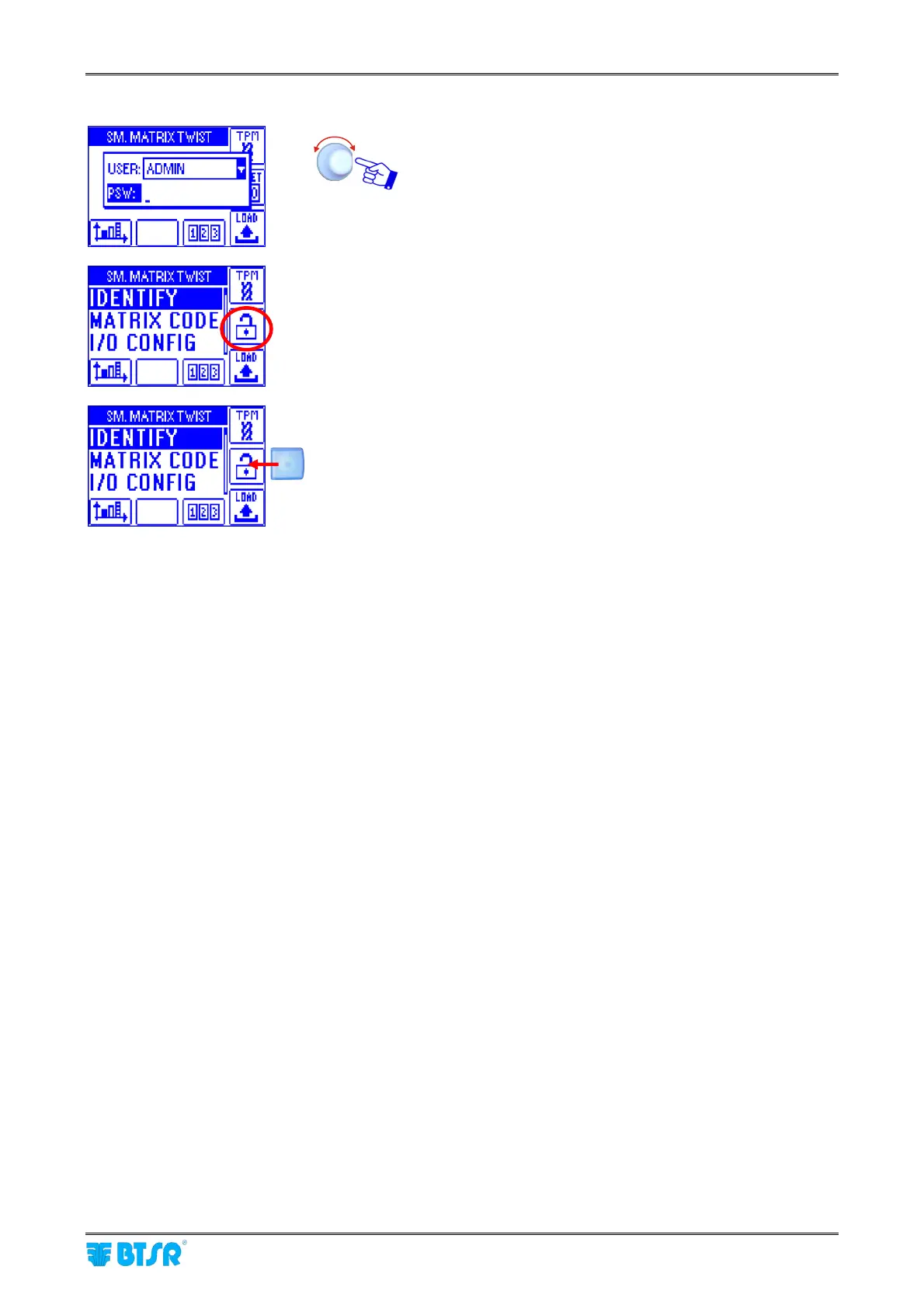
When you try to access a password-protected function, the following prompt will appear:
Choose the user name and set the password to access the
selected function.
The flashing padlock symbol indicates that all access to Smart Matrix
TWIST function took place entering a valid password (login).
If no operation is carried out within 90 seconds, then the padlock symbol
will disappear and you will be requested to type again the password to
access the protected functions.
Pressing the button associated with the padlock symbol, will force an
immediate logout, without waiting for 90 seconds (the padlock symbol will
disappear).
How to Disable the Keycode Function
To disable the password protection function, you will have to clear all the set users (using the CLR button)
and clear the Administrator password (turning the selector and clicking until all the password characters will
be replaced by blanks).
Password Protected Functions
SETUP MENU Access to SETUP menu function
STYLE MODIFY Access to STYLE menu function
STYLE LOAD Access to LOAD menu function
RESET COUNTERS Counters reset (with RESET ALL and RESET DOFF buttons within the
Error Counter Display screen)
SENSORS ON/OFF Sensor activation/deactivation (with the ON/OFF button within the Sensors
Histogram)
The user may access exclusively the functions selected (;) within the FEATURES window.











 To Next Page