Style Programming
SMART MATRIX WINDINGFEEDER - 27 -
Style Saving
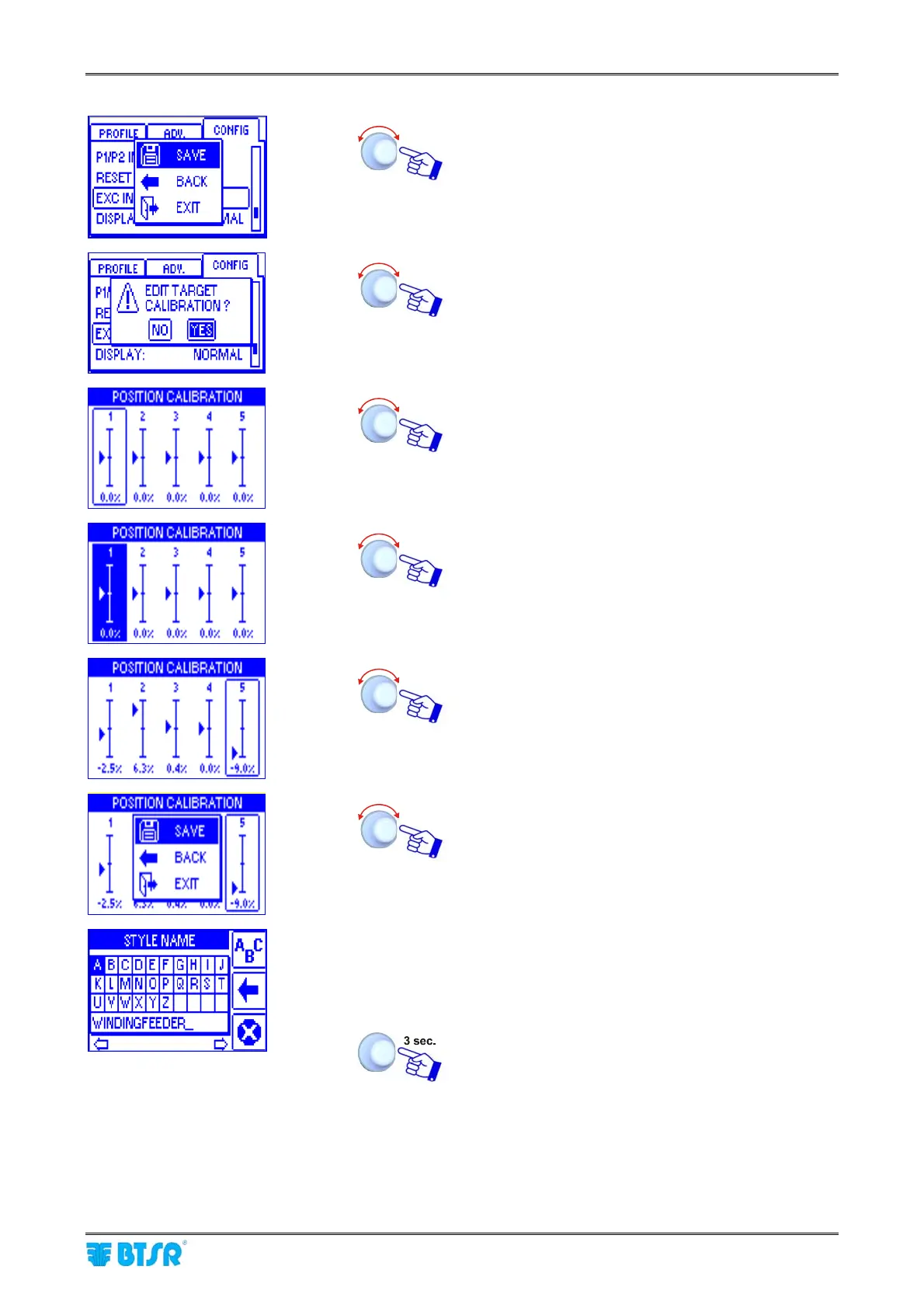
SAVE to save the set parameters
YES to introduce a TARGET correction factor.
This function can be useful in case of
slipping between yarn and
WINDINGFEEDER device wheel
To select the desired device. At the beginning the
correction factor is always 0%. [the correction range
is -10.0% to +10.0%]
To increase or decrease the selected device
correction factor.
Setting a negative value, the TARGET value will be
decreased by the set percentage; otherwise, setting
a positive value, the TARGET value will be increased
by the set percentage.
SAVE to save the set parameters and move to the
STYLE NAME screen
Set the style name, for instance: APPLICATION01,
instead of the device name WINDINGFEEDER (*),
operating as described of paragraph Navigation
Throughout the Display Windows.
Once you have set up the style name
(*) Maximum style name lenght = 15 characters











 To Next Page