7 | In Operation
44 / 68 0870211676_RA0760A_PLUS_-0004_IM_en
7.8 Monitoring
7.8.1 Operating Information
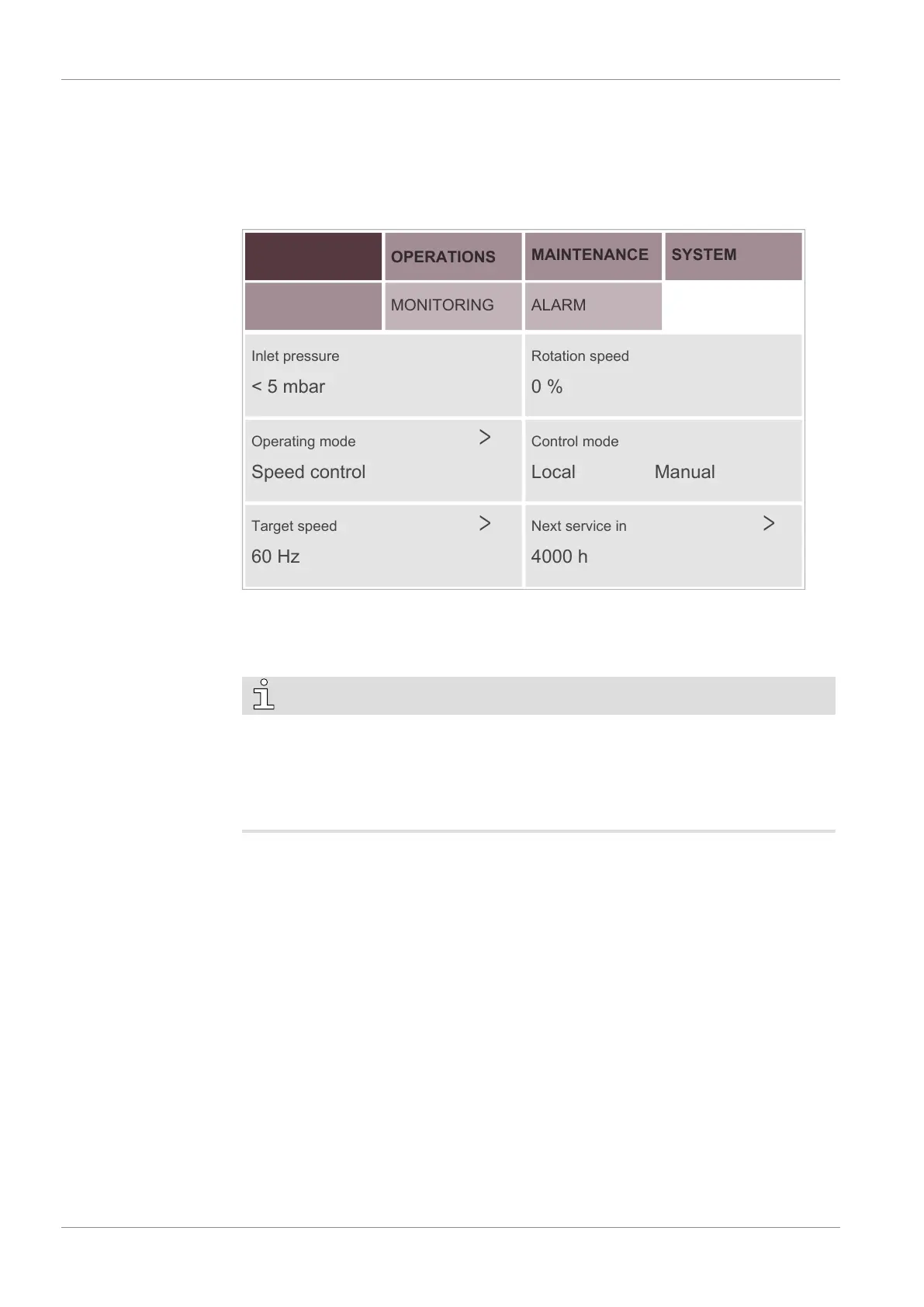
This display “HOME” > “MAIN” corresponds to the principal menu and is automatically
loaded when the machine is started. It displays the principal operating information.
HOME
MAIN
OPERATIONS
MONITORING
MAINTENANCE
SYSTEM
ALARM
Inlet pressure
< 5 mbar
Rotation speed
0 %
Operating mode
Speed control
Control mode
Local Manual
4000 h
Next service in
60 Hz
Target speed
Inlet pressure:
Indicates the operating pressure at the suction connection (IN) according to the selected
unit.
To change the unit see System Settings [►13].
NOTE
Display of the ultimate pressure.
Due to sensor accuracy, the minimum displayed value of the ultimate pressure is 5
mbar preceded by the symbol "<", which means that the actual value is lower than dis-
played.
The ultimate pressure of the machine is indicated on the nameplate (NP).
Rotation speed:
Indicates the operating speed of the machine in percentage based on the variable-fre-
quency drive speed range.
1% -> 35 Hz ; 100% -> 60 Hz
Operating mode:
Indicates which operating mode is selected, either “Speed control” or “Pressure con-
trol”, see Operating Mode [►34].
Control mode:
Indicates which control mode is selected, “Local/Manual”, “Local/Auto” or “Remote/
Auto”, see Control Mode [►31].
Target speed or target pressure:
Depending on the selected operating mode it indicates the target speed (drive frequency
in Hz) or the target pressure, see Operating Mode [►34].
Next service in:
Indicates the number of operating hours remaining before the next maintenance, see
Maintenance Schedule [►54].


 To Next Page