3-14 FlexNet
®
700 Series Line Extender Rev F
3
6. Attach the coaxial cable to the housing:
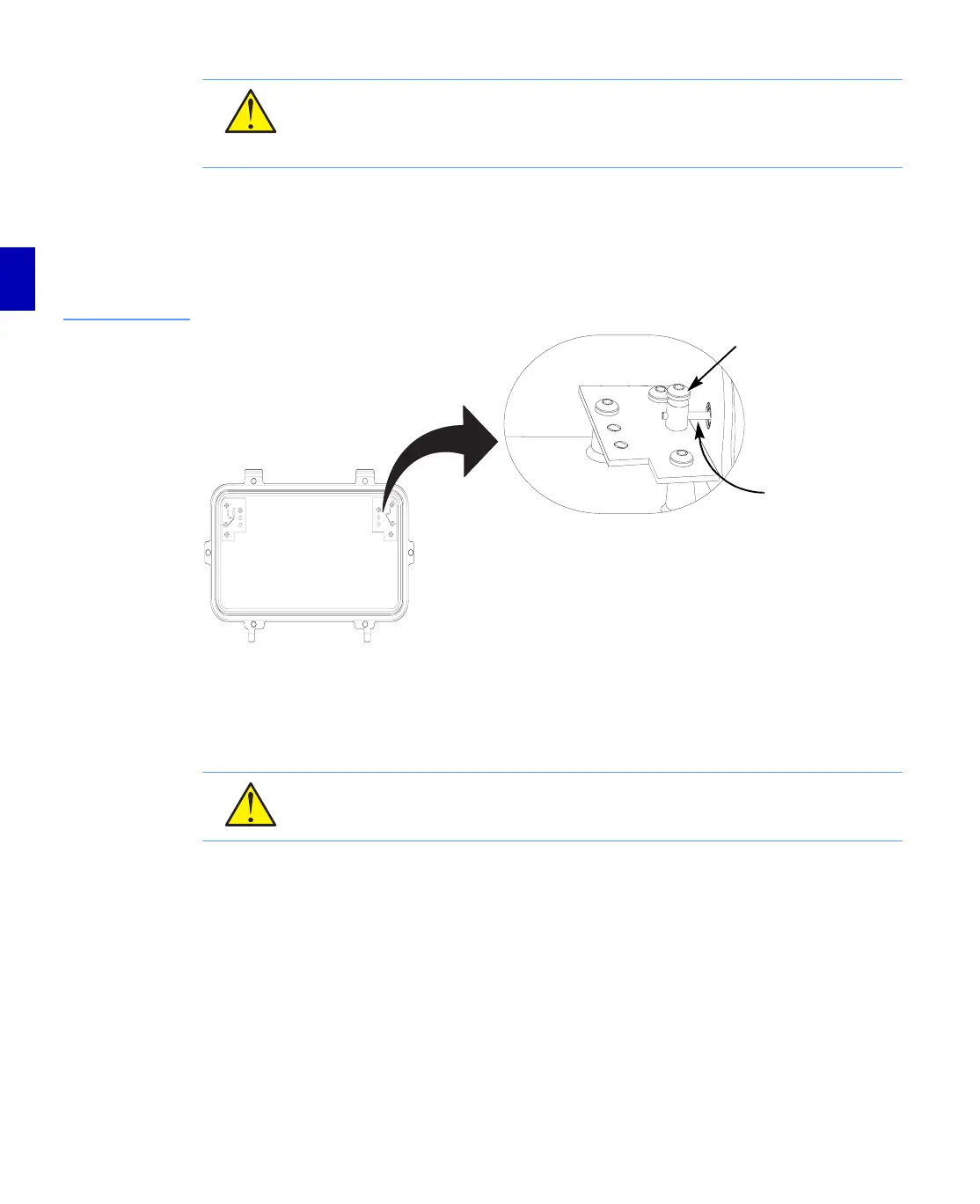
a. Thread the connector body into the cable entry port. Be sure that the center conductor
extends through the centerseizure block, but does not touch anything inside the
housing.
Figure 3.11
Exploded View of a
Centerseizure
Assembly
b. Slide the back nut onto the cable away from the end. Ensure that the locking nut is
oriented so the threaded end faces the cable entry port.
c. Slide the main nut onto the cable with the radiation sleeve inside the outer conductor
(shield). Make sure the end of the cable shield bottoms against the main nut.
d. Thread, tighten, and torque the cable connector assembly according to specifications
supplied by the manufacturer. Hold the cable firmly in position while tightening the
connector hardware.
CAUTION: Avoid contact of the connector center conductor to the chassis. Be certain
that the center conductor extends through the centerseizure post, but does not touch
the RF module chassis or housing. Ensure that no cable scraps or foreign materials remain
within the housing.
CAUTION: Avoid possible damage to the housing. Use two wrenches when tightening
the connector body, one on the port insert and one on the connector. Always tighten the
connector before tightening the centerseizure screw.
Center
Conductor
Centerseizure
Post


 To Next Page