M3
...................................................................................................................................................................................
60
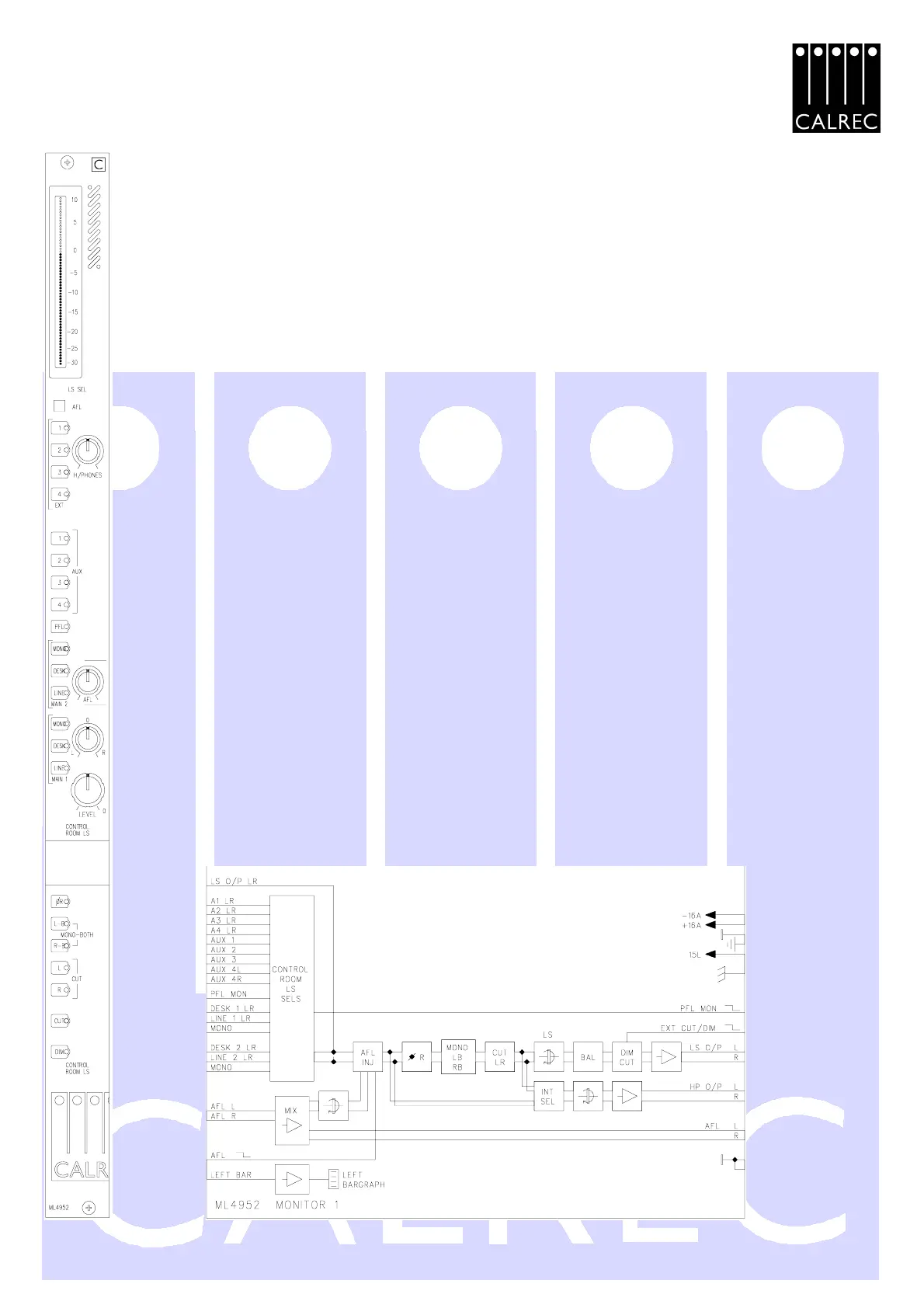
ML4952 MONITOR 1
LEVEL BARGRAPH : Displays level of left channel of meter select output (internally
selectable for PPM/VU and 0dB reference level).
AFL : Red indicator - illuminated when any AFL selection is made.
CONTROL ROOM MONITOR SELECTOR - 15 way selector with the following sources:
- 4 external Stereo inputs 1 to 4, Green LEDs (Labelled A1-A4 on schematic).
- Aux 1 to Aux 4, Green LEDs.
- PFL, Yellow LED.
- MAIN 2; Stereo line, Stereo desk and Mono outputs, Yellow LEDs.
- MAIN 1; Stereo line, Stereo desk and Mono outputs, Yellow LEDs.
HEADPHONE level control, monitors output of control room selector (internally selectable for output to
be taken either pre or post the LB, RB mono and phase reverse switching).
AFL : After Fade Listen trim control to monitor loudspeakers.
CONTROL ROOM MONITOR LOUDSPEAKER CONTROLS:
L - R : Balance control.
LEVEL control : Sets loudspeaker level.
ØR : Phase reverses right leg in monitor chain, Red LED.
L-B : Left to both outputs, Red LED (pressing both L-B and R-B gives a Mono mix
to both outputs).
R-B : Right to both outputs, Red LED.
CUT L : Cuts left loudspeaker, Red LED.
CUT R : Cuts right loudspeaker, Red LED.
CUT button : Cuts both loudspeakers, Red LED.
DIM button : Reduces loudspeaker level by 14dB, Red LED.


 To Next Page