CAV® 4.2 Operator's Manual, Rev. 2.0
20
Adjust the default wash settings (CAV 4.2 GUI)
Verify and adjust the default wash settings before running a wash for the first time.
Note: The CAV® 4.2 wash settings are defined in the method settings of
the last run test. When you start the CAV® 4.2 from a complete
shutdown, it has no knowledge of the last run test and uses the default
wash settings.
1. From the main screen, swipe the screen with left or right to move to the appropriate
bath screen.
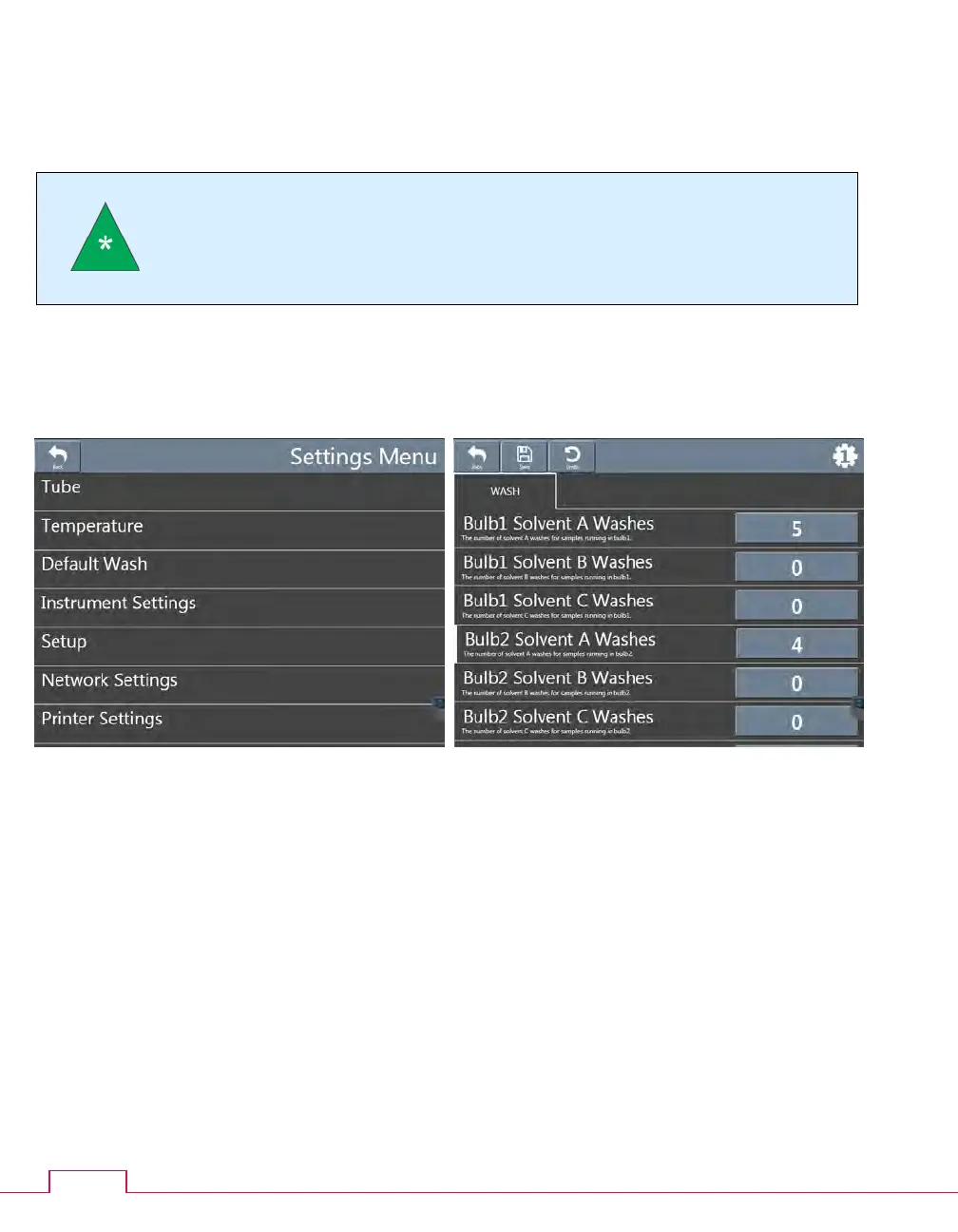
2. On the bath screen, click the Settings button. The settings menu opens.
Figure 15 — Settings menu Figure 16 — Wash screen
3. Click Default Wash. The Wash screen opens.
4. Verify and adjust the wash values as necessary. To change the wash value, you must be
logged onto the CAV® 4.2 with appropriate privileges.
5. Click Save when you are done adjusting the settings.
6. Click Back to return to the bath screen.
7. Repeat steps 1 through 6 for the second bath.


 To Next Page