CAV® 4.2 Operator's Manual, Rev. 2.0
22
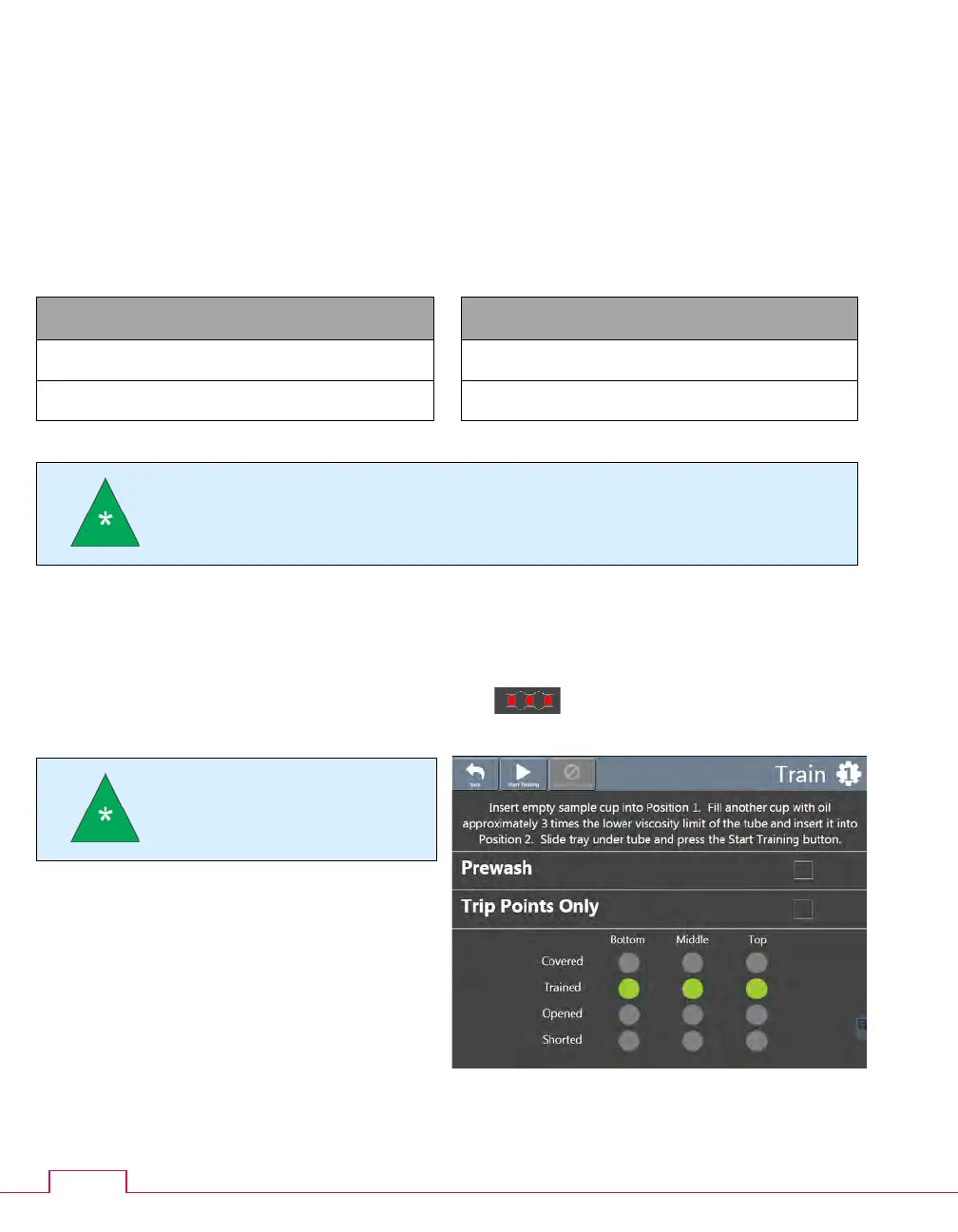
Figure 18 — Train screen
Train sensors (CAV 4.2 GUI)
Train the sensors whenever a CAV® 4.2 bath is to operate at a new temperature. Once trained,
the calibration values for a particular temperature are saved and will be recalled if the CAV®
4.2 is set to run at that temperature again. Retraining for a particular temperature is only
necessary when the viscometer tube is changed or if sensor performance changes over time.
Table 14 — Tools and materials required
Sample preparation materials
Notes: The ubbelohde tubes in each bath may have different viscosity
limits.
Temperature calibration must be performed first.
1. Insert an empty vial into position 1 of the carousel for the bath to be trained.
2. Fill a vial with a test solution that has a viscosity approximately 3 times higher than the
lower viscosity limit of the ubbelohde tube. Insert the vial into position 2.
3. From the main screen, click the tube button ( ) for the appropriate bath. The train
screen opens.
Prewash or Trip Points
Only boxes.
4. Click Start Training.
5. When training is complete, repeat
steps 1 through 4 for the second bath.



 To Next Page