CAV® 4.2 Operator's Manual, Rev. 2.0
23
Run a sample test (CAV 4.2 GUI)
This test verifies system calibration and provides a technician with basic training in operating
the CANNON® CAV® 4.2.
Table 15 — Tools and materials required
Sample preparation materials
1. Following your laboratory practices, prepare a 10 mL sample of test oil in the provided
sample vials, and then insert the sample vial into position 1 of the appropriate carousel.
2. From the main screen, click the circle representing position 1 on the appropriate bath.
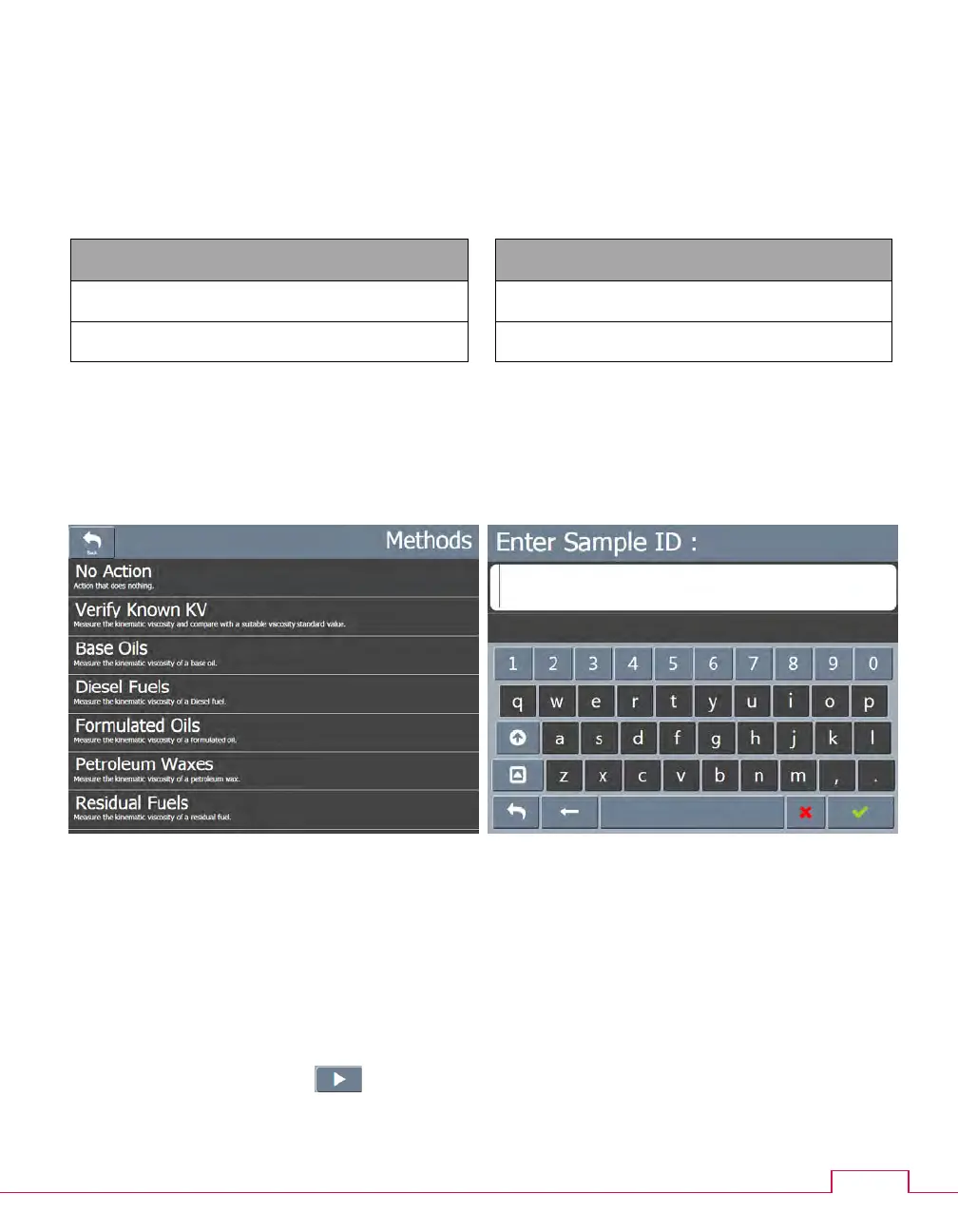
The methods screen opens.
Figure 19 — Methods screen Figure 20 — Field entry screen
3. Click Verify Known KV. The field entry screen open.
4. Enter the sample ID, then click the green checkmark to submit it. Another field entry
screen opens.
5. Enter the viscosity value (in cSt) of the test oil, then click the green checkmark to submit
it and return to the main screen.
6. Click the run button ( ).
7. When the test is complete, click the Results button to review the test results.



 To Next Page