10
When You Have Loaded a Dierent Type of Paper than the Preset One
When You Have Loaded a Dierent
Type of Paper than the Preset One
5
CAUTION!
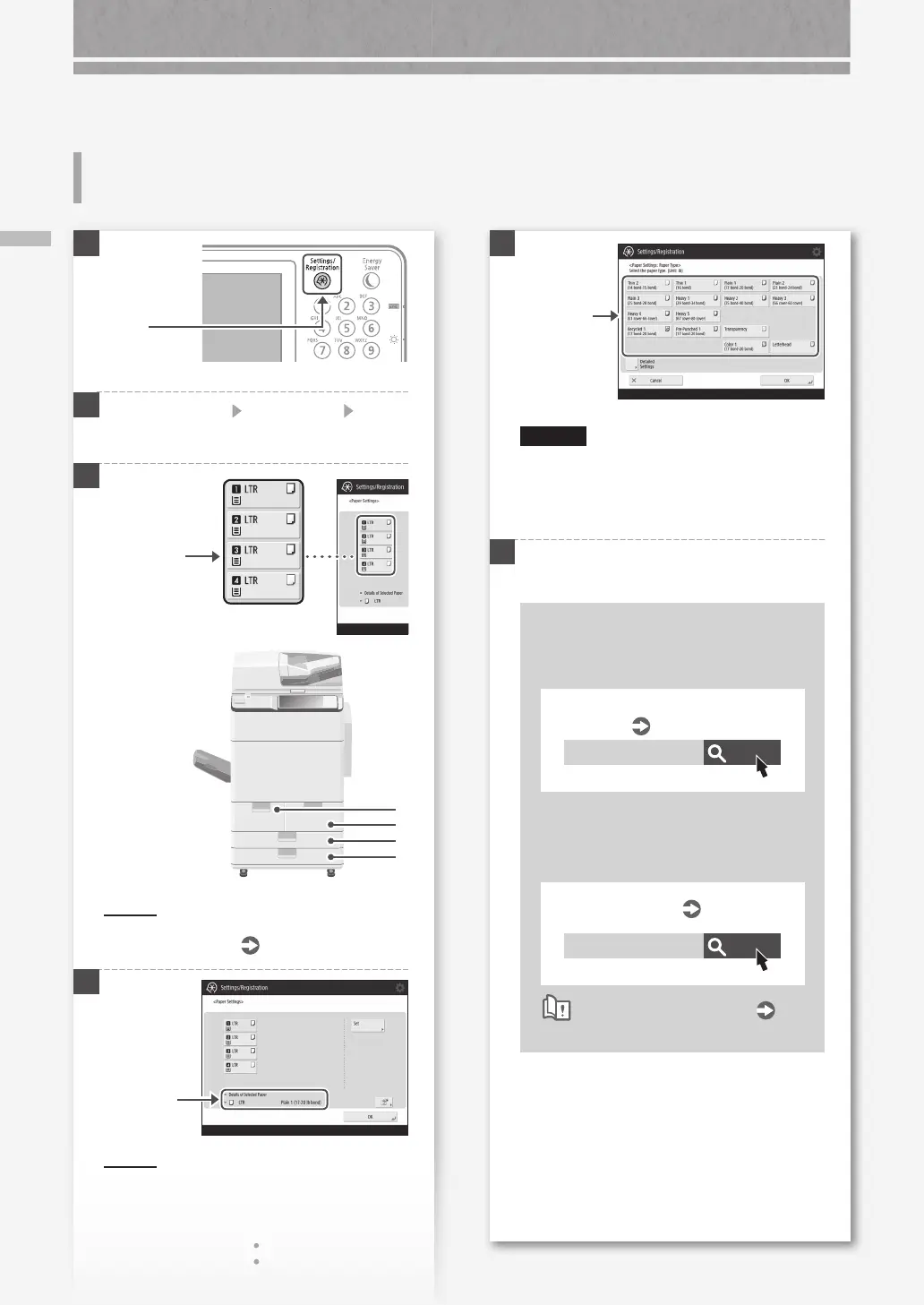
Make sure to select paper type that matches the
basis weight of the loaded paper.
2.
Press [OK].
6
Press [OK].
When you have loaded custom size
paper
Specify the paper size manually.
Search
10H3-02C
Specifying free size paper (custom
size paper)
User's Guide
To load tab paper
The Tab Feeding Attachment is required.
Search
10H3-029
Loading Tab Paper
User's Guide
How to use the search number
P.51
1.
Select the
paper type.
1
2
Press [Preferences] [Paper Settings] [Paper
Settings] on the touch panel display.
3
1
2
3
4
POIN T
Paper sources other than 1 to 4 are optional.
For more information
User's Guide
4
POIN T
If the displayed paper size is different from the
loaded paper size, adjust the paper guides.
2.
Press [Set].
Press
Select the
paper source.
1.
Check the
paper size.
How to Load Paper










 To Next Page