8
Loading Paper in the Paper Deck / Loading Paper in the Paper Drawer
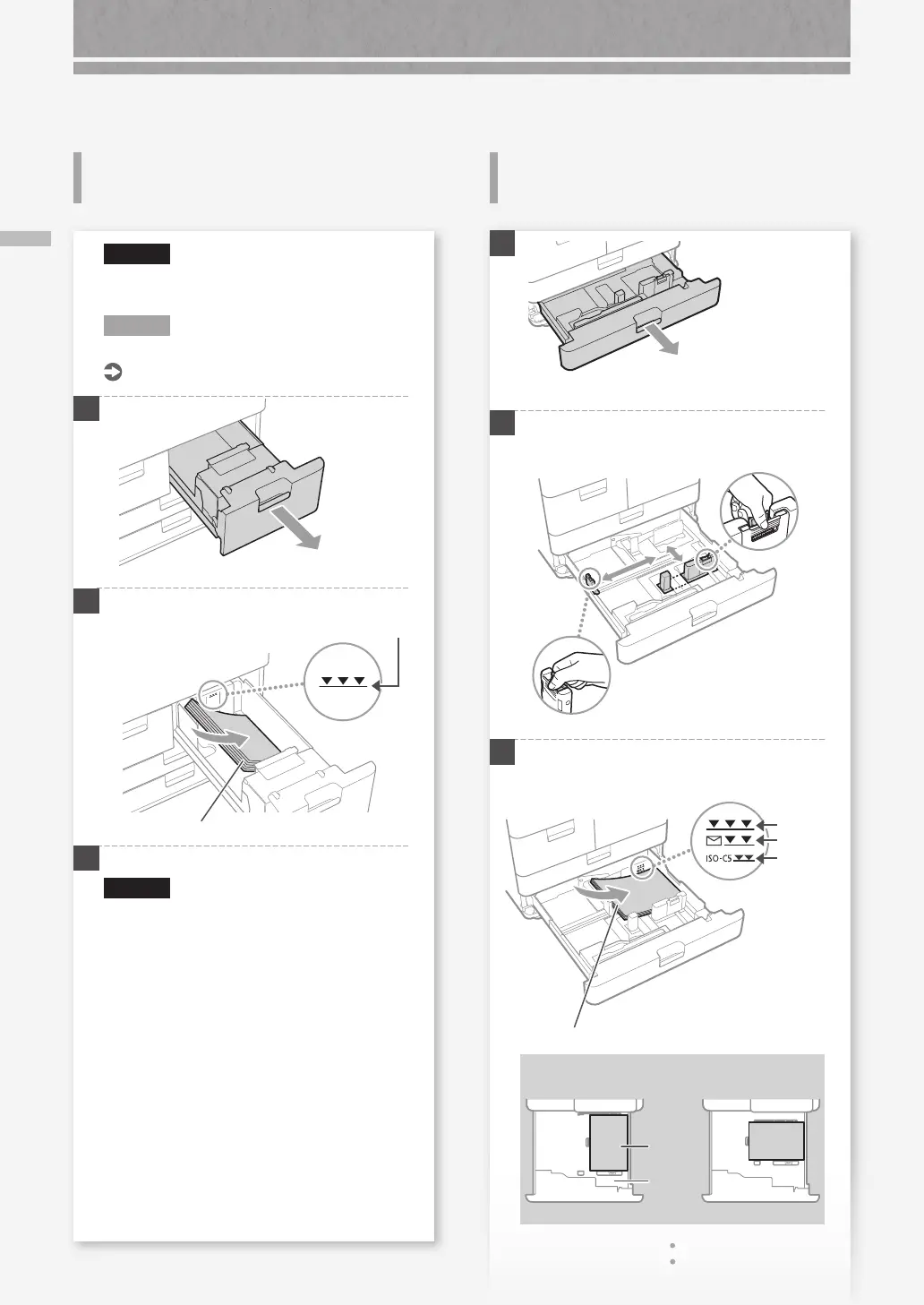
How to Load Paper
Loading Paper in the Paper Deck
Loading Paper in the Paper
Drawer
CAUTION!
Of the LTR size, you can load the preset size of
paper in the paper deck.
N O T E
When loading paper in the optional paper deck.
User's Guide
1
2
First fan the paper stack well and then load it.
Make sure that this line is not exceeded.
The print side face down
3
Return the paper deck to its original position.
CAUTION!
Be careful not to get your ngers caught
between the paper drawer and the machine.
1
2
Squeeze the light blue tabs and adjust the
positions of the slide guides.
3
First fan the paper stack well and then load it.
Make sure that this line is not exceeded.
Paper
Envelope
ISO-C5
The print side face down
Paper Orientation
Paper
Paper
Drawer
LTR
LTRR










 To Next Page