19
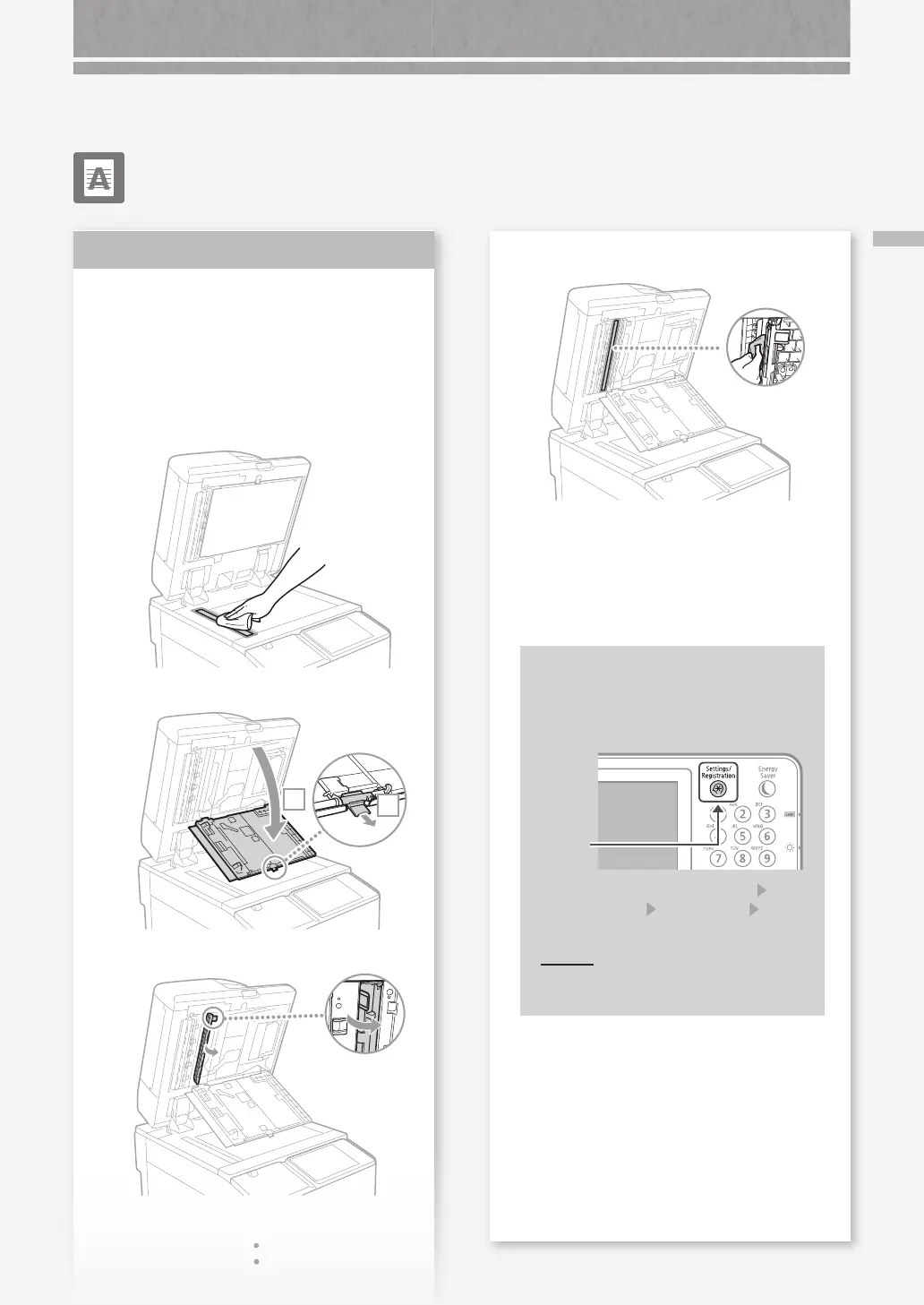
Black Streaks Appear in Images
Black Streaks Appear in
Images
Clean the document feed scanning
areas.
1.
Turn OFF the machine, and unplug the power
plug from the AC power outlet.
2.
Open the feeder, and clean the lower side
document feed scanning area using the
supplied glass-cleaning sheet.
3.
Open the cover.
1
2
4.
Open the inner cover.
Solution
5.
Wipe the original scanning area.
Wipe the thin and
long glass area.
6.
Close the cover and inner cover.
7.
Close the feeder.
8.
Insert the power plug into the power outlet, and
turn the power ON.
If black streaks still appear after the
document feed scanning areas have
been cleaned
Perform feeder cleaning.
1. Press
2. Press [Adjustment/Maintenance]
[Maintenance]
[Clean Feeder] [Start]
the touch panel display.
POIN T
It takes approximately 20 seconds to
clean the feeder.










 To Next Page