14
Loading Envelopes
How to Load Paper
Loading Envelopes
CAUTION!
• You can load envelopes in a paper drawer, the multi-purpose tray, or the optional POD Deck Lite.
• Do not use envelopes that have glue attached to their aps, as the glue may melt due to the heat and pressure of
the xing unit.
• Do not print on the reverse side of the envelopes (the side with the glued areas).
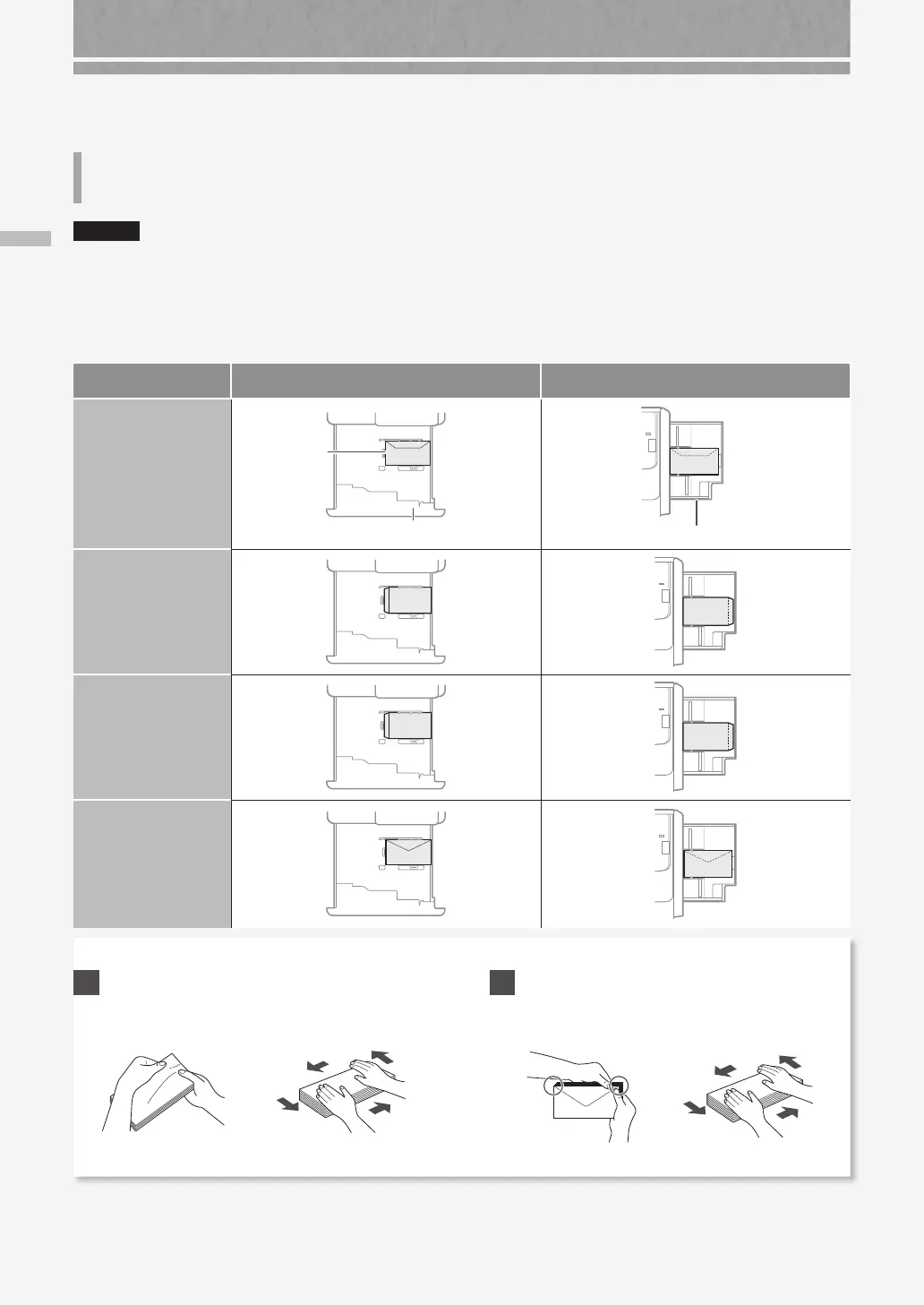
• For the paper drawer, load envelopes the front side face down, and for the multi-purpose tray, load them the front
side face up. For the loading orientation, see the table below.
Paper Drawer Multi-Purpose Tray
Yougatanaga 3
ISO-C5
Paper Drawer
Envelope
Multi-Purpose Tray
Nagagata 3
Kakugata 2
Monarch
COM10 No.10
DL
Preparation before Loading Envelopes
1
Take five or so pieces of envelopes, fan them well
to eliminate curls, and level the stack flat.
Press the stack along
the four side edges.
2
To prevent the sealing edge of the seal flap from
floating from the body of the envelope, press the
envelope in the four corners and expel the air.










 To Next Page