13
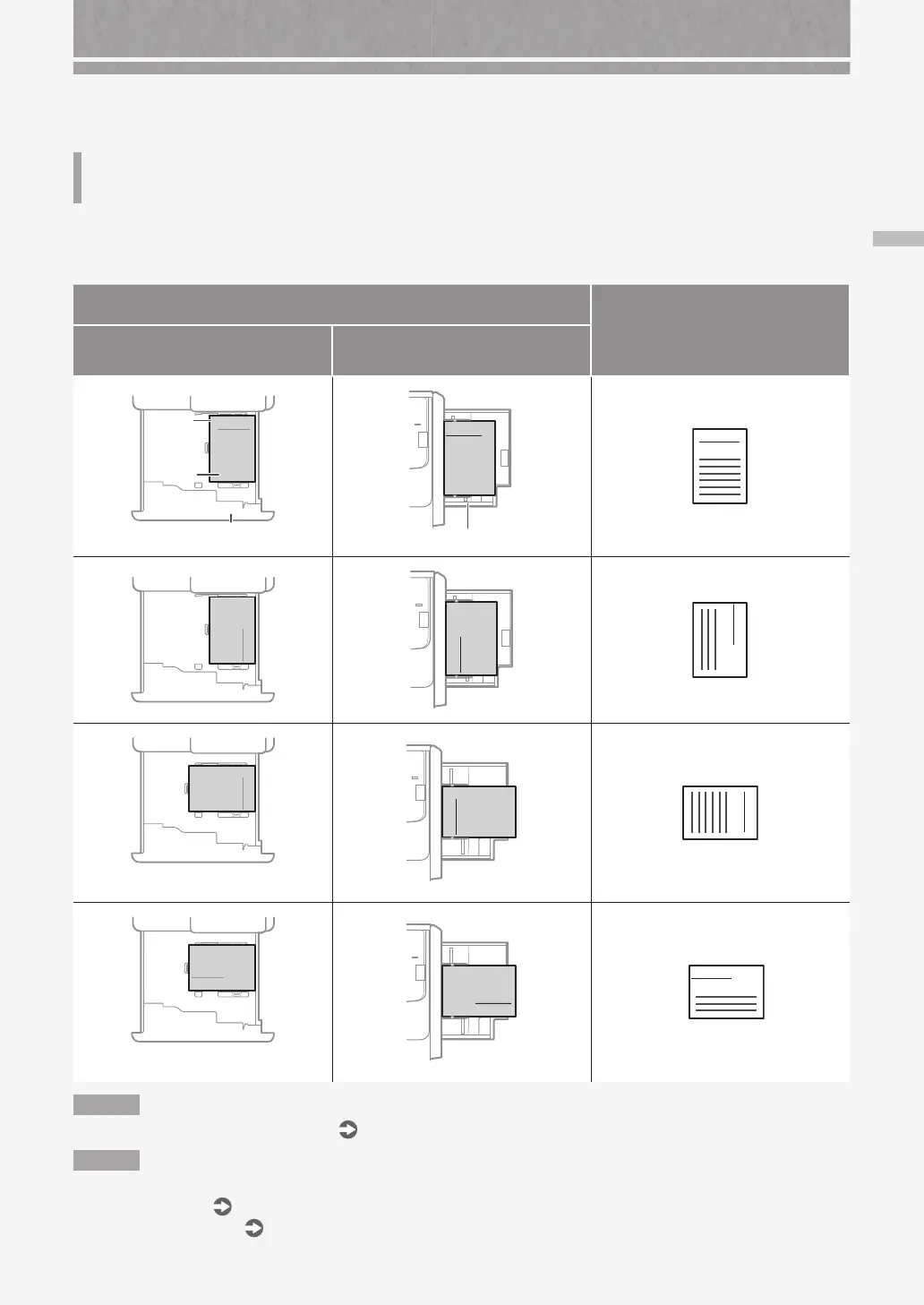
Loading Paper with Printed Logos
Loading Paper with Printed Logos
Refer to the table below to load paper with printed logos.
Example: When printing on LTR size paper
Orientation
Printing result
Paper Deck/Paper Drawer
* Paper drawer is taken as example.
Multi-Purpose Tray
Paper Drawer
Co. Ltd.
Logo
Paper
Co. Ltd
Multi-Purpose Tray
A B C
Co. Ltd.
Co. Ltd.
Co. Ltd
A B C
Co. Ltd.
Co. Ltd.
* Can be loaded only in paper drawer.
Co. Ltd
A B C
Co. Ltd.
Co. Ltd.
* Can be loaded only in paper drawer.
Co. Ltd
A B C
Co. Ltd.
N O T E
When copying to paper with printed logos
User's Guide
N O T E
Basic Paper Loading Operations
• For paper drawer
P.8
• For multi-purpose tray
P.11










 To Next Page