32
Canceling a Copy Job / Canceling a Print Job
Canceling a Copy Job Canceling a Print Job
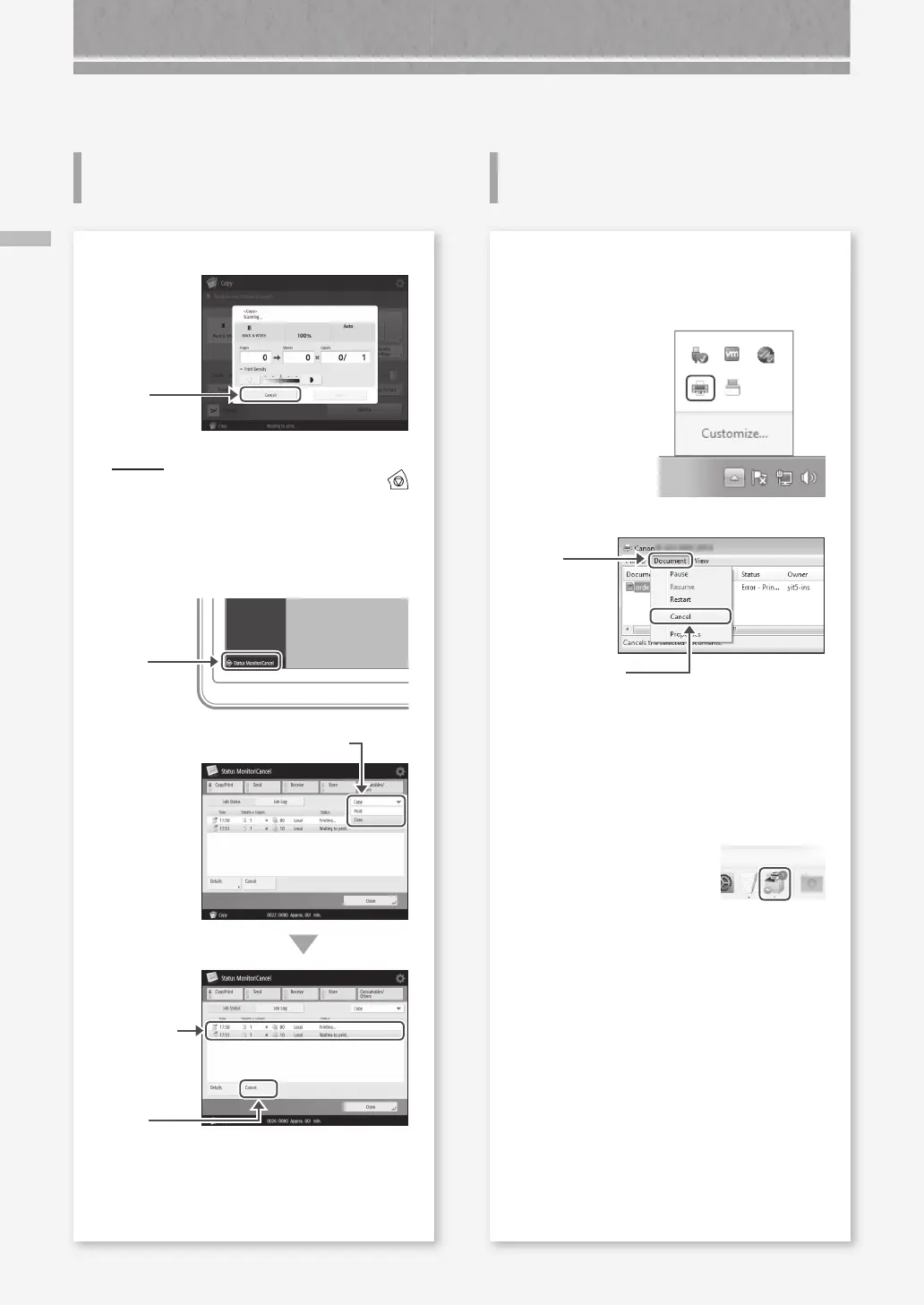
Canceling Copy/Print Jobs
To stop the paper feed
Press
POIN T
You can also stop the paper feed by pressing
on the control panel.
To cancel a copy job waiting to be output
1.
Press
4.
Press
2.
Select [Copy] from the drop-down list.
3.
Select the
copy job
you want to
cancel.
5.
Press [Yes].
For Windows OS
1.
In the computer screen, double-click the printer
icon.
2.
Select the file you want to cancel.
3.
Click
4.
Select [Cancel].
5.
Click [Yes].
For Mac OS
1.
In the computer screen, click the printer icon on
the Dock.
2.
Select the file you want to cancel.
3.
Click [Delete].










 To Next Page