EasyManua.ls Logo

Canon Canovision8 E50E - Page 156

Canon Canovision8 E50E
179 pages
Print Icon
To Next Page IconTo Next Page
To Previous Page IconTo Previous Page
Loading...
3-19
Loading
Motor,
Worm
Assembly,
Wheel
Gear,
Brake
Releasing
Am
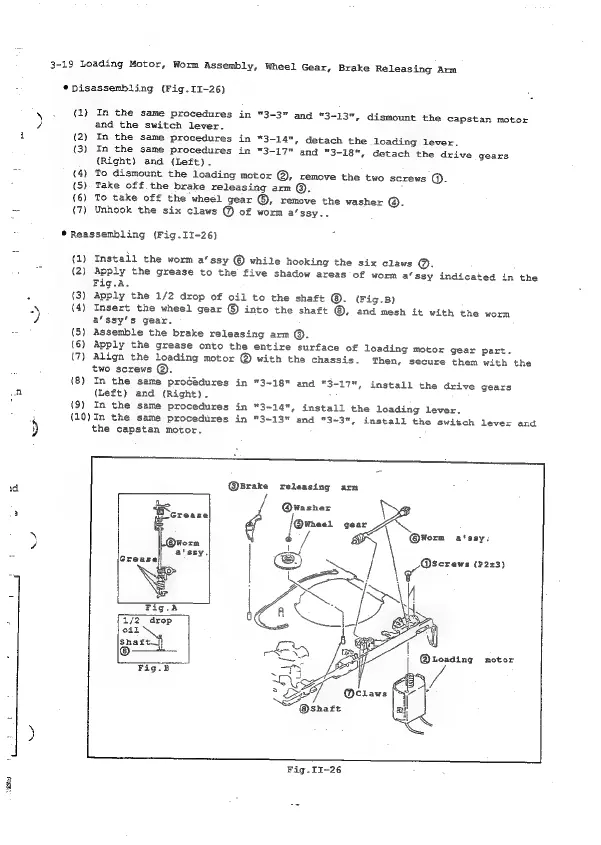
*pisassembling
(Fig.II-26)
us
\.
(1)
In
the
same
procedures
in
"3-3"
and
3-13",
dismount
the
capstan
motor
Z
and
the
switch
lever.
i
(2)
In
the
same
procedures
in
“3-14",
detach
the
loading
lever.
(3)
In
the
same
procedures
in
“3-17"
and
"3-18",
detach
the
drive
gears
(Right)
and
(Left).
=>
(4)
To
dismount
the
loading
motor
@,
xcemove
the
two
screws
().
(5)
Take
off
the
brake
releasing
arm
@.
(6)
To
take
off
the
wheél
gear
©,
remove
the
washer
®.
=
(7)
Unhook
the
six
claws
@
of
worm
a’ssy..
*
Reassembling
(Fig.II-26)
(1)
Install
the
worm
a‘ssy
©
while
hooking
the
six
claws
@.
oF
(2)
Apply
the
grease
to
the
five
shadow
areas
of
womn
a‘ssy
indicated
in
the
Fig.A.
"
{3)
Apply
the
1/2
drop
of
oil
to
the
shaft
(Fig.B)
3
(4)
Insert
the
wheel
gear
©
into
the
shaft
@,
and
mesh
it
with
the
worm
)
a’ssy’s
gear.
{5)
Assemble
the
brake
releasing
arm
©.
(6)
Apply
the
grease
onto
the
entire
surface
of
loading
motor
gear
part.
(7)
Align
the
loading
motor
@
with
the
chassis.
Then,
secure
them
with
the
two
screws
@.
(8)
In
the
same
procédures
in
"3-18"
and
"3-17",
install
the
drive
gears
oA
(Left)
and
(Right).
(9)
In
the
same
procedures
in
"3-14",
install
the
loading
lever.
3
{10)In
the
same
procedures
in
"3-13"
and
"3~3",
install
the
switch
lever
and
)
the
capstan
motor.
@5rake
releasing
arn
@wWasher
i
J@wneer
gear
\
1
@®@wWorm
a'ssy:
oe
=
Q@screws
(P23)
Fig.II-26

Table of Contents

Related product manuals