EasyManua.ls Logo

Canon Canovision8 E50E - Rotary Drum

Canon Canovision8 E50E
179 pages
Print Icon
To Next Page IconTo Next Page
To Previous Page IconTo Previous Page
Loading...
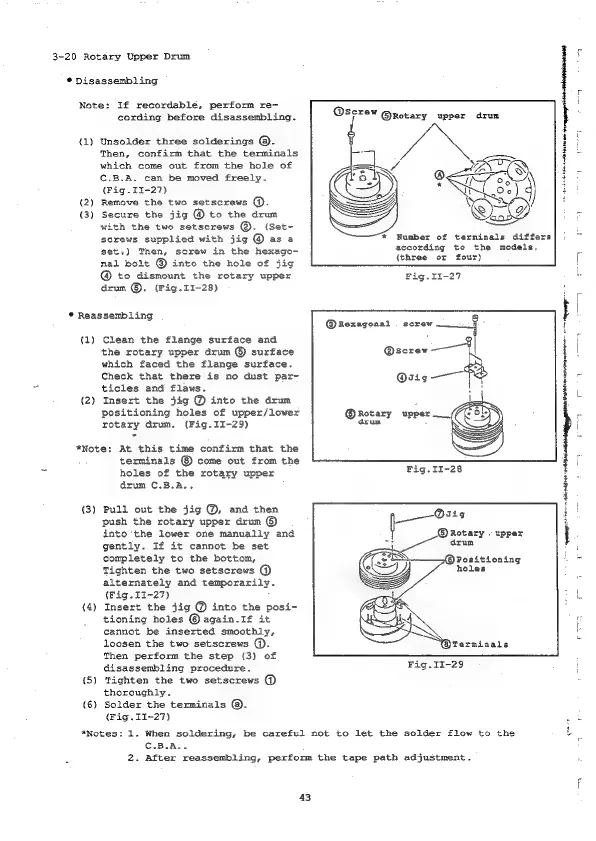
3-20
Rotary
Upper
Drum
*
Disassembling
Note:
If
recordable,
perform
re-
cording
before
disassembling.
(1)
Unsolder
three
solderings
@.
Then,
confirm
that
the
terminals
which
come
out
from
the
hole
of
C.B.A.
can
be
moved
freely.
(Fig
.II-27)
(2)
Remove
the
two
setscrews
@.
(3)
Secure
the
jig
@
to
the
drum
with
the
two
setscrews
@.
(Set-
screws
supplied
with
jig
@
as
a
sets)
Then,
screw
in
the
hexago-
nal
bolt
@
into
the
hole
of
jig
@
to
dismount
the
rotary
upper
drum
©.
(Fig.11I-28)
*
Reassembling
(1)
Clean
the
flange
surface
and
the
rotary
upper
drum
©
surface
which
faced
the
flange
surface.
Check
that
there
is
no
dust
par-
ticles
and
flaws.
(2)
Insert
the
jig
@
into
the
drum
positioning
holes
of
upper/lower
rotary
drum,
(Fig.II-29)
*Note:
At
this
time
confirm
that
the
terminals
come
out
from
the
holes
of
the
rotary
upper
drum
C.B.A..
(3)
Pull
out
the
jig
@,
and
then
push
the
rotary
upper
drum
©
into
the
lower
one
manually
and
gently.
If
it
cannot
be
set
completely
to
the
bottom,
Tighten
the
two
setscrews
@
alternately
and
temporarily.
(Fig.
II-27)
(4)
Insert
the
jig
@
into
the
posi-
tioning
holes
©
again.If
it
cannot
be
inserted
smoothly,
loosen
the
two
setscrews
@.
Then
perform
the
step
(3)
of
disassembling
procedure.
{5)
Tighten
the
two
setscrews
@
thoroughly.
(6)
Solder
the
terminals
@.
(Fig.
II-27)
@screw
@Rotary
upper
drum
Number
of
terminals
differs
according
to
the
models,
{three
or
four)
Fig.II-27
@kexagonal
screw
@serew
——
@sig——
@®Rotary
upper
___
drum
©
Rotary
.
upper
drum
holes
@Terminals
Fig.II-29
*Notes:
1.
When
soldering,
be
careful
not
to
let the
solder
flow
to
the
C.B.A..
43
2.
After
reassembling,
perform
the
tape
path
adjustment.
notte
emi
abelian
qieey

Table of Contents

Related product manuals