EasyManua.ls Logo

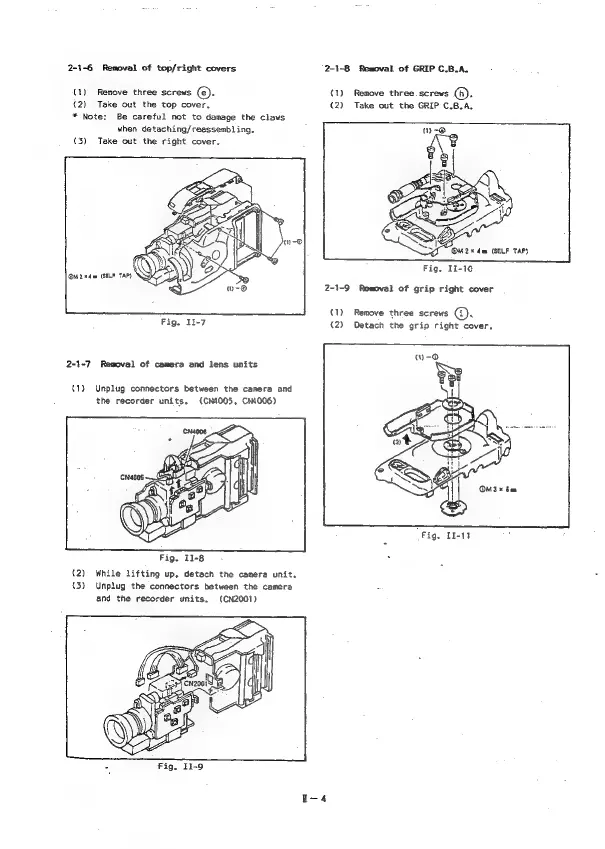
Canon Canovision8 E50E - Removal of Camera and Lens Units; Removal of Grip Right Cover; Removal of Top;Right Covers

Canon Canovision8 E50E
179 pages
Print Icon
To Next Page IconTo Next Page
To Previous Page IconTo Previous Page
Loading...
2-1-6
Removal
of
top/right
covers
2-1-8
Removal
of
GRIP
C.B.A.
(1)
Remove
three
screws
(©).
(1)
Remove
three
screws
(h).
(2)
Take
out
the
GRIP
C.B.A.
(2)
Take
out
the
top
cover,
*
Note:
Be
careful
not
to
damage
the
claws
when
detaching/reassembl
ing,
(3)
Take
out
the
right
cover.
Fig.
I1-10
M2
ede
(SELF
TAP}
2-1-9
Removal
of
grip
right
cover
(1)
Remove
three
screws
(@).
Fig.
11-7
(2)
Detach
the
grip
right
cover,
2-1-7
Removal
of
camera
and
lens
units
(1)
Unplug
connectors
between
the
camera
and
the
recorder
units.
(CM1005,
CN4006)
OM3*
ban
Fig.
I1-11
Fig.
11-8
(2)
While
lifting
up,
detach
the
camera
unit.
(3)
Unplug
the
connectors
between
the
camera
and
the
recorder
units.
(CN2001)

Table of Contents

Related product manuals