EasyManua.ls Logo

Canon Canovision8 E50E - Preparation for Recorder Section Adjustments Settings

Canon Canovision8 E50E
179 pages
Print Icon
To Next Page IconTo Next Page
To Previous Page IconTo Previous Page
Loading...
3-2
Preparation
for
recorder
section
adjustments
3-2-1
Settings
*
Preparation
°
Input
connector
e
(Extension
connector
kit,
DY9-1102-000)
°
Constant
voltage
supplier
(6
Vv)
*
Note:
Use
a
wireless
remote
controller
(WL-400)
to
change
the
mode
of
recorder
section
because
the
recorder
operation
buttons
are
on
the
AF
C.B.A.
1)
-
For
recorder
section
adjustment
I
(setting
for
character
display)
-
Procedure:
ue
(1)
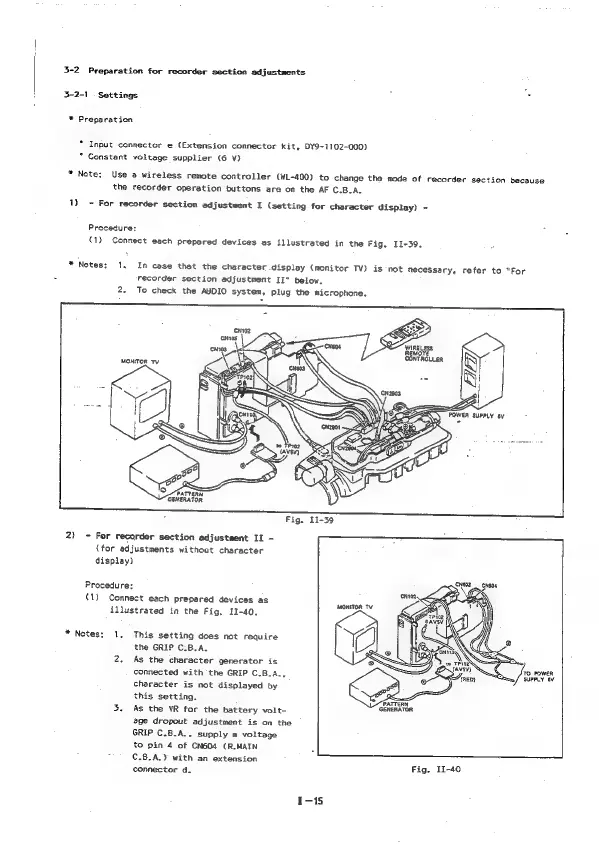
Connect
each
prepared
devices
as
illustrated
in
the
Fig,
11-39.
*
Notes:
1.
In
case
thet
the
character
display
(monitor
TV)
is
not
necessary,
refer
to
“For
recorder
section
adjustment
II”
below.
2.
To
check
the
AUDIO
system,
plug
the
microphone.
wir
REMOTE
INTROLLER
N62
PATTERN
GENERATOR
2)
-
For
recorder
section
adjustment
II
-
(for
adjustments
without
character
display)
Procedure:
(1)
Connect
each
prepared
devices
as
illustrated
in
the
Fig,
II-40.
*
Notes:
1,
This
setting
does
not
require
the
GRIP
C.B.A.
2.
As
the
character
generator
is
connected
with
the
GRIP
C.B.A.,
character
is
not
displayed
by
this
setting.
3.
As
the
VR
for
the
battery
volt-
age
dropout
adjustment
is
on
the
GRIP
C.B.A.,
supply
a
voltage
to
pin
4
of
CN604
(R.MAIN
€.8.A,)
with
an
extension
connector
d.
Pigs
diag)
‘Tro
PoweR
=/
SUPPLY
6V
ey
PATTERN
GENERATOR
1-18

Table of Contents

Related product manuals