EasyManua.ls Logo

Canon Canovision8 E50E - Disassembling Procedures

Canon Canovision8 E50E
179 pages
Print Icon
To Next Page IconTo Next Page
To Previous Page IconTo Previous Page
Loading...
2.
Disassembling
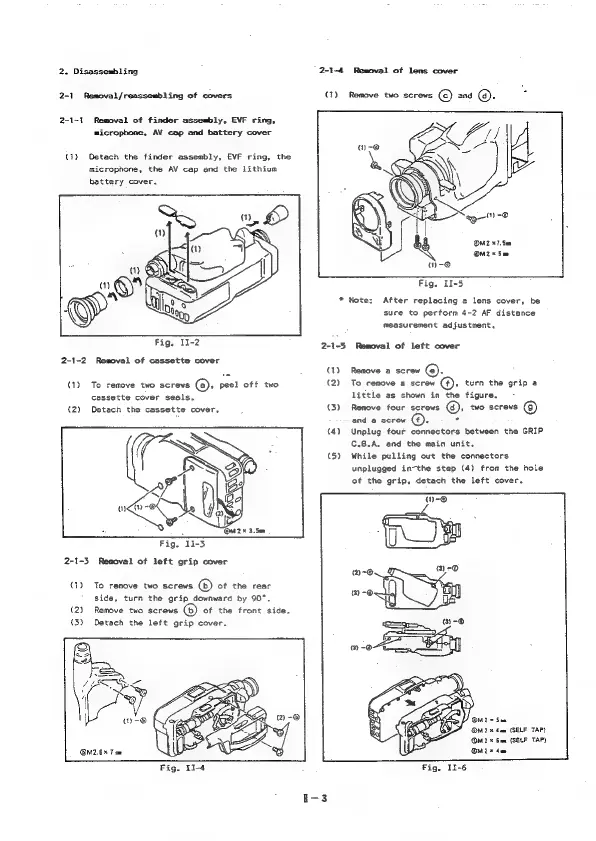
2-1-4
Removal
of
lens
cover
2-1
Removal/reassembling
of
covers
(1)
Remove
two
screws
()
and
©.
2-1-1
Removal
of
finder
assembly,
EVF
ring,
microphone,
AV
cap
and
battery
cover
(1)
Detach
the
finder
assembly,
EVF
ring,
the
microphone,
the
AV
cap
and
the
lithium
battery
cover.
OM2
x7.
Sem
OM2*
Sm
-@
Fig.
I1-5
*
Note:
After
replacing
a
lens
cover,
be
sure
to
perform
4-2
AF
distance
measurement
adjustment.
Fig.
I1-2
2-1-5
Removal
of
left
cover
2-1-2
Removal
of
cassette
cover
(1)
Remove
a
screw
@).
(1)
To
remove
two
screws
(a),
peel
off
two
(2)
To
remove
a
screw
@.
turn
the
grip
a
cassette
cover
seals.
little
as
shown
in
the
figure,
(2)
Detach
the
cassette
cover,
(3)
Remove
four
screws
,
two
screws
and
@
screw
().
.
(4)
Unplug
four
connectors
between
the
GRIP
C.B.A.
and
the
main
unit.
(5)
While
pulling
out
the
connectors
unplugged
in-the
step
(4)
from
the
hole
of
the
grip,
detach
the
left
cover.
2-1-3
Removal
of
left
grip
cover
(1)
To
remove
two
screws
(6)
of
the
rear
side,
turn
the
grip
downward
by
90°.
(2)
Remove
two
screws
(6)
of
the
front
side.
(3)
Detach
the
left
grip
cover.
@M2
x
4am
(SELF
TAP)
M2
*
Gem
(SELF
TAP)
OM2.6%
Tom
OM
x
de
Fig.
11-6

Table of Contents

Related product manuals