EasyManua.ls Logo

Canon Canovision8 E50E - Disassembling of Camera Section; Removal of PROCESS SHIELD

Canon Canovision8 E50E
179 pages
Print Icon
To Next Page IconTo Next Page
To Previous Page IconTo Previous Page
Loading...
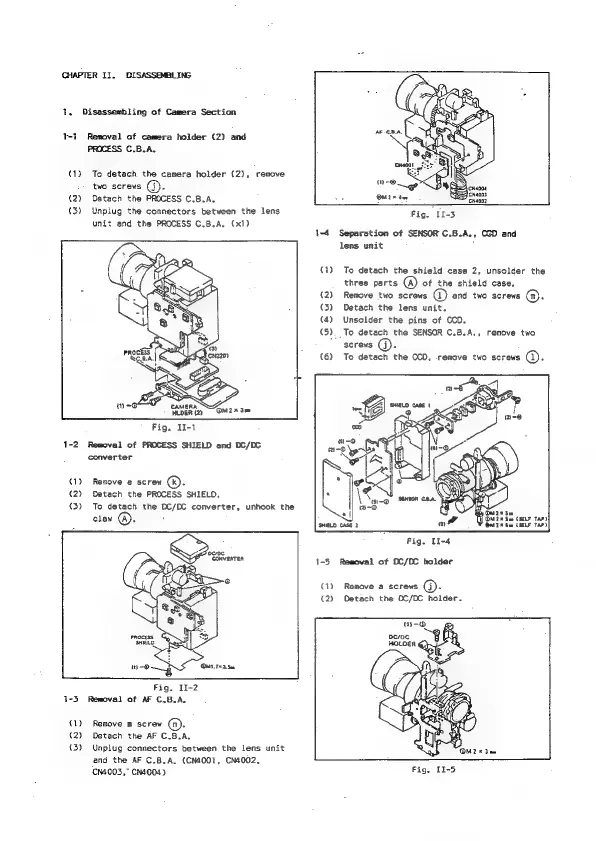
CHAPTER
Ii.
DISASSEMBLING
1,
Disassembling
of
Camera
Section
T-1
Removal
of
camera
holder
(2)
and
PROCESS
C.B.A.
(1)
To
detach
the
camera
holder
(2),
remove
two
screws
().
(2)
Detach
the
PROCESS
C.B.A.
(3)
Unplug
the
connectors
between
the
lens
unit
and
the
PROCESS
C.B.A,
(x1)
CAMERA
HLDER
(2)
Fig.
II-1
1-2
Removal
of
PROCESS
SHIELD
and
DC/DC
converter
(1)
Remove
a
screw
(R).
(2)
Detach
the
PROCESS
SHIELD.
(3)
To
detach
the
DC/DC
converter,
unhook
the
claw
.
Oed.72
3
See
Fig.
11-2
1-3
Removal
of AF
C.B.A.
(1)
Remove
@
screw
(a).
(2)
Detach
the
AF
C.B.A,
{3)
Unplug
connectors
between
the
lens unit
and
the
AF
C.B.A,
(CN400T,
CN4002,
‘cN4003,"
CN4004)
Fig,
II-3
1-4
Separation
of
SENSOR
C.B.A.,
OGD
and
lens unit
:
(1)
To
detach
the
shield
case
2,
unsolder
the
three
parts
(A)
of
the
shield
case,
(2)
Remove
two
screws
(1)
end
two
screws
(@).
(3)
Detach
the
lens
unit.
(4)
Unsolder
the
pins
of
CCD.
(5).
To
detach
the
SENSOR
C.B.
serews
G).
{6)
To
detach
the
CCD,
remove
two
screws
@:
»
remove
two
Du
#30
Pa
Du?
x
Sm
(ELF
TAP)
SHIELD
CASE
2
a
O67
x
Ga
CELE
TAP)
Fig.
II-4
1-5
Rewoval
of
DC/DC
holder
(1)
Remove
a
screws
(J).
(2)
Detach
the
0C/DC
holder.
n9-O
pero
HOLDER

Table of Contents

Related product manuals