EasyManua.ls Logo

Canon Canovision8 E50E - Brightness Adjustment; EVF Adjustments; Focus Adjustment; Rotation and Centering Adjustment

Canon Canovision8 E50E
179 pages
Print Icon
To Next Page IconTo Next Page
To Previous Page IconTo Previous Page
Loading...
7.
EVF
Adjustwents
7-1
Free-run
frequency
adjustment
SIGNAL
MODE
M.
EQ.
ADS.
Monoscope
master
(DY9-1062-000)
EVF,
Monitor
TV
GRIP
C.B.A.
VR2901
(V-SIZE)
Circle
on
monoscope
master
free
from
distortion.
Absence
of
incongruity
in
comparison
with
monitor
TV
screen
7-3
Rotation
and
centering
adjustment
Monoscope
master
(DY9-
1062-000)
[eay
|
ADJ.
|
Deflection
yoke,
centering
magnet
ee
Screen
is
not
tilted
and
is
located
right
at
the
center.
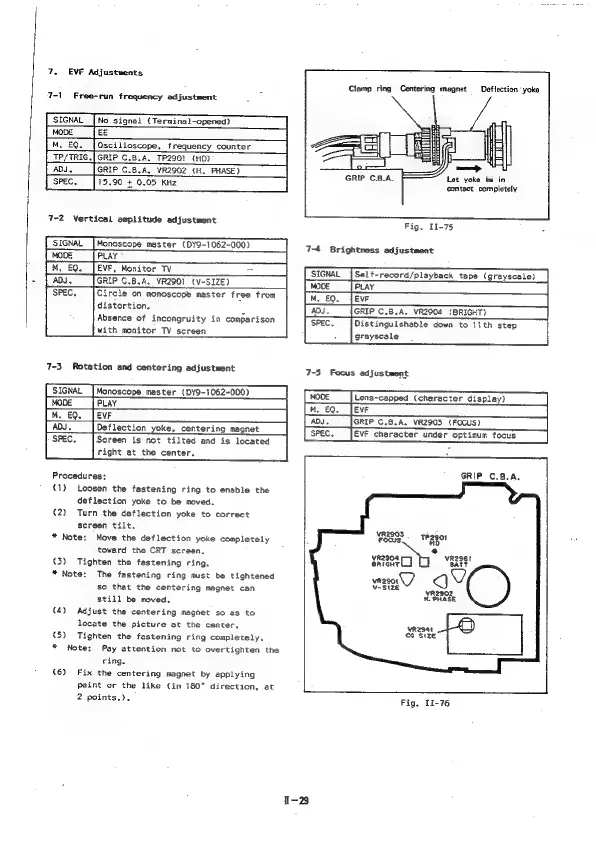
Procedures:
(1)
Loosen
the
fastening
ring
to
enable
the
deflection
yoke
to
be
moved.
(2)
Turn
the
deflection
yoke
to
correct
screen
tilt,
*
Note:
Move
the
deflection
yoke
completely
toward
the
CRT
screen.
(3)
Tighten
the
fastening
ring.
*
Note:
The
fastening
ring
must
be
tightened
so
that
the
centering
magnet
can
still
be
moved.
(4)
Adjust
the
centering
magnet
so
as
to
locate
the
picture
at
the
center,
(5)
Tighten
the
fastening
ring
completely,
*
Note:
Pay
attention
not
to
overtighten
the
ring.
{6)
Fix
the
centering
magnet
by
applying
Paint
or
the
like
(in
180°
direction,
at
2
points.).
Clamp
ring
Centering
magnet
Deflection
yoko
GRIP
C.B.A.
Let
yoke
be
in
contact
completely
Fig,
11-75
P
7-4
Brightness
adjustment
Selt-record/playback
tape
(grayscale)
PLAY
EVE
GRIP
C.B.A,
VR2904
(BRIGHT)
Distinguishadle
down
to
11th
step
grayscale
7-5
Focus
adjustment
[Mode
|
Lens-capped
(character
display)
|
ADJ.
_|GRIP
C.8.A.
VR2903
(FOCUS)
SPEC.
EVF
character
under
optimum
focus
GRIP
C.B.A,
vR2903
Focus
TPZB0t
VR2904
vR2gst
SRIGHT!
BATT
yR2902
H.
PHASE
vrz94t
€¢
S1ZE
Fig.
I1-76

Table of Contents

Related product manuals