EasyManua.ls Logo

Canon Canovision8 E50E - Chart for Adjustment

Canon Canovision8 E50E
179 pages
Print Icon
To Next Page IconTo Next Page
To Previous Page IconTo Previous Page
Loading...
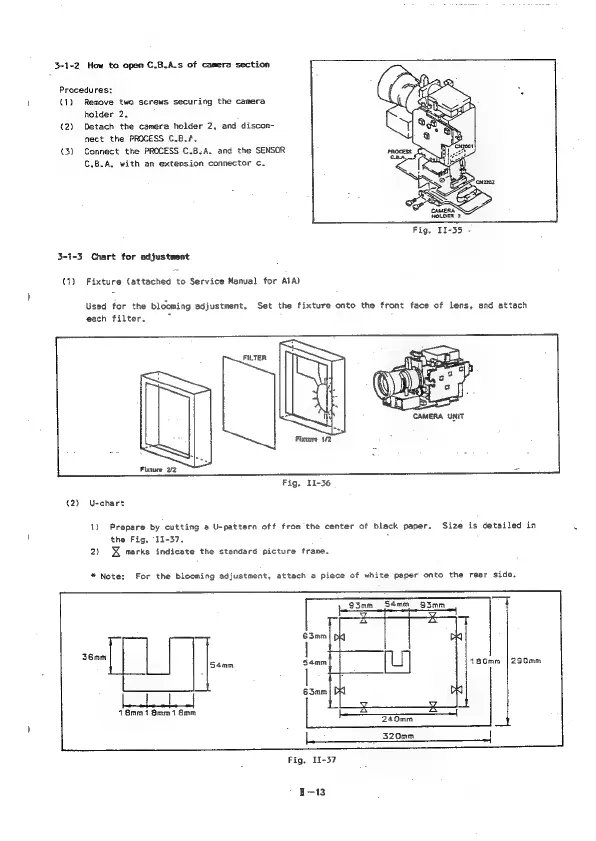
3-1-2
How
to
open
C.B.A.s
of
camera
section
Procedures;
(1)
Remove
two
screws
securing
the
camera
holder
2.
(2)
Detach
the
camera
holder
2,
and
discon-
nect
the
PROCESS
C.B./.
(3)
Connect
the
PROCESS
C.B:A.
and
the
SENSOR
C.B.A,
with
an
extension
connector
¢.
Fig.
II-35
-
3-1-3 Chart
for
adjustment
(1)
Fixture
(attached
to
Service
Manual
for
ATA)
Used
for the
blooming
adjustment.
each
filter.
Fixture
2/2
Set
the
fixture
onto
the
front
face
of
lens,
and
attach
Ree
Y
ee
é
>
CAMERA
UNIT
Fixture
1/2
Fig,
I1-36
(2)
U-chart
1)
Prepare
by
cutting
a
U-pattern
off
from
the
center
of
black
paper,
Size
is
detailed
in
the
Fig.
11-37.
:
2)
X
marks
indicate
the
standard
picture
frame.
*
Note:
For the
blooming
adjustment,
attach
a
piece
of
white
paper
onto
the
rear
side.
36mm
S4mm
180mm
|
290mm
18mm
1
8mm
1
Smm
L
:
L.
320mm
et
Fig,
11-37
1-13

Table of Contents

Related product manuals